Top-Down Design

The quadratic formula gives the two roots as:
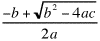 and
and 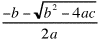
Now, how do we write the program? As we said in the first lecture you shouldn't sit down at the computer until a program is thoroughly designed. Instead, you develop the program by beginning with a very abstract, higher-level description of the solution and refining it over an over, filling in details with each round of refinement. This methodology is known as Top-down design.
- Get the coefficients of the equation from the user
- Solve the quadratic formula given those coefficients
- Print the roots for the user
Now, in fact, this is really the basic outline that almost all computational programs are going to start with. They are almost all of the form:
- Get the input values from the user
- Solve the problem given those values
- Print the results for the user
Anyway, now we can take each of those steps and refine them a step further. Keeping in mind the analogy that a program is alot like a recipe, as we refine the parts of the problem we should keep track of the values that need to be stored and any special routines that need to be used, much as the recipe author would keep track of ingredients and tools.
2. Get the coefficients of the equation from the user
- Prompt for the three coefficients: a, b, and c
- Input the three coefficients: a, b, and c
or we could expand it as:
2. Get the coefficients of the equation from the user
- Prompt for the first coefficient: a
- Input the first coefficient: a
- Prompt for the second coefficient: b
- Input the second coefficient: b
- Prompt for third first coefficient: c
- Input the third coefficient: c
This is just a stylistic choice, and either one seems fine for this example, since the problem specification (which was very higher-level) did not specify one choice or the other. We'll go with the first one for now as it will save a little typing.
Has this refinement told us anything about our ingredient and tool lists?
Yes, we need to store the 3 coefficients.
This leads to the question of what kind of variable we should use?
The problem didn't specify, so we have to make a choice.
Integer coefficients would work for alot of uses. But there is no reason to think a user
might not want to have floating point coefficients. So, to make the program most general,
double seems more appropriate. As far as tools go, since we want to get numeric input from
the user, we'll need the i/o objects from HMC.HMCSupport.
At this point we could either continue by refining these two new steps to greater detail, or put them aside and continue with the second higher-level step. As it happens, I'd say that the input step is probably already refined enough to be programmed without difficulty, so let's just continue to the computation step, the heart of the program. Our first inclination might be to write something like:
2. Solve the quadratic formula given those coefficients
- compute the first root:
- compute the second root:
That would be a perfectly good solution. But you should notice that the two computations share a fairly hard-to-compute piece:
 .
.
2. Solve the quadratic formula given those coefficients
- compute the common subexpression
- compute the first root: (-b + root)/2a
- compute the second root: (-b - root)/2a
Did this add anything to our lists of ingredients and tools?
Yes, we need to store the value of the subexpression
and of the roots. Also, we will need to use the Math package to get access to the
sqrt function. (Even though it is available to us without explicit importing,
it is good to keep in mind that it is really an external tool and not part of the
language itself.)
|
How far you have to break down the program's design depends on how comfortable you are
converting small tasks to programs, and how familiar you are with a particular task.
For example, if there were no square root method in the Math package then I would certainly need to think more about the design of the process of computing the value of
root first (and, probably, I'd have to look up the algorithm in a book somewhere!).
In this case, as we said, though, it is an easy jump from the design above to the following program. Note that we have included the steps of the design specification as comments in the program. This is a good place to start when commenting your programs.
| Click Here To Run This Program On Its Own Page |
// Program: Quadratic
// Author:  Joshua S. Hodas
// Date:    September 13, 1996
// Purpose: To compute roots of quadratic equation

import HMC.HMCSupport;

class Quadratic {

  public static void main(String args[]) {

    double a, b, c;      // The three coefficients
    double root,         // The Common subexpression
           x1, x2;       // The 2 results

    // Get the coefficients from the user

    HMCSupport.out.println();
    HMCSupport.out.println("Enter the three coefficients" +
                           " of a quadratic equation:");

    a = HMCSupport.in.nextDouble();
    b = HMCSupport.in.nextDouble();
    c = HMCSupport.in.nextDouble();

    // Solve the quadratic formula given those coefficients

    // Compute the common sub expression
    root = Math.sqrt(b * b - 4 * a * c);

    // Computer the two roots
    x1 = (-b + root)/(2*a);
    x2 = (-b - root)/(2*a);

    // Print the roots for the user

    HMCSupport.out.println();
    HMCSupport.out.println("The roots of the equation are " +
                           x1 + " and " + x2);
  }
}
|
x1 = (-b + root)/(2*a);
x2 = (-b - root)/(2*a);
division by zero error, or something similar. In Java (and some implementations
of other languages) the result is a bit curious. For example, suppose we enter 0, 1, and 2
for the coefficients. The program does not bomb, but it produces the output:
That's because the first root is (0.0 / 0.0), which is mathematically undefined, or Not a Number. The second root is (-2.0 / 0.0), which is Negative Infinity. You see, Java folows an IEEE specification for floating point arithmetic which requires that it properly handle undefined and infinite results of computations. This is useful since when such results occur in a subexpression of a larger computation, they may not matter. For example, 0.0 divided by anything other than 0.0 is 0.0, so in the expression (0.0 / (1.0 / 0.0)) it doesn't matter that the subexpression (1.0 / 0.0) is infinity. The overall result is still 0.0.The roots of the equation are NaN and -Inf

java.lang.ArithmeticException: / by zero
        at Quadratic.main(Quadratic.java:29)
main
of the class quadratic, on line 29 of the original source file.
One of the nice things about Java is that
when your program is compiled to bytecode
it maintains enough information about your source program so that it can tell you exactly
which line of your program generated an error, even with a runtime error (that is, an error which occurs due to some condition arising when the program is executed that the design of the program did not prepare it for.) Most programming language
systems can only tell you the precise location of errors that occur at compile time.
Conditional Execution
So far, the flow of control in our programs has been strictly downward, executing one statement after another. Solving this problem will require the program to be able to to distinguish between good input and bad input and change the flow of control to choose the correct action in either situation.
if (test-expression) { |
Note that the test expression, which determines the behavior of the statement, must be enclosed in parentheses. The list of statements to execute in each case is enclosed in a pair of braces, and is called a block. A block can be as long or as short as necessary. It can even include its own variable declarations. Any variables declared in a block are only accessible within the block. If you try to refer to them elsewhere you'll get a compiler error.
The following simple program asks the user to enter an integer and then uses a conditional statement to tell them whether the number is less than 10, or not:
| Click Here To Run This Program On Its Own Page |
// Program: SimpleIf
// Author:  Joshua S. Hodas
// Date:    October 2, 1996
// Purpose: To demonstrate the use of if-else

import HMC.HMCSupport;

class SimpleIf {

  public static void main(String args[]) {

    int inputValue;

    HMCSupport.out.print("Please enter an integer value:");
    inputValue = HMCSupport.in.nextInt();

    if (inputValue < 10) {

      HMCSupport.out.println("That value is less than 10.");

    }
    else {

      HMCSupport.out.println("That value is greater than " +
                             "or equal to 10.");

    }
  }

}
|
In order to make our quadratic equation solving program behave better, we should go back to the top-down-design and modify it so that, before attempting to solve the equation, the program checks the value of the first coefficient. If the first coefficient is not zero, the computation should proceed. Otherwise, an error should be printed and the program should terminate. In this design the second and third outer steps of the original design become subordinate to a check of the first coefficient. The new design is:
|
This new design yields the following Java program:
| Click Here To Run This Program On Its Own Page |
// Program: SaferQuadratic
// Author:  Joshua S. Hodas
// Date:    September 13, 1996
// Purpose: To compute roots of a quadratic equation
//          after making sure it is quadratic.

import HMC.HMCSupport;

class SaferQuadratic {

  public static void main(String args[]) {

    double a, b, c;      // The three coefficients
    double root,         // The Common subexpression
           x1, x2;       // The 2 results

    // Get the coefficients from the user

    HMCSupport.out.println();
    HMCSupport.out.println("Enter the three coefficients" +
                           " of a quadratic equation:");

    a = HMCSupport.in.nextDouble();
    b = HMCSupport.in.nextDouble();
    c = HMCSupport.in.nextDouble();

    // Check that the equation really is quadratic

    if (a != 0) {
      // Equation is quadratic, solve quadratic formula

      // Compute the common sub expression
      root = Math.sqrt(b * b - 4 * a * c);

      // Computer the two roots
      x1 = (-b + root)/(2*a);
      x2 = (-b - root)/(2*a);

      // Print the roots for the user

      HMCSupport.out.println();
      HMCSupport.out.println("The roots of the equation are " +
                             x1 + " and " + x2);
    }
    else {
      // Equation is not quadratic, print error

      HMCSupport.out.println("I'm sorry, that's not a" +
                             " quadratic equation since" +
                             " the first coefficient is 0.");
    }
  }
}
|
boolean value. Most commonly it will involve comparing
one value or expression with another using a relational operator.
In this example we used the not-equals operator, !=, which
is intended to look like an equals sign with a slash through it. This operator
evaluates to true when its two arguments do not equal one another,
and to false when they do equal one another.
The equals operator, ==, has the reverse behavior.
The other relational operators are <, <=,
>, and >=.
else
and its block are simply left out. The syntax of this limited form of the conditional is:
if (test-expression) { |
While it is legal to have an empty block,
it is generally bad style. If the else block is empty, you should omit the
else as above. If the if block is empty (that is, if you have tasks to perform
when the test fails, but none for when it succeeds), you should logically
reverse the sense of the test condition and omit the else
and its block. For example, the statement:
should be rewritten as:if (foo < bar) { } else { someStatements; }
if (foo >= bar) {
  someStatements;
}
|
This design becomes the following Java program:
| Click Here To Run This Program On Its Own Page |
// Program: DrinkingAge
// Author:  Joshua S. Hodas
// Date:    September 13, 1997 (modified September 6, 1998)
// Purpose: To demonstrate the use of if-else

import HMC.HMCSupport;

class DrinkingAge {

  public static void main(String args[]) {

    int thisYear = 1998, birthYear;

    HMCSupport.out.println("This program helps determine if" +
                           " someone is old enough to drink.");
    HMCSupport.out.println();

    HMCSupport.out.print("What year was this person born: ");
    birthYear = HMCSupport.in.nextInt();
    HMCSupport.out.println();

    if ((thisYear - birthYear) > 20) {

      HMCSupport.out.print("This person is 21 years old.");
      HMCSupport.out.println(" They can drink in moderation.");

    }
    else {

      HMCSupport.out.print("This person is not 21 years old.");
      HMCSupport.out.println(" They can't drink alcohol.");

    }
  }

}
|
The solution is to check the month they were born as well. Since this is only needed when the person was born in 1977, we break the test for how many years old the person is into cases for more than 21, exactly 21, and less than 21. Then we will put the month-based test inside the statements that get executed when the year test comes out to 21. This way we won't bother asking people for the month they were born if it won't make a difference.
Of course, this design has the same sort of bug as the last one, but here it comes down to the day a person born in September 1977 was born. We'll ignore that problem, and pretend this is an adequate solution. The new design is:
|
| Click Here To Run This Program On Its Own Page |
// Program: DrinkingAge2
// Author:  Joshua S. Hodas
// Date:    September 13, 1997 (modified September 6, 1998)
// Purpose: To demonstrate the use of nested if-else

import HMC.HMCSupport;

class DrinkingAge2 {

  public static void main(String args[]) {

    int thisYear = 1998, birthYear, ageInYears;
    int thisMonth = 9, birthMonth;

    HMCSupport.out.println("This program helps determine if"
                           + " someone is old enough to drink.");
    HMCSupport.out.println();

    HMCSupport.out.print("What year was this person born: ");
    birthYear = HMCSupport.in.nextInt();
    HMCSupport.out.println();

    ageInYears = thisYear - birthYear;

    if (ageInYears > 21) {

      HMCSupport.out.print("This person is 21 years old. ");
      HMCSupport.out.println("They can drink in moderation.");
    }
    else {
      if (ageInYears == 21) {

        HMCSupport.out.print("What month was this person born: ");
        birthMonth = HMCSupport.in.nextInt();
        HMCSupport.out.println();

        if (birthMonth <= thisMonth) {
          HMCSupport.out.print("This person is 21 years old. ");
          HMCSupport.out.println("They can drink in moderation.");
        }
        else {
          HMCSupport.out.print("This person is not 21 years old.");
          HMCSupport.out.println(" They can't drink");
        }

      }
      else {   // ageInYears is less than 21

        HMCSupport.out.print("This person is not 21 years old.");
        HMCSupport.out.println(" They can't drink");

      }
    }
  }
}
|
else part of the previous conditional.
The overall structure
was:
if (ageInYears > 21) {
  ...
}
else {
  if (ageInYears == 21) {
    ...
  }
  else {
    ...
  }
}
Notice that the block for the outer else only contains a single conditional statement.
It turns out that if you only have a single statement executed for one of the cases of
a conditional, you can leave out the braces for that case.
In general, we recommend always including the braces as it
makes it easier to add statements to that case later on if you decide you need to.
However, in this particular situation, where the goal is to create
a series of mutually exclusive cases, it is unlikely that we will ever want to add more statements in the else block. Furthermore, if there were more than three cases, each additional case would be nested deeper and deeper in the innermost else block. The nesting would lead to more and more indentation for each case. This is
undesirable, and in someways misleading since the cases are conceptually at the same
level. Therefore, when nested conditionals are being used to create mutually exclusive cases,
it is standard to leave out the braces of the else block and move the
if for the nested conditional onto the same line as the else.
While this is not actually a new construct, it is refered to as an else-if.
For example, in this case we would write:
if (ageInYears > 21) {
  ...
  }
else if (ageInYears == 21) {
  ...
}
else {
  ...
}
This can be extended as many steps as we want. If we want to test which decade of life someone is in, we could write:
if (ageInYears < 10) {
  HMCSupport.out.println("Still a child.");
}
else if (ageInYears < 20) {
  HMCSupport.out.println("In the teen years.");
}
else if (ageInYears < 30) {
  HMCSupport.out.println("In their twenties.");
}
else if (ageInYears < 40) {
  HMCSupport.out.println("In their thirties.");
}
else {
  HMCSupport.out.println("Get them a wheelchair!");
}
if
is really nested in the else block of the preceeding one.
This is what makes the cases mutually exclusive.
elses then these would become several
disconnected statements, that would be run in order. That is, if
we wrote:
if (ageInYears < 10) {
  HMCSupport.out.println("Still a child.");
}

if (ageInYears < 20) {
  HMCSupport.out.println("In the teen years.");
}

if (ageInYears < 30) {
  HMCSupport.out.println("In their twenties.");
}

if (ageInYears < 40) {
  HMCSupport.out.println("In their thirties.");
}
else {
  HMCSupport.out.println("Get them a wheelchair!");
}
then if the value of ageInYears were 25 the
program would print both In their twenties. and
In their Thirties., since each of these one-case
conditionals is a separate statement, and two of them will
have their test expresssions evaluate to true.Even when the cases appear mutually-exclusive, if the conditionals are written as independent statements then you could have multiple cases execute. For instance, if we wrote:
if (testValue < 10) {
  ...
}

if (testValue == 10) {
  ...
}

if (testValue > 10) {
  ...
}
It would certainly seem that only one of the three blocks
could be triggered. However, suppose the value of testValue
were initially 7, then the code in the first if's
block would execute. If this code included an assignment that changed the
value of testValue to be 20, then the third if's
block would execute as well.
Therefore, if you intend for cases to be mutually exclusive, you should
generally use the if-else construct (or the switch statement described
below) to ensure the proper behavior.
Complex Tests
int variable x
is between one and ten, inclusive. Using the habits you have learned in years of
math classes, you might try to write something like:
Unfortunately, if you do you will get a compiler error like:if (1 <= x <= 10) { ... }
YourClass.java:12: Incompatible type for <=.
Can't convert boolean to int.
        if ( 1 <= x <= 10)
                    ^
(1 <= x <= 10)
isn't all that different from the expression (1 + x + 10).
To evaluate the overall expression the system must choose some order in which to evaluate
each operator. In this case, since there are two <= operators,
it just evaluates them left to right. Thus, it is as though you had typed
((1 <= x) <= 10).
Now, if x were 4, then (1 <= x) would have the value
true. Is true less than 10? Obviously, there is no way for
Java to compare a boolean and an int, and that's just what the
error message is telling you.
if (1 <= x) {
  if (x <= 10) {
    ...
  }
}
&&, for "and", ||, for "or", and !, for "not". So, the test above can be written:
if ((1 <= x) && (x <= 10)) {
  ...
}
If you wanted to know if x is outside the range one to ten, you could write:
if ((x < 1) || (10 < x)) {
  ...
}
which is true if x is less than one or if it is greater than ten.
You could also write this test by reversing the sense of the original test using "not":
if (!((1 <= x) && (x <= 10))) {
  ...
}
While I have used parentheses above to make the tests clearer (and you are encouraged to
do the same), they are not always strictly necessary. The
relational operators all have higher precedence than the boolean operators, so there
would have been no ambiguity without the inner parentheses in the first two examples:
the relational operators would have been computed first, and the boolean operator then used
to combine the two truth values.
Among the boolean operators, ! has the highest precedence, (since it is similar to
the arithmetic unary negation), && is next (like multiplication), and
|| has lowest precedence (like addition). Thus, in the last example, the innermost
parentheses were not necessary, but the next outer pair was necessary to make the "and"
evaluate before the "not".
"Ifwhich is equivalent to the code:xis not zero andydivided byxis greater than 3, then ..."
then ifif ((x != 0) && (y/x > 3)) { ... }
x were zero and the boolean operator did not do short circuiting
we would have a problem:
as with the arithmetic operators, both arguments would be evaluated before they were combined.
Thus, even if x were zero, the computer would still compute y/x and attempt to compare it to 3. But the division by zero would cause the program to bomb.
Short-circuiting is based on the observation that if the first of two tests joined by an "and"
evaluates to false, then their combination must also be false, regardless of
whether the second test evaluates to true or false. So, there is no need, in that
case, to evaluate the second test expression. Similarly, if the first of
two tests joined by an "or" is true then the combination must also be true.
The short-circuiting operators take advantage of this knowledge any time the appropriate
circumstances occur. So, it is safe to write the desired test as we did.
If x is zero, the first test will evaluate to false, and the system will immediately
know that the result of the overall test will be zero and it should not evaluate the second test (or the block for the if).
Java also provides "ordinary" boolean operators that always evaluate both their arguments
and do not short-circuit. These versions are written & and |.
However, there is rarely a reason to use one of these. You should stick to the short-circuiting versions instead.
Comparing String Values
char. In addition, it is acceptable
to compare a pair of boolean values for equality/inequality, though not relative size.
String
values. The relative size operators are not defined for strings, and while the ==
and != operators are defined, they will not behave as expected. In particular,
== will return true only if the two Strings
are really the same object; that is,
if they are in the same location in memory.

| Click Here To Run This Program On Its Own Page |
// Program: BadStringEquality
// Author:  Joshua S. Hodas
// Date:    September 30, 1996
// Purpose: To demonstrate how == works badly on strings

import HMC.HMCSupport;

class BadStringEquality {

  public static void main(String args[]) {

    String s1, s2, s3;

    s1 = "Hello World!";
    s2 = s1;
    s3 = "Hello";
    s3 = s3 + " World!";

    if (s1 == s2) {

      HMCSupport.out.println("Strings s1 and s2 are equal"
                             + " using ==.");

    }

    if (s2 == s3) {

      HMCSupport.out.println("Strings s2 and s3 are equal."
                             + " using ==.");

    }
  }
}
|
it will tell you that only the first pair of String variables are equal,
even though the second pair contain the same string of characters.
For this reason, Java provides a separate set of methods for comparing strings. As we said earlier, strings are really objects in Java, and these methods will be your first example of sending a message to an object you created (as opposed to the i/o objects which you simply import).
equals MethodString is prepared to respond to the message equals with a
second String sent as the parameter. The String you send the message to will
respond back whether it and the String you sent as an argument contain the same series
of characters. So, for example, the following program, which replaces the use of ==
with calls to the equals method, will print that both pairs of String variables
are the same.| Click Here To Run This Program On Its Own Page |
// Program: GoodStringEquality
// Author:  Joshua S. Hodas
// Date:    September 30, 1996
// Purpose: To demonstrate the equals method

import HMC.HMCSupport;

class GoodStringEquality {

  public static void main(String args[]) {

    String s1, s2, s3;

    s1 = "Hello World!";
    s2 = s1;
    s3 = "Hello";
    s3 = s3 + " World!";

    if (s1.equals(s2)) {

      HMCSupport.out.println("Strings s1 and s2 are equal"
                             + " using \".equals\".");

    }

    if (s2.equals(s3)) {

      HMCSupport.out.println("Strings s2 and s3 are equal."
                             + " using \".equals\".");

    }
  }
}
|
equals method is case sensitive. Thus Hello
and hello would not be considered equal. If you wish the comparison to ignore case, use
the method equalsIgnoreCase, as in:
Alternatively, you can use the theif (s1.equalsIgnoreCase(s2))
toUpperCase
or toLowerCase methods to
first get copies of the strings that are all uppercase or all lowercase before comparing them, as in:
if ((s1.toUppercase()).equals(s2.toUpperCase()))
compareTo method. If the String you send
the message to is less than the String you send as an argument then the result of the
call will be a negative integer; if it is larger then the result will be a positive integer;
and if they are equal then the result will be 0.
This test is case sensitive, with uppercase letters considered smaller than lowercase letters. There is no case-insensitive version. Therefore, if you want to do a case-insensitive general comparison, your only option would be to use toUpperCase or toLowerCase
on the two strings being compared first.
The Switch Statement
In order to handle the user's response to the menu with an1. Lookup a phone number 2. Add a new entry 3. Update an entry 4. Delete and entry 5. Quit the program
if statement, the code
would look something like:
HMCSupport.out.print("Please enter your choice: ")};
input = HMCSupport.in.nextInt();
if (input == 1) {
   // code to Lookup a phone number
   ...
}
else if (input == 2) {
   // code to Add a new entry
   ...
}
else if (input == 3) {
   // code to Update an entry
   ...
}
else if (input == 4) {
   // code to Delete an entry
   ...
}
else if (input == 5) {
   // code to Quit the program
   ...
}
switch
statement is:
switch (test-expression) { |
The first line gives the expression whose value is to be used to select among the
possible actions. This is followed by a series of labelled sections of code. The first section
whose label matches the value that the test expression evaluates to is executed.
So, the switch statement equivalent to the last example is:
is:
HMCSupport.out.print("Please enter your choice: ")};
input = HMCSupport.in.nextInt();
switch (input) {
  case 1:
     // code to Lookup a phone number
     ...
     break;

  case 2:
     // code to Add a new entry
     ...
     break;

  case 3:
     // code to Update an entry
     ...
     break;

  case 4:
     // code to Delete an entry
     ...
     break;

  case 5:
     // code to Quit the program
     ...
     break;
}
switch statement do not have to be in any particular
order. The evaluation rule is just that the first case whose label matches is executed. If no
label matches the expression's value, then none of the sections is executed.
Of course, from a stylistic standpoint, it is generally easier to read a program if there is
some natural ordering among the cases.
switch statement than from an equivalent list of
if-else-if statements.
int values to label and select among
the various choices. Values of type char can also be used. This lets you
label a menu with characters instead of numbers if it is desirable.
If we were using the block of if-else-if... code above, we would accomplish this
by adding a final else block to trap any remaining cases. The
the switch statement similarly allows you to include a final section labelled
which is executed if none of the previous labels have matched the test expression's value. So, in this case we would add the following code after the section fordefault:
case 5::
  default:
     // code to print an error since selection wasn't 1-5
     ...
break at the end of the section being executed is reached, execution jumps to the
code after the end of the switch statement. If the break
statement is omitted then when the end of the section is reached execution just
continues with the code in the next section. This is useful if one case's task is
really a superset of another case's. This can be carried to the extreme: if two
or more cases share the same task, just give a series of labels, followed by the
desired section. Both these ideas can be seen in the following template
switch (expression) {
  case value#1:
     // code for first part of task for value#1
     ...
     // Falls through to next case

  case value#2:
     // code for second part of task for value#1,
     // which is the same as all of task for value#2
     ...
     break;

  case value#3: // Falls through to next case
  case value#4:
     // code for task for value#3 and value#4
     ...
     break;

  case value#5:
     // code for task for value#5
     ...
     break;
  }
}
 Last modified August 28 for Fall 99 cs5 by fleck@cs.hmc.edu
