Methods Avoid Repetition
Consider writing a program to print out the lyrics of the song "Ninety-Nine Bottles of Beer on the Wall". It would look something like:
| Click Here To Run This Program On Its Own Page |
// Program: BeerBottles
// Author:  Joshua S. Hodas
// Date:    October 24, 1996
// Purpose: To demonstrate the need for functions

import HMC.HMCSupport;

class BeerBottles {

  public static void main(String args[]) {

    HMCSupport.out.println("Ninety-nine bottles of beer on the wall");
    HMCSupport.out.println("Ninety-nine bottles of beer");
    HMCSupport.out.println("Take one down");
    HMCSupport.out.println("Pass it around");
    HMCSupport.out.println("Ninety-eight bottles of beer on the wall");
    HMCSupport.out.println();

    HMCSupport.out.println("Ninety-eight bottles of beer on the wall");
    HMCSupport.out.println("Ninety-eight bottles of beer");
    HMCSupport.out.println("Take one down");
    HMCSupport.out.println("Pass it around");
    HMCSupport.out.println("Ninety-seven bottles of beer on the wall");
    HMCSupport.out.println();

    // ... alot more ...

  }

}
|
This would go on and on, for ten or more pages. But notice that there is a lot of commonality in the program. For example, the two lines:
which print the chorus, occur in exactly the same way in each and every verse.HMCSupport.out.println("Take one down"); HMCSupport.out.println("Pass it around");
The solution provided by essentially every programming language is to allow you to break your program up into a lot of different subprograms. In most languages these are called functions or procedures. In object-oriented languages such as Java and C++ they are referred to as methods, though here we are using them more in the traditional manner of functions.

main, in all of our programs. There is nothing
particularly special about main, other than that it is the method that is called
automatically when the application is run. From now on our programs will have many methods.
The method main will continue to be the one called when the applciation is started,
but it may in turn call other methods we write to do some of the work. Of course, we have already
been calling other methods (such as HMCSupport.out.println and Math.random)
from within main,
the only thing new is that the methods we will be calling will be ones we write ourselves.So, for example, in the last program, it would make sense to define a method which prints the chorus of the song. The method would consist of the two lines of code, wrapped with the appropriate header information:
In order to call the method, we just give write the method name like any other we have used before. Since this is a method with no parameters, we follow the method name with an empty set of parentheses, as in:public void chorus() { // A method to print the chorus of the song HMCSupport.out.println("Take one down"); HMCSupport.out.println("Pass it around"); }
chorus();
Putting this into our previous program, we get the following version:
| Click Here To Run This Program On Its Own Page |
// Program: BeerBottles2
// Author: Joshua S. Hodas
// Date: October 24, 1996
// Purpose: To demonstrate the use of functions
import HMC.HMCSupport;
class BeerBottles2 {
public static void main(String args[]) {
HMCSupport.out.println("Ninety-nine bottles of beer on the wall");
HMCSupport.out.println("Ninety-nine bottles of beer");
chorus();
HMCSupport.out.println("Ninety-eight bottles of beer on the wall");
HMCSupport.out.println();
HMCSupport.out.println("Ninety-eight bottles of beer on the wall");
HMCSupport.out.println("Ninety-eight bottles of beer");
chorus();
HMCSupport.out.println("Ninety-seven bottles of beer on the wall");
HMCSupport.out.println();
// ... alot more ...
}
public static void chorus() {
HMCSupport.out.println("Take one down");
HMCSupport.out.println("Pass it around");
}
}
|
This change shortens the program by more than a page, and it also has the advantage of making it crystal-clear that each verse shares those exact same two lines.
Methods Can Receive Information Effecting Their Behavior
HMCSupport.out.println
we send it the value we want it to print; when we call the methods in the Math
package, we generally send them the values with which we want them to compute.To write a method whose behavior we want to vary based on the values it is sent, instead of writing the definition of the method hard-wired to a particular value, a variable is used in place of that value. Thus the code is parameterized over that value. For example, in the song-printing program, we can take all the code that depends on one particular value of the number of bottles of beer and make it refer to a variable holding the number of bottles of beer (as a string of words), as in:
numBottles = "ninety-eight";
HMCSupport.out.println(numBottles + " bottles of beer on the wall");
HMCSupport.out.println();
If we do this throughout the whole program, we then notice that there is a new block of code that is repeated verbatim over and over in the program. Its behavior varies because the value of the variable it depends on changes. Now, this block of code actually overlaps two verses, but that is no problem. We just have to construct the program around it properly.HMCSupport.out.println(numBottles + " bottles of beer on the wall"); HMCSupport.out.println(numBottles + " bottles of beer"); chorus();
When a method is declared the declaration has to say that the method expects to receive a value. It also says what the method will call the value it receives, and what kind of value it will be. This is called declaring the formal parameters of the method. This declaration appears in the method header, which takes the form:
public static void methodName(type_1 pName_1 , ... , type_n pName_n)
Since the chorus method didn't need any information from the calling code,
its list of parameters was empty.
foo which takes three integer parameters, we must write:
We cannot write:public void foo(int a, int b, int c)
public void foo(int a, b, c)
Since the method that prints a verse (roughly) of the song needs to receive a String
holding the number of bottles, and since we have decided to call that variable numBottles,
the header of the method is:
public static void verse(String numBottles)
Inside the method, the formal parameter can be used just like any variable declared in the method. You can examine or change its value at will. (But note, as we will see below, changing its value will not effect the value of anything outside the method.)
Putting the header together with the code for the body of the method we get:
public void verse(String numBottles) { // Method to print a verse HMCSupport.out.println(numBottles + " bottles of beer on the wall"); HMCSupport.out.println();" HMCSupport.out.println(numBottles + " bottles of beer on the wall"); HMCSupport.out.println(numBottles + " bottles of beer"); chorus(); }
To call the method we must now provide it with a String value to use as the
number of bottles to be printed within the method. This value can come from any
source that evaluates to a String. It could be a literal, as in:
It could be a variable, as in:verse("ninety-eight");
Or, it could be an arbitrary computation resulting in aString num = "ninety-eight"; verse(num);
String value:
String num = "ninety"; verse(num + "-eight");
When you call a method, the value, or variable, or expression you send to the method is called the actual parameter since it is the value that will actually be used for the formal parameter when the body of the method is executed.
Putting these ideas together, we can build a much shorter program to print the
beer bottle song. Notice that because our verse method begins with the
second half of the verse, the program begins with code to print the first part of the first
verse, and ends with code to print the last line of the song (has anyone actually
ever sung the last line of this song????):
| Click Here To Run This Program On Its Own Page |
// Program: BeerBottles3
// Author: Joshua S. Hodas
// Date: October 24, 1996
// Purpose: To demonstrate the use of parameterized functions
import HMC.HMCSupport;
class BeerBottles3 {
public static void main(String args[]) {
HMCSupport.out.println("Ninety-nine bottles of beer on the wall");
HMCSupport.out.println("Ninety-nine bottles of beer");
chorus();
verse("ninety-eight");
verse("ninety-seven");
verse("ninety-six");
verse("ninety-five");
verse("ninety-four");
// ... ninety-two more ...
verse("one");
HMCSupport.out.println("No more bottles of beer on the wall!!!");
}
public static void chorus() {
HMCSupport.out.println("Take one down");
HMCSupport.out.println("Pass it around");
}
public static void verse(String numBottles) {
HMCSupport.out.println(numBottles + " bottles of beer on the wall");
HMCSupport.out.println();
HMCSupport.out.println(numBottles + " bottles of beer on the wall");
HMCSupport.out.println(numBottles + " bottles of beer");
chorus();
}
}
|
For now all our method headers will continue to start with public static void.
The void part will change just below, but we will not see methods that
are not public static for a few more weeks.
Actual Parameters To Methods Are Copied
| Click Here To Run This Program On Its Own Page |
// Program: PassByValue
// Author:  Joshua S. Hodas
// Date:    October 27, 1996
// Purpose: To demonstrate an aspect of parameter passing

import HMC.HMCSupport;

class PassByValue {

  public static void main(String args[]) {

    int x;

    x = 4;
    HMCSupport.out.println("The value of x before call: " + x);
    increment(x);
    HMCSupport.out.println("The value of x after  call: " + x);

  }


  public static void increment(int x) {

    HMCSupport.out.println("Value of x at method start: " + x);
    x = x + 1;
    HMCSupport.out.println("Value of x at method   end: " + x);

  }

}
|
The output of this program is:
Even though we increment the parameter inside the method, that does not effect the variable holding that value in the calling method. This is a very important aspect of the way that Java works. When sending parameters to a function it uses a protocol known as pass-by-value, which means that it is the value of the actual parameter that is sent, not the actual parameter itself.The value of x before call: 4 Value of x at method start: 4 Value of x at method end: 5 The value of x after call: 4
When you think about it, this makes perfect sense. The method increment
was declared as expecting an int as a parameter. As we know, it would
have been perfectly legitimate to use the method with the following call:
since we said that the actual parameter in a method call can be a literal, a variable, or any other expression that has the right type. But since the value being passed is not in a variable, if we did not first copy it into a new variable used in the method, how could we increment it. You can't change the value of a literal!increment(4);
Don't Get Confused About Parameter Names
-
Every method has its own set of variables, consisting of the variables named as
formal parameters in the method header and the variables declared inside the method.
A method can only refer to its own variables.
- You should pick names for your variables and formal parameters that make
sense in the context of the method in which they are being declared.
For example, suppose you are writing a program which manipulates grades. In it you write a method
maxwhich takes two grades and determines which is the larger one and returns it. In that context, the fact that the two numbers it is being called with are grades is not important, and it would be bad style to name the formal parametersgrade1andgrade2. Doing so would mean that you'd want to edit the code for the method if you later wanted to use it in a program that manipulates some other sort of values. Better to name the parameters something more generic, since that is how themaxmethod is thinking of them. Then the code for the method can be lifted without change. - The fact that two variables in different methods have the same name is unimportant.
It is neither good nor bad style, and it does not mean that they contain the same value, refer
to the same location in memory, or are connected in any other way. (It is good style if it
happens coincedentally out of an effort to give variables names that are sensible in context.
It is bad style if it happens in an attempt to set up some correspondence, even though none
exists.)
Even if the actual parameter passed to a method in the method call has the same name as the formal parameter in the method definition, this sets up no special relationship, and doesn't make it any more possible for the code in the method to change the value of the variable in the calling method.
Let us define the function f(x) = x * x. Then, f(2) is 4. If y is 3, f(y) is 9. On the other hand, for x equal to 5, f(x) is 25.When we give the definition of the function f, it is as a schematic computation, whose actual value is later filled in for a given value of the parameter variable x. When we refer to f(2) it is as the result of carrying out the schematic computation on the value 2. When we refer to f(y) it is the result of evaluating that schematic expression for the value 3, since that is the value of the variable y, which the function is being applied to. That is, the value of y is the value that is used for the value of x for as long as we are evaluating the expression that defines the function. Finally, when we refer to f(x) in the last sentence, the value of x, which is 5, is used as the value of x while evaluating the expression. The fact that the value came from a variable named x has nothing to do with the use of the name x in the definition. The x in the definition refers to whatever value the function is being applied to.
Methods Can Return Information As Their Result
public static part of the
header and before the method's name. Putting the type here enables the compiler to insure that the calculations inside the method are correct in that they are at least producing the type of
value you intended. It also allows the compiler to check that calls to the method are written in
such a way that they are prepared for a value of this type. So for example, if the method foo were defined to take an int as a parameter and to return a double
as a result, as in:
then the compiler would know that the call:public static double foo(int n)
should generate an error (since we are trying to take aint y = foo(3);
double value and put it in
the int variable y).
Since all of the methods we have defined
so far have not returned values, we have been using the type void in this
position, which indicates that no value is returned. Any valid Java type (or class)
can go in this position. For example, the following code defines a method which
takes a double value as an argument and computes and returns the square
of whatever value it is given.
In this example, the return type is the same as the parameter type, but that is certainly not always true. For example, we can define the following method which takes apublic static double square(double x) { return x*x; }
long
as a parameter and responds whether that parameter is even or not:
Recall that, even though we have declared the formal parameter to be apublic static boolean even(long x) { if (x % 2 == 0) { return true; } else { return false; } }
long,
you could pass in an int value as the actual parameter in a call to the function without
using an explicit cast. Since the copying of the actual parameter's value to the formal parameter's
storage is essentially the same as an assignment operation, the
automatic casting rules say that an int can be cast up to a long without damage.
Of course this method is more complicated than it needs to be. Think about what the
overall structure of the if statement means: "if this expression
evaluates to true, then return true, otherwise (that is, if it evaluates to false),
return false." But that's silly: we are just returning whatever the test expression
evaluates to. There is really no reason for the if statement at all. So,
the method can be shortened to:
public static boolean even(long x) {

   return (x % 2 == 0)

}
return Is A Flow Control Statementreturn
statement. Clearly, though, only one of the two would get executed since they
are in opposite branches of a conditional statement. It is important to
understand, though, that only one return statement is ever executed in
a given call to a method. At the moment the statement is executed,
the value specified is returned, and flow returns to the point
where the method was called. Thus, though the original is probably better style,
you could also write this method as:
In this version, if the parameter passed is even, the test succeeds and the firstpublic static boolean even(long x) { if (x % 2 == 0) { return true; } return false; }
return statement is executed. The execution of the method stops immediately,
and the value true is returned to the point where the method was called.
If the parameter is odd, then the test fails, and the body of the if
(containing the first return statement) is skipped over. At that point the
next statement encountered is the second return statement. It is executed
and the method returns false.
Common Errors with return Statements
returnreturn statement in the last example,
it would never get executed in any circumstance.
The same would be true of any code inside the if block but after the first
return statement. Therefore, the compiler will alert you to such useless code by
generating a message like:
pointing to a line that can never be executed.foo.java:27: Statement not reached. x = 3; ^
return A ValueSurely, the compiler realizes that since we went to all the trouble to compute the value of the square, and even named the method indicatively, that we intend to return that result! But of course the compiler cannot make that assumption. There might be several values computed in the course of a method. The compiler cannot presume to guess which one you consider to be the final result. So, in this case, it will complain with an error like:public static double square(double x) { double square; square = x * x; }
foo.java:21: Return required at end of double square(double).
Note that if the return statement occurs in one branch of a conditional, it must also occur in the other branch (or at some point later in the method that the compiler can be sure will be executed). Otherwise the compiler will not be convinced that the flow will always lead to a use of return.
return In A void Methodvoid and attempt to return a value,
the compiler will complain, since no value should be returned. Similarly, if you call
a void method in a way that expects a return value (for example on the
right hand side of an assignment, or inside a larger arithmetic expression) the compiler
will also reject it.
return In A void Methodreturn statement can be used within void
methods. In such cases it is simply used without a value to return, and is instead followed
immediately by the semicolon, as in:
In these uses its purpose is simply to force an immediate exit from the method, instead of the ordinary exit which occurs when the flow reaches the last statement in the method.return;
Top-Down Design With Methods
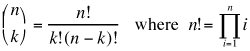
One possible top-down design for a program that computes these values for the user might be:
|
for-loop three separate times in
our code. This will have two effects. Obviously, it will save some
typing and paper. However it will also make the program
clearer and more natural. Rather than having to look at a
few-line-long loop and figure out that it computes the factorial
(assuming we don't include a comment at the beginning of each loop saying
what it does), the reader will instead see method invocations that look
something like:
What could be easier to understand?nfact = factorial(n);
For example, even though this program will only compute n choose k
once, it seems a natural choice for a method. It will make this program's main
method easier to read, and if someday later I need to compute combinations for a
larger probability/statistics application all I need to do is grab this method (and the
ones it relies on) and include them in that program.
In the end, it is not uncommon to have a method for nearly each line of each level of the top-down-design for a program. Each block of code then reads like a higher-level outline of a process implemented by the methods at the next lower level.
Putting these ideas together, we come up with the following program:
| Click Here To Run This Program On Its Own Page |
// Program: NChooseK
// Author:  Joshua S. Hodas
// Date:    October 27, 1996
// Purpose: To demonstrate Top-Down-Design with Methods

import HMC.HMCSupport;

class NChooseK {

  public static void main(String args[]) {

    int pop, group;

    HMCSupport.out.println("This program computes the "
                           + "number of combinations "
                           + "possible from a population.");

    HMCSupport.out.print("Enter the population size: ");
    pop = HMCSupport.in.nextInt();
    HMCSupport.out.print("Enter the selected group size: ");
    group = HMCSupport.in.nextInt();

    HMCSupport.out.println("There are " + choose(pop,group) +
                           " ways of selecting " + group +
                           " objects from " + pop + " objects.");
  }


  public static long choose(int n, int k) {

    return (factorial(n) / (factorial(n-k) * factorial(k)));

  }


  public static long factorial(int n) {

    long product = 1;

    for (int i = 2 ; i <= n ; i++) {

      product *= i;

    }

    return product;

  }

}
|
Organizing Your Methods
Java does not have any requirements on the order of methods in a class definition. The compiler
just makes multiple passes through the code to make sure all the types match up properly. This
means that you can organize the methods in any way you prefer. There is no fixed style rule
for this, but one good choice is to organize the methods in order by their level in the top-down design. The method ("main")} comes first, providing a very high-level view of the
program's structure. This is followed by the methods the main calls, which together
give a view of the next level of the detail. Then come the methods that these methods call, and
so on.
 Last modified August 28 for Fall 99 cs5 by fleck@cs.hmc.edu
