Assignment 6
Harvey Mudd College
Computer Science 60
Assignment 6, Due Thursday, October 14, by midnight
Maze Maker
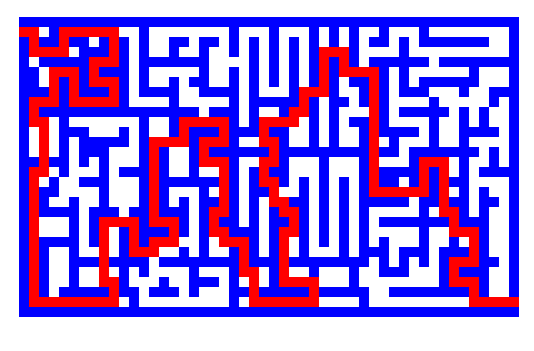
Assignment 6 embeds your breadth-first search code from
Assignment 5 into an applet for searching a maze. This will give you the chance
to use Java's graphics library and event-handling code.
Example Applet
You can run example maze maker applets by
Prof. Keller or
Prof. Dodds.
Files and Classes to Create
You will need to create a file
Maze.java that contains at least two classes: a Maze class
that contains the graphics code for the maze-making applet and breadth-first
search code for solving it and a Queue class which provides the
services of a queue for the breadth-first search. You can use your
Queue class from the previous assignment for this (also, a working
Queue class will be placed in the file
/cs/cs60/assignment5/hw5.java.sols once that assignment is complete.
You will also need an html file which contains an < APPLET
... > tag. An example html file
and information about where to place it are given below.
What does the code have to do?
The Maze Maker applet (the code's class name is Maze) is a tool for
constructing mazes. The user drags the mouse within the rectangular field to
create internal walls, as shown in blue above. The object of the maze player
is to find a path constructed by the user. Maze Maker is required to display a
minimal-length path through the maze, as shown in red in the picture above.
The rules for maze creation are as follows:
- The drawing field is a grid made of squares of 10 pixels
on a side, 30 by 50 squares total, including outer walls.
- When the user depresses the mouse button, if the cursor
is over a blank square (or a previously-drawn path
square), draw mode is indicated. If the
cursor is over a wall square when the mouse is depressed,
erase mode is indicated.
- In draw mode, a background square over which the
mouse button was depressed, and any squares over which
the mouse is dragged, are changed into wall squares if
they are not wall squares already.
- In erase mode, the wall square over which the
mouse is depressed, and any squares over which the mouse
is dragged, are erased.
- The start and finish squares of the maze are fixed to the
upper left and lower right areas of the maze, as shown in
the drawing. These squares and the outer wall squares are
never modified by the user.
- Add a Clear button which removes
everything which has been drawn.
- On the sample, you will notice a logo when the applet
first opens; this is not required.
The rules for path creation are as follows:
- A minimum-length path, if any exists, is drawn in red when the mouse
button is released.
- While the user is drawing, the previous path remains on
the screen, except as overwritten by drawing.
- The path must be minimal-length, in the sense that there
is no shorter path from start to finish.
- A path moves only vertically or horizontally from square
to square, not diagonally.
- If there is no path possible, then no red squares are
drawn.
The code for the simple applet in Square.java
will help in setting up a Maze.java file for the maze maker
applet. Square.java demonstrates the use of mouse down, mouse drag, and mouse
up events, as well as how to draw to the screen. (Click here to
run the applet.) Use the method of an off-screen buffer, as discussed in
class and shown in the Square.java example, so that your applet does not
flicker. This is mandatory.
I want more!
If you haven't had enough of your Maze.java file at the end of this
assignment, there are a couple of specific items and an open-ended invitation
to improve on the applet for (10 pts.) optional bonus credit (for one):
- Filling in gaps: If you click and then drag the mouse quickly
over the applet, gaps will appear among the maze-wall blocks which get
created or eliminated. (If you're using the appletviewer (below) you
will see this even moving the mouse at glacial speeds.) One way to
remedy this (other than buy new hardware) is to draw a line of
maze-wall blocks from each mouse drag event to the previous one. That
way no gaps appear, regardless of the update speed of the event
handler.
- A better Queue class: Instead of using the linked-list queue
from Assignment 5, implement a Queue class which is a derived
class of Vector. (Vector is a built-in java class
which already has Stack as a derived class.) Use the vector as
a circular queue as described in section 7.10 of the class text.
- Add any feature you think would enhance the maze maker applet and that
requires a nontrivial addition to the code. Be sure to
document your feature and point it out in the code.
Testing your applet
Applets require an html file. The text for the web page containing the example
applet is Square.html.
The text for the web page containing the example maze maker applet is mazeMaker.html.
You should create a page named mazeMaker.html and are welcome to copy
from that link.
You can test your code in two ways:
- With the appletviewer: if you are working in the terminal
room or have an X connection to a remote machine, you can
test your applet with the command
appletviewer mazeMaker.html
from any directory which contains both the compiled java code (Maze.class)
and the mazeMaker.html file.
Caution! For me, Turing's appletviewer takes a long time
to appear and run (> 1 minute) unless the line
setenv JAVA_FONTS "/usr/local/java/jre/lib/fonts"
is added to the .cshrc file (which is then "sourced") before running.
This line speeds the search for fonts, but error
messages still appear that some fonts are not found.
Appletviewer seems to process mouse events very slowly in any case.
- With a web browser: you can create a directory named
public_html in your home directory with the command
mkdir public_html
Documents you place in that directory will be publicly available on the web.
For example, you can place this index.html
file into your public_html directory and then access it from
the URL http://www.cs.hmc.edu/~username, where username is
your username.
If you then place your mazeMaker.html file and compiled java code
Maze.class in that same directory, you can use the link from
your index page to test your applet.
Thank you! Netscape will reload newly-compiled applet code if
you hold down the "Shift" key while pressing the reload button.
For me this approach provided a much more responsive application.
What's the compiler saying about "deprecation"?
When you compile your Maze.java file with the
1.2.2 version of the java compiler, it will print a message similar to
> javac Maze.java

Note: Maze.java uses or overrides a deprecated API.
Recompile with "-deprecation" for details.
1 warning
This is because some of the method calls used are no longer the
preferred way of handling events and graphics in java. If you
compile with the "-deprecation" flag, the compiler will tell
you what calls are now deprecated. You can leave out
that flag to avoid seeing the warnings.
This assignment is using older calls to certain event-handling and
graphics methods in order to create applets which will work with
the default capabilities of a wide variety of browsers.
Submission
You should submit your Maze.java source file in the usual
way, i.e., by running
% cs60submit Maze.java
You will be asked to input the assignment number (6).
You should not submit your mazeMaker.html file.