The purpose of this assignment is to gain experience in constructing a parser. The parser will parse a user-typed expression. (Bonus credit is available for creating an applet like the one above.)
Like writers of natural-language parsers, your goal is to parse input from a user in order to determine its meaning -- and, from there, to judge whether or not that expression is true. Unlike writers of natural-language parsers, your task is simplified in that you will only have to parse input expressions that are syntactically correct logical statements. In this assignment you will write a program that converts logical expressions into parse trees. In Assignment 8 you'll analyze the parse tree to determine the validity of the original logical expression.
For this assignment, you will need to create (actually, only alter) one file, named Parser.java.
To submit your Parser.java file, you will need to run
cs60submit 7from the directory in which that file is located.
Test cases for your code for this assignment
appear in the directory
/cs/cs60/as/a7 . Also, the file to start
from is there named /cs/cs60/as/a7/Parser.java.
You should be able to copy that file to your directory
and compile and run it. It will parse OR expressions.
(Note: we are using a common, if slightly counterintuitive,
notation in which
the plus sign '+' indicates OR and the multiplication
sign '*' indicates AND. If you consider false/true
values to be 0/1, the use of '+' as OR and '*' as and
seems somewhat justified... .)
To test your java code, you can simply run it on the sample test files named /cs/cs60/as/a7/TestN.in, where N is replaced by the number of the test. You can compare the output to the answers in /cs/cs60/as/a7/TestN.out. For example,
% java Parser < /cs/cs60/as/a7/Test1.inwill show you the result of running the first test.
% java Parser < /cs/cs60/as/a7/Test1.in | diff - /cs/cs60/as/a7/Test1.outwill return nothing (no differences) if your parser produces the expected output. If you do see lines beginning with "<", they are output lines that your program printed , but do not appear in the ".out" file. Lines beginning with ">" appear in that file, but not your program's output.
As usual, cs60submit will run your code against the same tests.
On execution your parser will present the user with a prompt
Type an expression >at which the user can input arbitrary logical expressions. Logical expressions consist of the symbols described in the grammar below (in the section The grammar to parse).
For example, the user might input
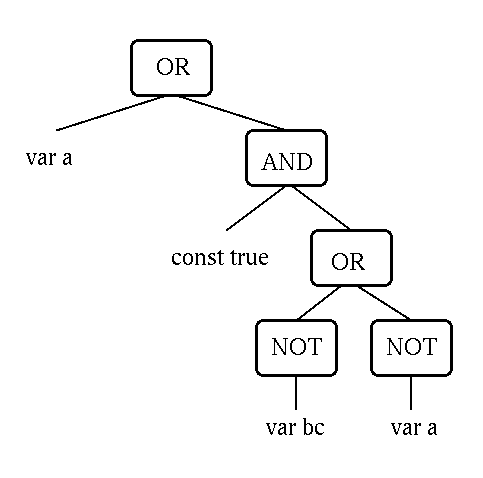
Type an expression > a + 1 * (bc' + a')As a logical statement, this input would mean "a OR ( true AND ( NOT bc OR NOT a ) )". Note that variables can consist of more than one character though only lower-case, alphabetic characters with no whitespace are allowed -- things like bc in the previous expression. Constants must be 0 or 1 with 0 meaning false and 1 meaning true.
The parser should then create a parse tree (an Objet of the Expr class) and then print out that tree with each operator in prefix form. The correct output in this case is
(OR (var a) (AND (const true) (OR (NOT (var bc)) (NOT (var a)))))which represents the parse tree
In a file named Parser.java, include the following classes and methods:
Parser should have methods named
public String toString();The strings on the left of the above list are meant as guides for what toString() should output. In addition, each of these derived classes from Expr must have a constructor and necessary data members. The examples OrExpr and VarExpr in the file /cs/cs60/a7/Parser.java should guide you.
Once you have constructed a Tokenizer, call the object t, the call
t.tokenizeNextLine()returns a Stack of Strings that are the tokens. Your methods will be able to use that stack of strings, named tokens with the following Stack methods:
The grammar specified below uses the following meta-symbols:
|   the vertical bar separates alternatives

{ } curly braces denote "0 or more repetitions of" what they contain

[ ] square brackets denote "0 or 1 repetitions of" what they contain,
       that is, an "option"
| Symbol | Meaning |
| 0 | FALSE |
| 1 | TRUE |
| any group of letters | a proposition variable |
| postfix ' | NOT |
| infix * | AND |
| infix + | OR |
| infix > | IMPLIES |
| infix = | IFF |
The full grammar is the following:
    E -> I [ = I ]            Expression (or Equality expression)
    I -> S [ > S ]            Implication
    S -> P { + P }            Sum ("OR")
    P -> L { * L }            Product ("AND")
    L -> U { ' }              Literal (the ' is a single quote)
    U -> V | C | ( E )        Unit
    V -> A { A }              Variable name
    C -> 0|1                  Constant
    A -> a|b|c|d|e|f|g|h|i|j  Alphabetic character
        |k|l|m|n|o|p|q|r|s|t
        |u|v|w|x|y|z
Whitespace is allowed between any tokens, but not between letters in a variable name.
For optional bonus credit (up to 20%), turn your parser into an applet with functionality similar to the one linked at the top of this page. (Another parse-tree-creating example is available here. It handles arithmetic expressions, rather than the logical ones this assignment is concerned with.)