CS 60, Fall 2001
Assignment 5, Due Wed. 10 October
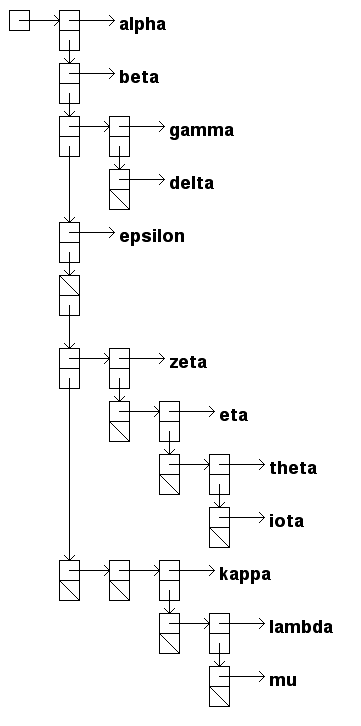
Applications that require drawing of trees are ubiquitous in current software products. For example, most operating systems have a way of drawing the file system as a tree. Construct a Java applet (small application) that displays any Polylist as a data structure box diagram. For example, this R-expression
[alpha,
 beta,
 [gamma, delta],
 epsilon,
 [],
 [zeta, [eta, [theta, iota]]],
 [[kappa, [lambda, mu]]]
]
should display as something close to the tree on the next page. This image was captured from an applet running in Netscape 4.74 on a Mac from a web page:
www.cs.hmc.edu/courses/2001/fall/cs60/examples/java/treeDraw/treeDraw.html
Your applet should include a method that accepts an arbitrary Object, which might be a Polylist, and draws the corresponding diagram. Objects that are not Polylists are shown by drawing the result of their toString() method. It is not necessary to do input of Polylists from a source outside the applet. The Polylist shown here was produced by the statement:
Polylist testTree =
    Polylist.list("alpha",
		  "beta",
		  Polylist.list("gamma",
				"delta"
			       ),
		  "epsilon",
		  Polylist.nil,
		  Polylist.list("zeta",
				Polylist.list("eta",
					      Polylist.list("theta",
							    "iota"
							   )
					     )
			       ),
		  Polylist.list(Polylist.list("kappa",
					      Polylist.list("lambda",
							    "mu"
							   )
					     )
			       )
		 );
For grading and help purposes, please use the name TreeDraw as the name of your class.
Your tree drawing method should conform to the following prototype:
int drawTree(Object ob,
             int Xoffset,
             int Yoffset,
             int Xdelta,
             int Ydelta,
             int featureSize)
where:
Ob is the Object to be drawn, which may or may not be a Polylist. If not, then just the value of the tostring() method is drawn.Xoffset is the horizontal offset for the root of the object.Yoffset is the vertical offset for the root of the object.Xdelta is the number of pixels between horizontal layers.Ydelta is the number of pixels between vertical items.featureSize is the size of one box in pixels.To help you get started with Java applets and graphics, we supply a sampler in
www.cs.hmc.edu/courses/2001/fall/cs60/examples/java/appletGraphics/In particular, this sampler illustrates the following things:
init() and run() methods of the applet.
You may also use the skeletal program in
www.cs.hmc.edu/courses/2001/fall/cs60/examples/java/treeDraw/TreeDraw.javaand the .html in
www.cs.hmc.edu/courses/2001/fall/cs60/examples/java/treeDraw/treeDraw.html
Note also that the structure of the diagram is similar to that produced by the analysis method in the notes, the difference being that there the tree is printed out, whereas here it is drawn.
As always, let recursion do (some of) the work for you.