CS 60, Fall 2001
Assignment 6, Due Fri. 19
October
Assignment 7, Due Fri. 2
November
Traffic Jam, Phase 1
Construct a Java applet for phase 1, the
construction phase, of the Traffic Jam game, shown below.
Note that appropriate use of objects
should be regarded as a requirement, since this is one of the topics that this assignment
tries to exercise.
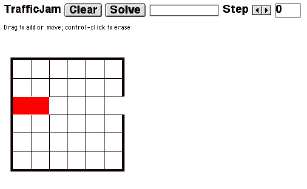
The red rectangle and the gap at the right end of that row
have a significance that will be described below.
This image was captured from Internet Explorer 5 running on a Mac on web
page where such an applet resides:
http://www.cs.hmc.edu/courses/2001/fall/cs60/examples/java/TrafficJam/
In phase 1, your applet allows you to construct a
traffic jam. A traffic jam consists of a set of cars (dominoes of length 2) and
trucks (dominoes of length 3) laid out on a grid. Cars and trucks are
“drawn” by dragging the mouse over cells in the grid. The applet
must constrain things so that at most one car or truck can cover a given cell.
Cars and trucks cannot be split in two, be laid out on diagonals, have
wrap-around, etc.
Below is a picture of a completed puzzle. The
applet has arbitrarily assigned different colors to each car and truck.
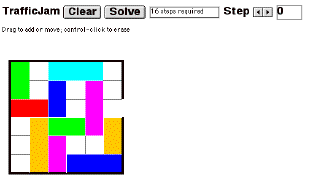
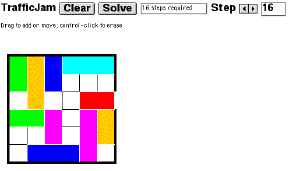
The object of the game is for a user to maneuver the cars and trucks by sliding them up and down or right and left on the grid so that the distinguished red car (as shown in the first picture) can move to the exit position at the right. Sliding can only be done along the axis of a car/truck; it cannot slide perpendicular to its axis. For example, the red car can only move left and right. The picture below shows the state where the red car has moved to the exit position. This follows after 16 steps of moving various cars/trucks. See if you can mentally trace the steps that would be used.
In phase 2 (the next assignment), you will write code that can determine whether a solution is possible and, if so, will steer the cars and trucks so that the red car gets to the exit position. In other words, the phase 2 applet will solve the puzzle, if there is a solution. If not, it will say so. This is a simple form of “AI” (artificial intelligence) problem based on searching a graph.
Obviously for phase 1 you will need to learn how to make your applet react to the mouse. The textbook and lecture notes will contain some information on this. You will also need to know how to sense a control-click of the mouse for purposes of erasure. We will provide you with the slider component for stepping the puzzle through its solution.
Here is a checklist of specific things your phase 1 applet will need to be able to do:
-
When the mouse is pressed over an empty cell, drawing begins. The cell changes color. Dragging the mouse in any direction to another empty cell extends the drawing to an adjacent square. However, once the mouse is moved in a specific plane, the drawing must continue in that plane. In other words, it should not be possible to create right-angle objects. Also, it should not be possible to create objects of length more than 3.
-
When the mouse is released, if the drawn object covers only one cell, it disappears.
-
When the mouse is pressed over an occupied cell, dragging moves the corresponding object in the direction dragged, but only if this direction is along the axis of the object. Dragging perpendicular to the axis does nothing.
-
When the mouse is pressed over an occupied cell, and the control key is held down, the correcponding object is removed.
Here are some design suggestions:
-
Represent cars and trucks as objects. Probably it is best to use a single class and just differentiate based on length of the shape (2 for car, 3 for truck). In this way, your game could easily be generalized to longer shapes.
-
Represent the grid state as an object containing a 2-dimensional array. Each cell of the grid will reference the car/truck on that cell, or be null if there is no object. This allows you to detect unoccupied cells easily. Multiple grid objects representing various game states will be needed for phase 2.
-
Each car/truck should know about the cells it currently occupies. This information is updated when the car/truck is moved. In turn, the grid information can be updated.
-
Record in each car/truck a standard location, say the pair of indices of the upper-left cell occupied, the direction, and the length. This information is enough to characterize the occupied cells.
-
Work in terms of cell indices rather than pixel coordinates. The cell indices can be obtained from pixel coordinates by subtracting an offset and dividing by the cell size. Pixel coordinates can be obtained from indices by reversing this process.
-
In order to detect direction of mouse motion, do not expect that only one coordinate will change, because it is difficult for a human to control the mouse in this way. Instead, you will need to sense which direction dominates on a given mouse-drag sequence. That direction would maintain itself until the mouse is released.
-
There are two ways to do mouse-handling: Over-ride methods mouseDown, mouseUp, mouseDrag, etc. or add handler objects from inner classes. The first of these is explained in the textbook. The second will be explained in class.