In the movie Speed! Keanu Reeves has to survive on a city bus whose speed can not drop below 60 miles per hour. While excpetional movie performances are sometimes described as timeless, this assignment sets out to demonstrate that Keanu's performance could be considered stateless.
More formally, this assignment is an introduction to "low-level" control of a simulated robot. Part 0 introduces the robot simulator, which emulates a Nomad 200 (one is dormant in my office, at the moment). Part 1 involves pure reactive control, in which the input stimuli are directly "wired" to output signals without any attempt at modeling the world. Given a simulated robot whose speed is fixed, your task (in part 1) is to build a purely reactive strategy for navigating it through an environment without crashing. (We will compare the strategies of different lab groups to determine how much speed they can actually handle... . See the Robot Pentathlon, below.)
Part 2 asks you to design a wall-following robot. This can be done (with some degree of success) in a purely reactive manner, but the possibility of keeping track of the world by maintining some state is allowed. Even so, you will likely only want to keep track of what is needed to accomplish the task.
In order to run the Nomad simulator, you should copy all of the files from /cs/cs154/Nomad into a directory of your own. From your directory, you can start the simulator, named Nserver, simply with Nserver & A set of four windows should appear:
Information about the current state of the robot, its configuration and the readings of the sensors can be obtained by accessing a global structure, called the State vector. State is an array of 42 long integers. It is updates whenever a robot motion command gets called or any time gs() (get state) is called. Here's what's inside State:
State[0] is not used.

State[1] through State[16] are the infrared sensor readings.

   The infrared sensors can detect close-range obstacles (lower
   values indicate closer objects). Values will be from 0 to 15.
   The infrared sensors themselves are numbered from 1 to 16
   counterclockwise from the front of the robot.

State[17] through State[32] are the sonar sensor readings.

  The sonar sensors are arranged in the same way as the IR sensors.
  They will provide readings (in inches) from about 10 up to 255.

State[33] is the bumper state.

  The 20 low-order bits of this integer indicate which (if any)
  bump sensors are depressed. The bump sensors are arranged in
  an overlapping fashion counterclockwise from the front of the robot.

State[34] is the X coordinate of the robot computed from the encoders.

  The units are tenths of an inch.

State[35] is the Y coordinate of the robot.

State[36] is the steering angle of the robot.

  This is the direction that the wheels are facing, as computed from the
  encoders. Counterclockwise rotation is positive, and the units are
  tenths of a degree, so this value is between 1 and 3600.

State[37] is the angle of the robot's turret.

  The Nomad 200 has an independently moving turret (to which the
  sonars are attached. Typically, the turret is controlled in sync
  with the steering, so that the sonar sensor #1 is always facing forward.

State[38] is the current translational velocity of the robot.

State[39] is the current rotational velocity of the robot.

State[40] is the turret's current velocity.

State[41] holds error messages.
Everytime a motor command (ac, sp, pr, vm, st, zr -- see below for descriptions of these) is issued, the values in the State vector get updated. However, the simulator will only update those sensors you are interested in using. To determine which sensor data to compute and return, a second array Smask, is checked. If Smask[i] is 1, then State[i] is computed and returned. Otherwise, it that part of the State vector is ignored.
In the simulation, there is no harm in activating all of the possible state with the code
for (int i=1 ; i<42 ; ++i) {Smask[i] = 1;}
ct();
The call to ct() registers the new mask vector with the robot.
Here is a summary of the main motion commands. The return values are 0 or 1, depending on whether the command failed to reach the robot or succeeded reaching the robot. Note that this is not the same as saying whether the commands had their desired effect! In the simulator, the commands will return 1.
These robot commands are executed asynchronously, i.e., the function itself will return immediately, and while the intended action starts on the robot, the program will move on to the next instruction. The only exceptions are zr which zeros the robot's location information and ws which waits for a previous command to stop.
You can try these commands in the simulator by going to the "Panels" menu of the "Robot" window and chosing "Command Line". How can you make the robot turn in place? How can you make it turn in a broad arc? A narrower arc? Get a feel for how these commands work. The command-line panel is not an ideal interface, because it's not a true command interpreter. C (or C++) code is the most flexible place to try things out... .
Controlling the Nomad consists of four steps
In any case, survivor.cc and the other files are in
/cs/cs154/as/ATo get started, copy them to a directory of your own. You should then be able to run
maketo create the executable survivor. In order to control the simulated robot with your program, simply start the server and then run the executable. You will see the robot reacting to the environment as specified by the motion control commands you included in your code. (As long as no connection problem occur -- see below.)
After starting Nserver a number of messages will be displayed. Near the bottom of this output there should be a message:
Using server tcp port #7019.(or whatever port number you specified -- see below for more on setting up a communications port). If you don't see this message and get something like
ERROR: bind call failed in server, tcp port #7019 already in usethen you will need to change the port used.
In order to change the port used, you need to do two things. First, in the world.setup file (in your dirctory containing Nserver), change the line that reads
serv_port = 7019to something like the following
serv_port = 7025(or whatever other port number you will be using). Second, at the start of the main function in your robot control code, add the line
SERV_TCP_PORT = 7025;This sets a global variable that the server uses to set up communication.
Complete information on the Nomad is available in the Nomad User's Manual and Nomad Language Reference Manual. I will make some hard copies available; on-line copies are in postscript form in /cs/cs154/docs (on turing).
As mentioned in the introduction, the first test we'll be putting the simulator to is building Keanu-level intelligence. In particular, you should write a function
int computeRotationalVelocity()that maps the sonar values (the input) to a rotational velocity (the output), so that the robot (whose speed is fixed) survives as long as possible without hitting the walls or obstacles in various environments. The return value of computeRotationalVelocity is an integer, because that is the type expected by the velocity-setting call, vm. (A prototype function is provided in the test file, /cs/cs154/as/A/survivor.cc .
You may use the current rotational and translational velocities of the robot in your computeRotationalVelocity function -- they are accessible as State[39] and State[38], respectively.
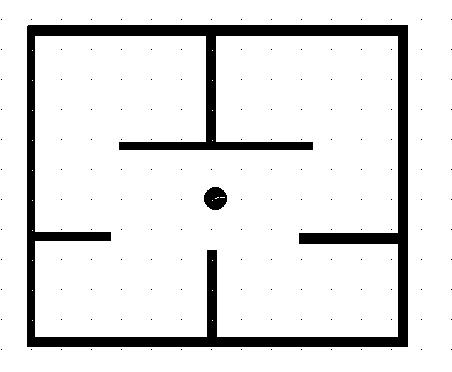
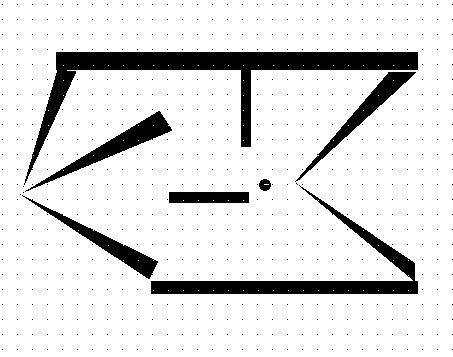
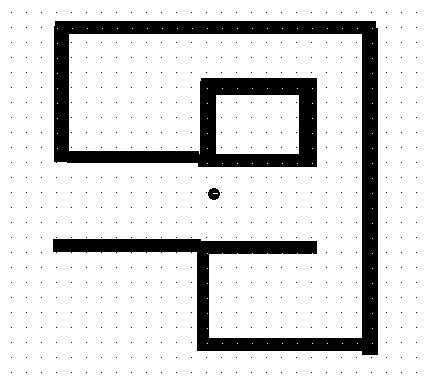
In the write up, below, explain your approach and include the text of your code either in the HTML or as a link from it. Also, include the results of your algorithm run at a variety of different speeds on the above two worlds and at least one world of your own devising.
Wall-following and corridor following are low-level behaviors essential for higher-level navigation and helpful for just wandering around. (This may have been a technique you used in the previous part of the assignment.)
There is no restriction on how you design your wall-follower, i.e., you need not use purely reactive control. Also, you may stop and start the robot as you see necessary -- there is no requirement to go a particular speed. However, just as survival times measure the fitness of algorithms in part 1 of this assignment, for the wall-followers, running time will determine their fitness -- the faster they can circumnavigate an obstacle, the better, but even a slow moving successful wall follower is better than one which wanders away from the wall or continually crashes into it.