Harvey
Mudd College
Computer Science 60
Assignment 07
DESC Applet
Due Dates:
- For all sections Tuesday night.
Nov. 5.
This assignment is based on a06, Double-Ended Spam Cruncher (DESC), which gives the rules of behavior.
Requirement: Implement in Java an Applet
demonstrating the DESC’s behavior on a variety of grid samples, selected from a
Choice menu.
A screen shot of the DESC applet
is given below:
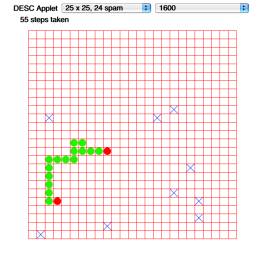
In the picture above, the DESC has already crunched 15 spam (the plural of spam is spam, as far as we know). The red dots show the two heads and the green dots show the body, with the number of cells in the body being the number of spam crunched. The DESC is doing its search for the next closest spam square, which will resolve to the X in the lower left. The left choice menu choses the example. The right choice menu chooses the delay between steps of the DESC. The DESC begins moving as soon as an example is chosen, and the delay can be set at any time, without restarting the current example.
You are not required to use different colors for the head and body. The square size we are using is 20x20 pixels.
Extra Credit Options (State at the top of your source file which ones you are offering, if any, and provide documentation that describes how the option is used):
- Color
Option: Have the head and body cells
colored differently, as shown in the drawing.
- Construction
Option: Using the mouse, the user can
click on squares on the grid to place or remove spam. This could go on
while the DESC is moving, or while it is stopped. For the latter, you
should include a pause button.
- Target
Mode Option: This adds a separate
mode. Rather than having the DESC move on its own, it waits for the user
to click the next spam square, then the DESC chooses a shortest path to
the selected square. The number of moves is recorded for comparison to the
number of moves made by the breadth-first algorithm.
- Steering
Option: The DESC is controlled by the
four arrow keys on the keyboard which indicate the direction the
currently-selected head is to move. Hitting the space bar reverses the
direction. It keeps moving all the while, with the user indicating
direction only. Were it to run into an obstacle, such as the edge of the
grid or itself, it waits until the user steers it another direction or
waits. This option forms the basis of a game in which the score is the
number of cycles needed to crunch all of the spam. (Low score is better.)
If the player deadlocks the spam cruncher, he or she loses.
- Traveling
Spam Cruncher Option: Realizing that
finding the smallest number of steps is an instance of the “Traveling
Salesperson Problem”, known to be computationally very difficult, the
programmer nonetheless develops a controller for the DESC that will
realize this number of steps.
- Negotiable
Options: I am willing to consider
other options, but they should be negotiated before you have
developed them.
Resources: In /cs/cs60/a/07, I am providing some sample applet code and a means to initialize your applet with various samples, so that you don’t have to type them in:
SampleApplet.java
illustrates a basic applet setup with animated graphics.
Sample.java provides a class Sample and a method
static Sample[] makeSamples()
that will generate sample data. Each Sample
has a method
java.util.Enumeration elements()
that will enumerate the set of all Pairs
in a Sample. A Pair, in turn, provides public variables row and col
to give you the row and column of the pair. (Pair.java
is also included in the directory.)
Recall that the key methods of an Enumeration
are:
boolean hasMoreElements()
and
Object nextElement().
Sample also provides:
int getRows()
int
getCols()
and
String getTitle()
that you will want to use to set create Grids and set up your
choice menu.
Your system should work on any samples that are provided, not just the ones in
this particular static version.
Viewing your applet in a web browser
You may establish a web page on turing. Suppose that your login id is
jsmith
and your .html file is
desc.html
Put desc.html and all relevant .class files in your directory
~jsmith/public_html
Then your may be viewed at
www.cs.hmc.edu/~jsmith/desc.html
You may need to set protection on your directory to make it web accessible:
chmod 775 ~
chmod 775 ~/public_html
chmod 664 ~/public_html/*
Submitting your code
You should submit your using
cs60submit DESCapplet.java . . .
where . . . represents all other support .java files needed. Do NOT submit .class files or test files.