CS 60, Fall 2002
Assignment 8, Due Tue. 19
November
Logo Builder
(REVISED)
Logo is a
programming language with featuring a number of easy-to-access features,
including “turtle graphics”. Turtle graphics is a simplified form of graphics
in which an imagined “turtle” moves on the screen, drawing with its “pen”.
Turtle graphics commands include telling the turtle to move forward some number
of pixels, turn right some number of degrees, pick its pen up (so that it
doesn’t draw when it moves) and put it down again (to resume drawing). Using
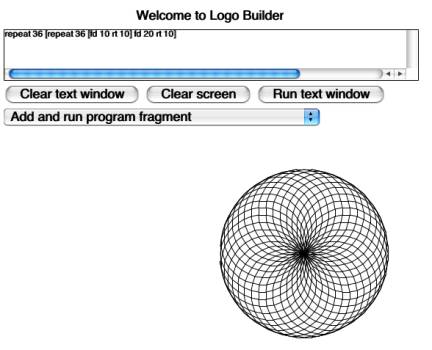
simple commands, quite elaborate drawings can be made, such as the one shown
below, which was created by the Logo program shown in the text window:
Iteration
in Logo is accomplished either by the repeat command or by recursion. In this assignment you only
deal with the repeat command, not recursion, and all quantities are constants,
no variables.
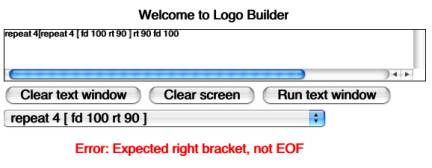
Although the syntax of Logo is quite simple, it is still possible for the programmer to make syntax errors. For example, if the number is omitted from a command that takes a number, a left or right bracket is misplaced, or there are superfluous characters inserted, these result in a string that is not in the language. Rather than simply reject the string, it is helpful for the parser to give the user some clue as to the source of the error. The following display shows the means of reacting to a syntax error in Logo Builder: An appropriate error message is displayed in the display area, but no drawing takes place.
You are
given a setup for a Logo turtle graphics applet, that is missing only the
parser. You are asked to construct a class LogoParser for a small subset of the
Logo language, using LogoTokenizer that is provided (a bare skeleton LogoParser
is provided.) The LogoTokenizer deals with all direct character input for you.
When called, it returns a Token of one of the following classes:
LeftBracketToken
represents ‘[’
RightBracketToken
represents ‘]’
NumberToken
represents a numeral
StringToken
represents a string of letters
ErrorToken represents an unrecognized token type
EOFtoken
represents the end-of-file
Any
whitespace between tokens is skipped over. All tokens implement the interface
defined in Token.java and are in separate files. In addition, NumberToken has the method
double getValue()
that gets the numeric value of the token. (You will need to cast the value to an int for use here.) For StringToken, the toString() method gives the value.
The
LogoTokenizer class provides the following methods:
Token getToken(): remove and return the next token from the input stream.
Token peekToken(): return the next token from the input stream without removing it.
String
getRemainder(): return the unparsed remainder of the input as a String.
Once you have a Token, instanceof can be used to determine its type and it can be cast to that type in case a method such as getValue() is to be used.
The following code from Logo.java shows how the LogoTokenizer fits into the
applet:
void
processString(String input)
{
LogoTokenizer logoIn = new LogoTokenizer(input);
LogoParser parser = new
LogoParser(logoIn);
Program program =
parser.getProgram();
if( program instanceof
ExecutableProgram )
{
if(
logoIn.peekToken() instanceof EOFtoken )
{
program.execute(turtle, this);
// could give an error message
}
else
{
errorMessage("Garbage after an otherwise-valid program."
+ logoIn.getRemainder());
}
}
else
{
errorMessage(((ErrorProgram)program).toString());
}
repaint();
}
The LogoParser uses the
methods of LogoTokenizer to get the tokens it needs for parsing the input. It
produces a Program, described subsequently, which can be executed or not. Program
is an interface with two implementing classes: ExecutableProgram and
ErrorProgram. Program defines the method:
void
execute(Turtle turtle, Logo applet);
If the program is executable, this will cause some action on the screen. If it is not executable, it will cause an error message on the screen.
An
ExecutableProgram contains a sequence of Commands. A Command is added to a
program by the method:
public void addCommand(Command command);
A Command is an interface implemented by a variety of specific command classes: FDcommand, REPEATcommand, etc., each containing information specific to that command.
The LogoParser must call the constructors of the various Commands and of either ExecutableProgram or ErrorProgram. Commands are not returned directly by the parser, but instead are used to build up the program.
The
grammar to be used is as follows, where auxiliary symbols are in italics.
The
meta-symbols {...} means "0 or more occurences of ...", | means
"or".
Other
symbols '[', ']', "cs", etc. are terminal tokens.
There is
no grammar rule given for number
or for string because the
tokenizer will parse these for you automatically.
program -> { command
}
command
-> cs | //
clear screen
home | // home turtle
pu | //
pen up
pd | //
pen down
fd number | //
move forward
rt number | //
right-turn
repeat number [ program ]
Note that the
grammar allows arbitrary nesting of repeats, and this is one of the key points
of this assignment, recursive-descent parsing.
You are welcome to
augment these commands for extra credit. Negotiate the possibilities with me.
A running example
applet may be found at:
http://www.cs.hmc.edu/courses/current/cs60/examples/java/logo/logo.html
All files, with
only a skeleton for LogoParser.java, will be available on turing in
/cs/cs60/a/08/
To demonstrate the
pattern, here is one of the parse methods from my LogoParser. It is called once
it is determined that we have an “fd” token:
/**
* Get the rest of an fd command.
*/
Command getFDcommand()
{
Token token =
in.peekToken();
if( token instanceof
NumberToken )
{
in.getToken();
return new
FDcommand(((NumberToken)token).getValue());
}
else
{
return new
FailureCommand("Expected number after fd, at "
+ token);
}
}
You are advised to
start by parsing Programs of only a single kind of command, then build up from
there. Most of the commands are straight-forward, except for repeat, which has
more complexity.
While your error
handling need not mimic the example’s precisely, you should give some kind of
message for erroneous input.