Computer Science 60
Principles of Computer Science
Fall 2007


Assignment 11: DFAs and NFAs in JFLAP and Prolog! [100 Points]
Due Wednesday, November 28th, 2007, 11:59pm


In this assignment you will continue the DFA simulator you started last week.  You will also get a chance to build some Turing machines to recognize some languages.

To submit your files for this assignment, please place them in a single zip file named hw11.zip and submit them through Sakai in the usual way.

Part 1: Automata in JFLAP, again! [40 points]

JFLAP!


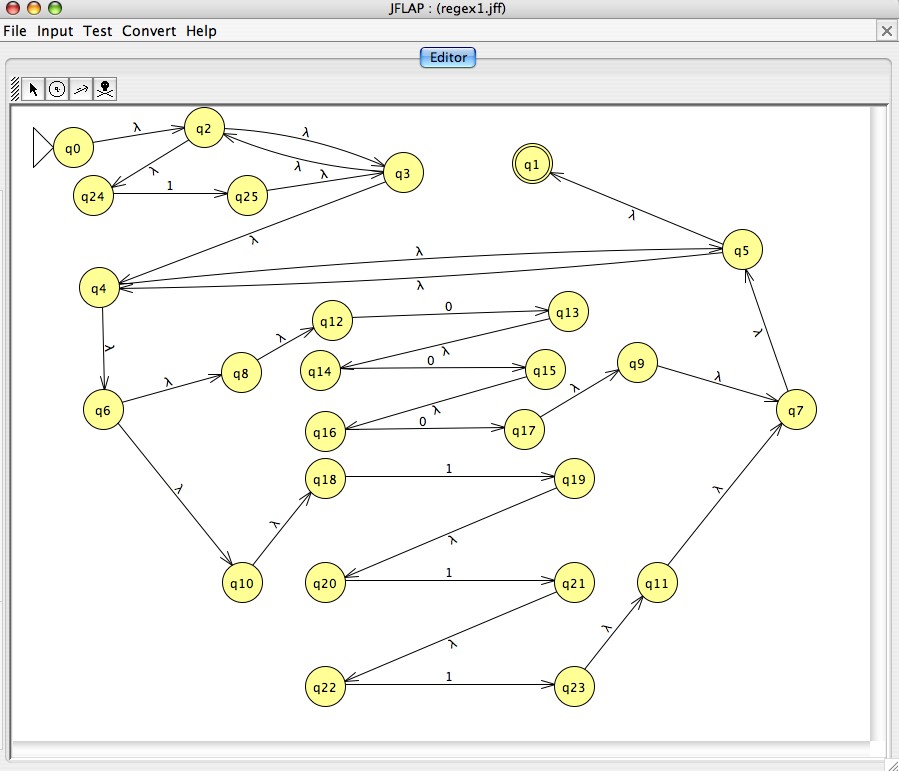
Click for a larger image of an example JFLAP NFA...

All of our problems use the binary alphabet: { 0, 1 }

The problems

  1. [5 points] JFLAP can convert Regular Expressions to NFAs, NFAs to DFAs, and DFAs to Regular Expressions. However, in the process it can sometimes add more states than are strictly necesary. Determine what regular expression it is that JFLAP has turned into the NFA in the image near the top of this webpage. (You may want to click on it to get a closer view...) Submit this as part1_1.txt and explain in a couple of sentences an English description of the language generated by your regular expression. 
  2. [25 Points] Build a Turing Machine to accept the language from the previous problem:
      L = { w | w contains only 0's and the length of w is a power of 2 }.
    Although it is not regular, it is decidable. That is to say, there is a Turing machine that accepts it.

    We highly recommend spending some time thinking about this problem and sketching a solution on paper before using JFLAP. If you design the Turing Machine carefully, you can build it using fewer than nine states. 

    Save your Turing Machine in a file called part1_2.jff.


  3. [10 Points] A surprise...?! In the sampleProof.txt file we've shown that the language
      {w | w contains an equal number of 0's and 1's in any order.}

    is not regular.

    However, now consider the following closely related language:

      {w | w contains an equal number of occurrences of the pattern 01 and 10.}

    This language contains 0110 (this contains the pattern 01 once and the pattern 10 once) as well as 101 (this contains the pattern 10 once and the pattern 01 once - they overlap, but that's fine!). Amazingly, this language is regular! Show that this is true by building a DFA or NFA for this language using JFLAP. Save and submit your solution in the file part1_3.jff.

Part 2: Automata in Prolog, continued [60 points]

Building on last week's assignment, you will write a Prolog program that is capable of simulating a DFA and generating all of the strings that are accepted by a given DFA if the language of that DFA is finite.  In last week's assignment and in class we considered strategies for constructing this predicate.  This week's assignment walks you through one possible breakdown of the problem that reflects many of the ideas we discussed in class.   You should place all of your code for this part in a file called part2.pl.

In the problems below, you should use the same testing framework as in last week's assignment.  For each problem, you must include in your solutions at least two tests for the predicate.  

  1. Define reach(State1, State2, Transitions)
     Given a list of transitions, and a state State1, reach should determine State2s that are reachable from State1. This predicate should be capable of generating State2s or State1s.
  2. Define reachable_from_set(Set, Result, Transitions)
    Given a list of transitions, and a set of states represented as a list, reachable_from_set should determine as Result the set of states reachable from Set.
  3. Define reachable_in_exactly(N, Start, End, Transitions)
    Given a list of transitions, a number N >= 0, and a Start state, determine as End states that are reachable from Start in exactly N steps. (Your answer does not have to generate values for N.)
  4. Define states(DFA, States) to return the set of all States for the DFA.
  5. A state is defined to be "live" if
    a. There is an accepting state reachable from it.
    b. It is reachable from the initial state.
    Define live(State, DFA) to return State provided that State is live.
  6. A state is defined to be "looping" if
    a. It is live.
    b. There is a non-empty path from the state back to itself.
    Define looping(State, DFA) to return looping states. Note that the language of a DFA is finite iff there is no looping state
  7. Define gen_accept(DFA, Sequence) to generate the set of accepting sequences of the DFA, one at a time.
    If the set of sequences is infinite, it should go on generating forever.  However, if the set of is finite, it should fail after the last sequence is generated. Thus, "setof" and the usual testing framework should be OK for testing, as long as there are finitely many accepting sequences in the language of the DFA

Extra credit.

For completely optional extra credit, write a variation of the "gen_accept" predicate from problem number 10 called "ordered_gen_accept" Thus,
ordered_gen_accept( DFA, Sequence ) should be able to generate the accepting sequences of the DFA, one at a time, in increasing order of length. Thus, all length-1 accepting strings should be generated before any length-2 accepting strings, and all length-2 accepting strings should be generated before any length-3 strings, and so on.

The order of the accepting sequences of the same length does not matter. As usual with prolog, repeating the generation of answers is OK, too.

For example, borrowing the dfa from test(36), the first few outputs would be in the following order:

ordered_gen_accept( dfa(a, [b, e], [ (a, 0, b), (a, 1, c), (b, 0, d), (b, 1, d), (c, 0, f),
                                      (c, 1, e), (d, 0, f), (d, 1, e), (e, 0, f), (e, 1, f),
                                      (f, 0, f), (f, 1, f) ]),  X ).

 X = [0] ;       % this one should be first

 X = [1, 1] ;    % this one should come before the next two

 X = [0, 0, 1] ;

 X = [0, 1, 1]

potentially stopping here or repeating some of the three-element sequences