CS 151: Programming Assignment 1
Introduction to Python [60 points]
due Wednesday, January 30, 11:55pm
Please
read and follow the submission instructions on the assignment page. Don't forget about the assignment survey.
This is a SOLO assignment.
Everyone must do their own work on this assignment (but you may
verbally discuss the assignment with others if you want).
In this course you will complete your programming assignments in
Python. I chose Python over other textbook-supported languages (LISP
and Java) because (1) Python is easy to use and fairly easy to learn,
(2) one of the more complete libraries associated with the textbook is
in Python, and (3) Python is a highly useful language to know.
The purpose of this assignment is to help you get comfortable
programming in Python. This assignment will NOT teach you everything
you need to know about Python; thus, another purpose of this assignment
is to help familiarize you with the Python documentation. Keep this documentation handy throughout the semester.
Part 1: Getting Started
Python is installed on all of the lab machines in Beckman B102 and
B105, but I recommend that you also install it on your own computer.
You will need to work with the code provided with the book, which is
not installed on the computers in the labs. You can obtain Python at www.python.org/download/.
After installing Python you can immediately run it by choosing "Python
(command line)" from the Python menu from the programs part of your
start menu. You should see Python start in a command window.
Alternatively you can start python by opening a command window and
typing "python" at the prompt. Of course you need to add Python to
your path if you are not running from within Python's directory.
Python is an interpreted language, which means you can type commands
directly at the prompt. Try the following, pressing enter after each
one. Notice that you do NOT need semi-colons at the end of each line,
nor do you need to declare variables before you use them (Python has implicit typing, like Rex).
>> 10**4
>> a = 'ai is cool'
>> len(a)
>> a.split()
>> myL = [1, 2, 3, 4]
>> myL[1:3]
>> myL[1:]
Can you understand what each of the above lines of code does? You'll
get more practice with lists and strings later, but you may also want
to check out the documentation.
Of course, you will usually want to save the programs you write. Like
in almost any other language, you can write programs in a file and then
load them into the Python interpreter. Python comes with its own
editor, called IDLE. In my opinion IDLE is pretty good, but you may
use any editor you like. jEdit, the editor used in CS5, is a reasonable option.
Open your editor of choice and type in (or copy) the following code that defines a simple list search function:
def listSearch( L, x ):
""" Searches through a list L for the element x"""
for item in L:
if item == x:
return True # We found it, so return True
return False # Item not found
Save your file as "search.py".
Notice a few things about the syntax of this function:
- Python uses colons and indentation to indicate blocks. Indentation is critical in Python.
The colon at the end of a line indicates the start of a block of code,
all of which must be indented to the same degree. For example, the
"return False" line is outside the for-loop because it is indented at
the level of the function body, not the for-loop body.
- Variables
are not declared in Python. The L is understood to be a list and the x
an element in the list, but it's up to the user to enforce this.
Return values are also not specified. If a function includes a return
statement, that's what it returns. If it does not, then it returns
nothing.
- The for-loop in Python is a little different
from what you might be used to. It specifies that the variable i
should take on each value in the list L. The "range" function is very
useful in getting for-loops in Python to behave like "normal"
for-loops. (See the documentation on for-loops).
- The line in quotes at the top of the function is a
special comment called a "docstring". It is displayed when the user
asks for documentation about this function by typing help(listSearch)
at the Python prompt. (Try this below). The parts of the line
starting with the symbol # are regular comments.
To run this function, you
first need to load the code into the interpreter. From IDLE, simply
press F5 to load the function. You should see a Python prompt (but it
should look like nothing really happened). If you are not using IDLE,
in a command prompt navigate to the directory containing the file you
just created and run Python (by typing "python"). Then type:
>> import search ; reload(search) ; from search import *
This line is overkill for loading your file, but it will definitely
load and/or reload everything you have written in the file search.py so
I suggest copying and pasting this line for any file you are trying to
load into Python in the future (changing the filename as appropriate,
of course).
Now that the program is loaded you can run any functions defined in the file (in this case just one). Try it out, e.g.:
>> listSearch([2, 5, 1, 6, 10], 1])
True
Part 2: Programming in Python
You're now set up and ready to go. Complete each of the following
problems. Be sure to include docstrings for every function you write.
- Simple functions [20 points]. Complete the following problems in a file called pa1pr1.py.
- Write a function called TwoToTheN(n) that calculates 2^n in log(n) time.
- Write two functions, one called mean(L) and the other called median(L)
that return the average and the median of a list of numbers,
respectively. You may implement this functions recursively or
iteratively.
- Assume a tree is represented as a nested list of lists. E.g., the tree
4
/ /\ \
/ / \ \
10 3 14 1
/\ |
33 2 12
Would be represented as the list [4, [10, [33], [2]], [3], [14, [12]], [1]].
Notice that this tree is neither binary nor ordered in any way and
that the leaves are all lists of length 1. Write two functions: BFS(Tree, elem) and DFS(Tree, elem) that perform a breadth first search and depth first search, respectively, of the tree and return whether or not elem is in Tree. You will probably want to read about how lists can be used as Stacks and Queues in the Python documentation.
- Objects [20 points]. Complete this problem in a file called pa1pr2.py
In this problem you will develop an object for managing a game of Tic
Tac Toe. While we covered the basics of creating objects in Python in
class, you will probably want to refer to Python's documentation on creating classes. Create a class called TTTBoard that defines the following functions:
You may represent the board however you like. You may define other
functions as well. You may wish also to define a function that allows
two players to play the game to make sure your above functions are
working correctly.
- GUI development [20 points]. Complete this problem in a file called pa1pr3.py
Finally, you will develop a GUI for your Tic Tac Toe game you developed
above. Although we will cover the basics of designing GUIs with
TkInter in class, you will probably also need to rely on the TkInter documentation.
You may or may not build GUIs in future assignments, but GUI building
is fun, and it will give you more practice with objects in Python. :)
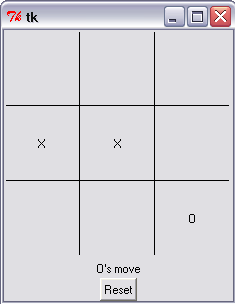
Your goal is to create a simple GUI for playing an interactive game of
TicTacToe like the one above. At a minimum, it should have the
following functionality:
- At the beginning of the game, it should display an empty 3x3 tic tac toe board
- When
a player clicks on an empty square, it should place that player's move
in that square. It should not allow a player to place a move in a
non-empty square. It does not have to give an error message, but it
should not change turns until the current player has made a legal move.
- It
should automatically alternate between players' turns. It would be
nice if your GUI displayed whose turn it is, but it does not have to.
- It
should detect when the game if over and display a message about who won
(or if there was a tie). It should not allow moves to be placed on a
game that is finished.
- It should have a button that resets the game and clears the board.
Feel free to be as creative as you like, but all you need to implement
is this basic functionality. You should use the Tic Tac Toe class you
wrote in the last problem here. To do so, include the line:
from pa1pr2 import *
at the top of your file.
- Install the AIMA code [0 points]
Your last task is to install the code associated with the book. Go to
http://aima.cs.berkeley.edu/python/readme.html and follow the
instructions for downloading and installing the code on your machine.
Make sure you have it working by running one or more of the doctests
(don't worry if you don't understand what they do). E.g., go to the
directory where you installed the code and type at the command line
(NOT in Python):
$ python doctests.py -v search.py
IMPORTANT: Over the course of the semester I may ask you to
implement algorithms whose implementations already exist in this code
repository. When completing your
programming assignments do not look at or use the AIMA code unless the
assignment specifically tells you to do so. For this assignment, feel free to look through or run the code if you like.
When you are done, submit your solutions to problems 1, 2 and 3 though the Sakai site.