Harvey
Mudd College
Computer Science 42
Fall
Semester, 2009
Assignment 8: DESC Applet
Due Date: Wed.
night. Nov. 25 (allowing you two weeks; please start early, because this is
non-trivial)
Working in pairs is possible on this assignment, and is highly
recommended. Do not work
in groups larger than two, please. If you need a partner, please contact me as
soon as possible, so I can help you find one.
Requirement:
Implement a Java Applet
demonstrating the Double-Ended Spam Cruncher (DESC) behavior on a variety of grid samples,
selected from a menu. The DESC could model an AI player in certain types of games.
Your applet should be runnable using a web browser. It can be hosted either on
your CS Department account, or some other place of your choosing. Email the URL
where your DESC will be hosted once you’ve decided.
A screen shot of one
version of the applet is given below. The objective of the DESC is to “crunch”
as much spam as possible, in the fewest number of moves possible, while staying
in its two-dimensional environment. In addition, there is a penalty for spam
left uncrunched. The point values are 20 for each crunched spam, -10 for each
leftover spam, and -2 for each step taken. The DESC is shown below with its two
red heads and a body of magenta circles. The spam is shown as green rounded
rectangles. The blue squares are walls through which the DESC cannot pass. Neither can it
pass through its own body, and it must stay on the given grid. The body always follows one of the two
heads. Only heads, not body cells, can “crunch”. (The DESC is not a
constrictor.)
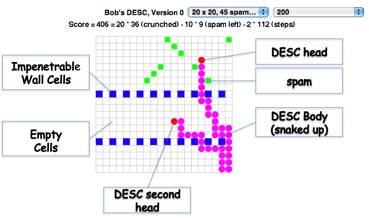
When spam on a cell is
“crunched” by either head, the DESC’s body lengthens by one cell. In the
picture above, the DESC has already crunched 36 spam. Thus it has extended its
original size of only two cells (both heads) to 38 cells total. The crunch
effect is to be achieved as follows: If the DESC can move its head onto a spam
cell, then the head takes the place of that cell and a body cell is added where
the head formerly was. The DESC should not break apart nor cross over itself.
The DESC can only move in
one of four directions (N, S, E, W). The DESC always starts on the leftmost two
squares in the top row. Those squares are considered sacred, and no spam or
wall can be placed on them.
The left choice menu
lists the available samples. The right choice menu chooses the delay between
steps of the DESC. The DESC begins moving as soon as an example is chosen, and
the delay can be set at any time, without restarting the current example.
The square size we are
using is 15x15 pixels, and we suggest that the grid be limited to 40x40 cells.
Resources:
One of my versions of the
DESC will be found at:
http://www.cs.hmc.edu/courses/2009/fall/cs42/desc/
Zipped code for a starter kit
may be found at:
http://www.cs.hmc.edu/courses/2009/fall/cs42/descstarterKit.zip
Similar starter code running as
an applet may be found at:
http://www.cs.hmc.edu/courses/2009/fall/cs42/descStarter
The starter code crunches spam,
but does not search for it. Instead, a detached head moves around randomly on
the grid. If it happens to hit spam, it crunches it. It does not go through
walls.
Hints:
·
Please use the
“boilerplate” code provided for graphics buffering, so that your applet does
not flicker.
- Compiling with
Java version 1.5 is advised, as some browser versions do not support 1.6
yet.
- Debugging
through a browser can be annoying, partly because browsers tend to cache
the code, so you are never quite sure whether the browser has the most
recently compiled code. Thus it is better to debug using an IDE such as
Netbeans, or using the appletviewer on the desktop. The appletviewer runs the Java
class named in the desc.html file that is provided as an argument, as does
the browser.
- A Deque is the
recommended structure for the DESC. Keep track of the cells covered as
(row, column) pairs.
- Treat one head
as dominant for controlling
motion at any one time, but enable switching between the two heads easily.
- Possible
heuristics (only if you can afford the time):
- For searching
in a dense region, some kind of raster scan by the DESC might be more
cost-effective.
- When out of
obvious possibilities, maybe “regroup” by having the DESC “coil up” in an
unoccupied region.
- Search along
the body of the DESC to find a cell from which spam can be “seen”, then
try to back up the head to that cell.