cs121-fall2010 - midterm answers
CS 121
-
Fall 2010
Sample answers
design
question 1 (10 pts)
The "Window-Icon-Menu-Pointing device" (WIMP) interface first
developed in the early 70's at Xerox PARC, implements many established
principles of design for usability, sometimes with great success,
sometimes with unintended negative effects. Give 2 examples of
positive aspects and why they work; give 2 examples of negative
aspects and why or when they don't work as intended.
Hints: for positive, think WIMP vs. terminal command line
interface; for negative, think beyond desktop business applications.
Positives
- Visibility
- Organization
- Consistency across applications
- Learnability
- Conceptual model adapted to business apps
Negatives
- Clutter, inefficient use of space
- Inefficient operation for expert users
- Desktop metaphor not adapted for (and often forced onto) certain applications
- Need for specialized hardware
- Accessibility issues
|
requirements
|
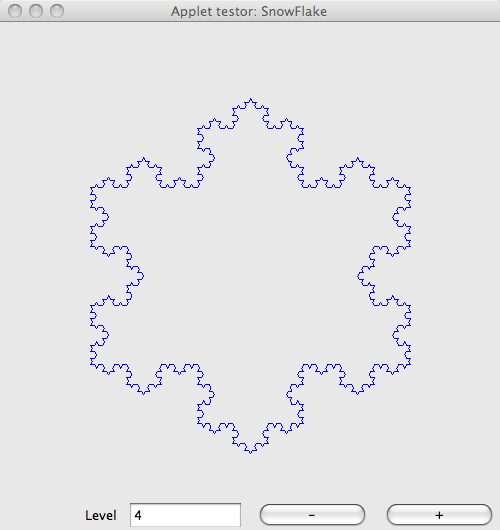
The SnowFlake applet illustrates the concept of fractals by
providing an interactive plot of the Koch snowflake. The interface
shows the snowflake curve; a field that displays the current
subdivision level, and in which the user can enter the subdivision
level; and, two buttons, labeled "+" and "-" to increase or decrease
the level. When the user clicks the buttons or enters a new
subdivision level value, the graphics and data displayed are updated
accordingly.
Left: screenshot of the SnowFlake Applet
(click for larger size)
|
question 2 (25 pts)
Translate the informal description of the SnowFlake applet given
above into a list of formal requirements. Group the requirements
based on their type (FURPS+), and number them (for use in the next
question).
Note: make your list as complete as possible based on the
description provided, but do not make up requirements.
|
FURPS+ = Functional, Usability, Reliablity, Performance, Supportability, Others
(1) The applet shall display a plot of the Koch Snowflake at a specified subdivision level (F)
(2) The applet shall display the current subdivision level (F)
(3) The applet shall provide means for the user to specify a subdivision level (U)
(4) The applet shall provide means for the user to increment the subdivision level (U)
(5) The applet shall provide means for the user to decrement the subdivision level (U)
(6) The applet shall maintain consistency between the plot and the subdivision level (R)
(7) The applet shall respond to user actions in a timely manner (P)
|
use cases
question 3 (20 pts)
The use case Increment subdivision level explores
one interaction scenario with the system described above. Translate
the scenario below into a use case (short narratives under headings),
and then into a refined use case (atomic steps). Refer to the
requirements you listed in your answer to the previous question.
Scenario: Increment subdivision level
The user presses the button labeled "+". The subdivision level is
incremented by 1, as reflected in the display, and the Koch snowflake
plot is redrawn at the new subdivision level. If the subdivision
level is at its maximum value, nothing happens.
Use case (10/20 pts)
- Use case name: Increment subdivision level
- Requirements explored:
4, 1, 2, 6, 7
- Actor:
User
- Preconditions:
The applet is running.
- Triggers:
The user presses the button labeled "+". (4)
- Main course of action:
The subdivision level is incremented by 1, as reflected in the
display, and the Koch snowflake plot is redrawn at the new subdivision
level. (1,2,6,7)
- Alternate course of action:
If the subdivision level is at its maximum value, nothing
happens.
- Exceptional course of action:
The applet crashes.
|
Refined use case (10/20 pts)
- Use case name: Increment subdivision level
- Requirements explored:
4, 1, 2, 6, 7
- Actor:
User
- Preconditions:
Applet is running
- Triggers:
"+" button clicked (4)
- Main course of action:
- increment subdivision level by 1 (4)
- recompute Koch snowflake (1)
- update curve plot (1)
- update subdivision level display (2)
- Alternate course of action:
If subdivision level is at maximum
do nothing
- Exceptional course of action:
Crash
|
architecture and design
question 4 (20 pts)
A Koch snowflake is a closed curve that can be computed
procedurally given a base polygon and a subdivision level. The base
polygon can be represented by a collection of vertices. Each vertex
has two coordinates.
The following UML class diagram illustrates two possible designs
for a SnowFlake class.
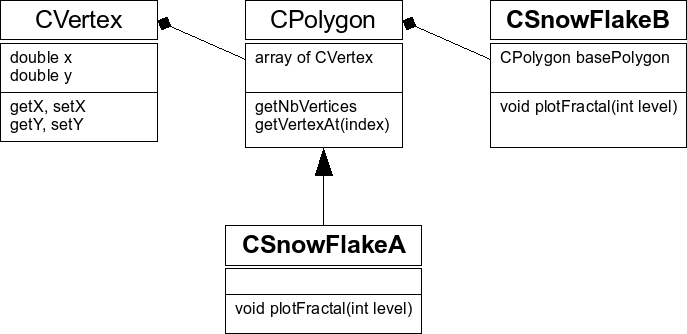
Two possible designs for class CSnowFlake
(click for larger size)
Briefly describe the difference in design between class CSnowFlakeA
and CSnowFlakeB. Explain which design is more appropriate (and why).
|
CSnowFlakeA extends CPolygon (is-a relationship)
CSnowFlakeB contains an instance of CPolygon (has-a relationship)
In this case, given that the base polygon is used to compute the snow flake curve, containment is a better design.
|
question 5 (25pts)
Write the C++ header file for the CSnowFlake class
that implements the design you chose above. Do not provide
implementation for member functions (only declarations in the class
definition). Write the file name in a comment at the top. Document
your code using the Doxygen syntax we have been using for the project.
Note: this code will not be checked with a compiler, typos will not
be counted as errors - what matters is the intention...
Some potentially useful info:
- All elements defined for the Koch snowflake application should
be placed in the
ksn namespace.
- Classes
ksn::CPolygon and ksn::CVertex
are defined in header files KsnPolygon.h
and KsnVertex.h respectively.
|
Important features:
- File name
- Author name
- Include guards
- Include
KsnPolygon.h
- Namespace
- Doxygen comments
- private data members (when appropriate)
- public member functions: default constructor, copy constructor, assignment operator, plotFractal
|
|
// File name: KsnSnowFlake.h
// Author: Alex

#ifndef KSN_SNOW_FLAKE_H
#define KSN_SNOW_FLAKE_H

#include "KsnPolygon.h"

namespace ksn{


    /// The Koch snow flake class.
    /// Implements design B (containment)
    class CSnowFlake{
    private:

	/// The base polygon used to compute the curve
	CPolygon m_basePolygon;

    public:

	/// \name Creators
	//@{
	/// Default constructor
	CSnowFlake();
	/// Copy constructor
	CSnowFlake(const CSnowFlake &rhs);
	//@}

	/// \name Manipulators
	//@{
	/// Assignment operator
	CSnowFlake& operator=(const CSnowFlake &rhs);

	/// Computes and plots this snow flake at the specified subdivision level.
	/// \param level The subdivision level
	void plotFractal(int level);
	//@}

	/// \name Accessors
	//@{

	//@}
    };


} // namespace ksn


#endif // KSN_SNOW_FLAKE_H
|