Overview
In this assignment you will develop a simple 3D modeling program. Unlike previous assignments, we are not supplying any skeleton code. Rather, you'll create an OpenGL application from scratch.
This program will quickly become unwieldy if you don't take care to design and refactor as necessary! Refer to the course page for deadlines.What You Have to Do
The assignment is worth 100 points. The required features (in bold) total 55 points. Choose options to bring your grade up to 100 or more. (Points beyond 100 are discounted as in prior assignments.)
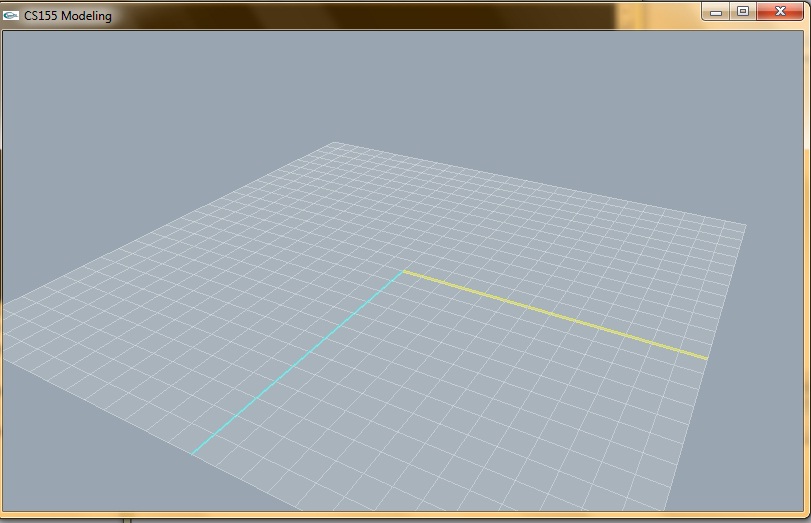
- (3 pts.) Build a 3D world with a floor as a base for your modeling as shown in the screenshot below. The floor should be
centered on the origin and lie in the x-z plane.
The floor should show highlight the positive x and z axes and provide a grid with squares 1 unit wide/deep.
- (3 pts.) Add ambient light and a point light to your scene. Your point light should have noticable attenuation across the floor.
- (5 pts.) Build camera controls that allow the user to rotate the camera and zoom in and out.
- (2 pts.) Add a menu (attached to the right mouse button) that allows the user to toggle between perspective and orthographic modes.
- (15 pts.) Add support for the user to create a box. After choosing the menu option to add a box, the user should be able to left click on the floor to select a starting point then drag the mouse to the opposite vertex to create a rectangle on the floor that forms the base of the box. During the dragging process you should display a "rubberband" of the base on the floor as feedback. Once the base is established used a default height of 1 unit for the box.(Note: This requires "picking" and/or some intersection tests to determine the point on the floor the user has selected. See Woo for information on picking.) Be sure to create all necessary surface normals so that lighting is correct. You can use a default color for new objects.
- (10 pts.) Allow the user to select any object that has been created then translate it, rotate it about its center, or shear (scale independly in x, y, z) it. To receive full credit the user interface should be simple and intuitive (and avoid keyboard input of transform parameters).
- (2) Allow the user to specify the diffuse/ambient properties of an object. (Always set diffuse=ambient.)
- (15 pts.) Design and implement a scene graph data structure to support multiple objects. It should be extensible for the extrusion/lathe objects described below and their modeling tansforms (you may but don't have to borrow code from project 2 for this item).
- (15 pts.) Add support for a lathe object. The user should be able to create a catmull-rom spline on the floor by selecting control points. When completed the user should be able to move and/or delete control points. When the user is done you should rotate the spline about the x axis in order to create a lathe object. Allow the user to specify the number of sample points you'll use on the spline as well as the number of slices you'll use in the rotation. You should provide caps for the top and bottom. Note: if the original spline crosses the x axis the result will have intersecting faces -- that is not your problem. The center of this new object will be the origin. Once completed the user should be able to translate, rotate, and scale the object as well as set its color. (The center of the object should be unchanged by an extrusion.)
- (15 pts.) Add support for extrusion. The user should be able to select any existing planar surface, place vertices (convex) on that surface, then extrude the selected vertices orthogonally to the plane. The direction and height of the extrusion should be controllable by the user. Once completed the original object and the extrusion should be considered one object and the user should be able to transform it and set its color.
- (2) Add a menu item that let's the user toggle the "look" of their objects between wireframe and filled.
- (2) Add support for deleting an object.
- (5) Add support for copying an object (let the user immediately drag it to a new location).
- (5) Add support for grouping several objects into one. Allow the user to specify center of the new object.
- (10 pts.) Add support for saving/loading a scene.
- (5 pts.) Add support for a sphere.
- (5 pts.) Add support for a cylinder.
- (5 pts.) Add support for a cone.
- (?) Impress us with something we hadn't considered.
What to Submit
You should upload a zip file to your wiki that includes the following- the complete windows project file for your robot (it must compile and run on the LAC machines)
- a writeup called assignment3.html that (a) explains how to operate the robot and (b) enumerates the features you've implemented
- your robot movie.
There are many opengl tutorials and demos online. You MAY NOT use any code off the web unless you get explicit permission from me.
You get two late days for this project. They may be used to extend any deadline. A 5 points penalty per day will be applied for additional delays.