Computer Science 60
Principles of Computer Science
Fall 2011
Assignment 6: Spampede!
Due Monday October 24 by 11:59 PM
Please read the following carefully. There is a lot here!
-
First, note that this assignment is due the Monday after fall break.
The assignment is also worth 125 points rather
than the usual 100.
- Pair programming is
permitted on all three parts of this week's assignment.
- You will be submitting several files for this assignment. Please
zip all of your files into a single zip file named hw6files.zip
and then submit that zip file for your assignment. That way,
we know we'll be able to run your applet!
This assignment has three parts, which ultimately build to the
Spampede game! In Part 1, you will
extend the capabilities of your maze
solver from HW6 (though you may use our solution code for that
assignment if you prefer).
In Part 2, you will use the results of Part 1 to build some of the
primary functionality of the Spampede game.
In Part 3, you will use Part 2 in a graphical applet - if you'd like
to make it accessible from your CS webspace, all the better.
What is the final product?
-
You might want to try out the basic applet (with required
functionality, but no extras, except for sound), which is available at: http://www.cs.hmc.edu/~dodds/Applets/SpampedeBasic/Spampede.html
-
Also, an applet that demonstrates only what is in the original set of
files in the /cs/cs60/hwfiles/a7 directory and can be tried
out at http://www.cs.hmc.edu/~dodds/Applets/SpampedeOriginal/Spampede.html
Please note that some web browsers are
finicky about rendering applets. If these applets don't run for you
on your regular web browser, try another one (e.g. Safari, Explorer, etc.)
In general, it will be much easier to develop your code using the
appletviewer and only go to the web when your program is entirely complete!
In any case, Parts 1 and 2 of this assignment are all text-based, so
you need not even think about this for awhile.
- You can find an applet with some bells and whistles at http://www.cs.hmc.edu/~dodds/Applets/SpampedePlus/Spampede.html.
This applet demonstrates some additional functionality, but more
is certainly possible (see the extra credit options, below).
Overview
This project introduces and practices a number of different techniques that
are common to software engineering, that is the design and
implementation of large software projects. Certainly this assignment can
only provide a hint at a very rich -- and important -- field.
The Spampede applet is a bigger and more complex beast than any
you have had to deal with in the past. Before you begin, we
provide you with an overview of the software design behind the Applet
you will create. Normally, it would be up to you, the developer,
to do this design, but because this is your first large-scale project,
we have done the class design for you.
The functionality of the application is broken down into three classes:
- Maze.java:
Responsible for storing the walls and spam in the maze, and for
searching for spam and returning the path to the nearest spam can.
You will extend the Maze class to incorporate more of the game's functionality.
- SpamMaze.java: A subclass of Maze that does everything a Maze
does AND keeps track of the spam that populates the board and location
of the centepede. This is the class that has all of the
functionality for playing the game including moving the pede,
populating the board with spam, determining whether the pede has hit a
wall, etc.
- Spampede.java: A class that controls the functionality of the Applet.
This class is responsible for displaying the board to the user,
handling the user's key strokes, and controlling the timesteps that
move the pede forward.
Part 1: Improving Maze.java [25 points]
The first part of this assignment is to improve the Maze class in which you wrote breadth-first search for assignment 6. In
particular, you may start with either your own Maze.java file
from last week or you may use our solution to that problem provided with the starter files.
Either way, the internal data in the MazeCell (row, col, contents,
etc.) MUST be private and you should start by
making sure you add at least four public accessor
("getter and setter") methods to the MazeCell class within Maze:
- public int getRow() { ... }, which
returns the row of this MazeCell.
- public int getCol() { ... }, which
returns the column of this MazeCell.
- public char getContents() { ... }, which
returns the contents of this MazeCell.
- public void setContents(char newcontents) {
... }, which sets the contents of this MazeCell to become newcontents.
These methods will be important for getting and setting values in other classes that you build in parts 2 and 3 of the assignment.
You should have a new zero-input contstructor for Maze. This is already in the solution file, or you can copy it from here:
protected Maze()
{
        ROWS = mazeStrings.length;
        COLUMNS = mazeStrings[0].length();
        this.maze = new MazeCell[ROWS][COLUMNS];
        for (int r=0 ; r< ROWS ; r++)
        {
            for (int c=0 ; c< COLUMNS ; c++)
             {
                 maze[r][c] = new MazeCell(r,c,mazeStrings[r].charAt(c));
             }
        }
}
This constructor loads a maze in from the static data member named mazeStrings,
which is simply an array of strings contained in Maze.java. The nice thing about this is that you can edit your
Maze directly in the file! Notice that we are assuming that
the Maze class has data members named ROWS
and COLUMNS that keep track of the dimensions of the array.
What is protected?
When data or methods are given the access level protected, it means that derived classes may use
that data or method. However, unrelated classes may not use that data or method.
Thus, protected is in-between the access level of public, which any class may use, and private,
where only the defining class may use the data or method. Because part 2 of this assignment asks you to
write a class named SpamMaze that will be a class derived from Maze and because
SpamMaze will use this zero-argument constructor, protected is an appropriate access level. Basically, what we are saying is that this constructor should only be used to help create subclass objects not to directly create stand-alone Maze objects.
A more flexible breadth-first-search
The final method to write in Maze.java is
protected MazeCell multiBFS(MazeCell start, char destination) ...
which will implement breadth-first search from start to ANY cell containing the character in destination, which will typically be a 'D',
representing spam. This method will be critical in implementing the
autonomous spam-seeking behavior of the pede. Because it is
breadth-first search, the method should
find the closest destination to the start MazeCell.
Note that this is slightly different from the BFS that you wrote on
hw6. Now, you will need to make sure to stop the BFS process
when it first reaches a destination of the type that you are
looking for!
What should multiBFS do?
This method should have the following behavior:
- Printing, but not changing, the Maze: That is, when multiBFS finds a path from start to destination, it should mark it with the 'o' characters, as before, and then print out this Maze. Afterwards -- before returning -- it should remove the 'o'
characters and then return the next MazeCell on the path to the
destination. If the Maze was not solvable, it should print that message
and still return a valid MazeCell neighboring start. (See next point...)
- Returning the next MazeCell on the path: This method should return the MazeCell that is adjacent to the start along the path that it found to the destination. If there was no path from start to any cell containing destination, then the multiBFS method should return any empty MazeCell that neighbors start to the N, E, W, or S. If there are no empty neighbors, then multiBFS should return an arbitrary MazeCell that neighbors start (and the centipede will crash!)
- REALLY not changing the Maze! Regardless of whether a path is found or not, this method should reset all visited flags and parent data members of every MazeCell in the Maze. Unlike the previous assignment, where a Maze was solved only once, here your code will be solving a Maze repeatedly, so multiBFS must be really sure to leave the maze as it was before running breadth-first search. There is an empty method private void clearFlags() to write for just this purpose.
Testing your code
Be sure to test your code thoroughly before heading to part 2 of this assignment... there is a test in main for this purpose, and you should try editing the mazeStrings in order to make sure it works in a variety of conditions! You do not need to submit any testing this week, though.
Part 2: Writing SpamMaze.java
[50 points]
The overview
In this part of the assignment you will create a derived class named
SpamMaze that handles the model for the applet, which is part 3. A
derived class is simply an extension of the data and capabilities
(methods) available in the base class. Thus, by starting the code as in the
provided SpamMaze.java file:
import java.lang.Math;
import java.util.LinkedList;

class SpamMaze extends Maze
{
  // your code goes here...
}
You should keep in mind that any object of type SpamMaze
IS also an object of type Maze. In other words, a
SpamMaze can do everything a
Maze can do, and more!
This is identical to the relationship of every object with Java's
Object type. Object is the base class of all Java classes.
The data
Because a SpamMaze object represents the model for the Spampede
applet, it needs to keep track of (1) the maze, (2), the centipede, and (3)
the spam in the environment. Remember that (1) is already taken care of
because your SpamMaze is a derived class of Maze. To keep
track of (2) and (3), you should use lists of MazeCells. In
particular, you will declare two data members:
  // The data members representing the spam and the centipede
  private LinkedList<MazeCell> spamCells;
  private LinkedList<MazeCell> pedeCells;
Each of these is of type LinkedList<MazeCell>, which is the Java-library version of a double-ended queue implemented via a linked list. You will thus have access to the methods listed at http://java.sun.com/j2se/1.5.0/docs/api/java/util/LinkedList.html. Notice especially the methods addFirst, addLast, removeFirst, removeLast,
getFirst, getLast, and get(int n). Each get method is similar to peek in that it returns a value, but does not change the list. You can ask the size of a list with size(), which returns an int.
The methods
You should, in essence, implement all of the functionality, but not the
graphics front end, for the Spampede game inside SpamMaze.
At a minimum, you should implement the following methods. You may
choose to add more methods - either private helper methods (to help
these public methods) - or other public methods for your game to use.
- public SpamMaze() a zero-argument
constructor. This should call the base class's zero-argument
constructor (to create the Maze) and then it should do
additional initializion of the data members that are part of
only the SpamMaze class (see above). Note that
the initial state of the centipede is that its head is at
maze[1][2] and that it has only one body segment, at
location maze[1][1]. Thus, the centipede is initially
facing east. It's initial direction is east as well. This
may be set here in the constructor or elsewhere in the game -
that's a design choice that is up to you.
- public int getRows() is an accessor
that returns the number of rows of this maze.
- public int getColumns() is an
accessor that returns the number of columns of this maze.
- public char getContents(int r, int c) is an accessor that returns the contents of the MazeCell at row r and column c in this maze.
- public void setContents(int r, int c, char newcontents)
is an accessor that sets the contents of the
MazeCell at row r and column c to become the
char newcontents in this maze.
- public void addSpam() adds one
can of spam to the environment. You can choose the
method used to add spam but the following properties are
required:
- An inserted can of spam may not be placed anywhere on
the current location of the centipede's body nor on a wall
or existing can of spam.
- The reference to the new can of spam must be inserted
in the spamCells LinkedList.
You may wish to use random numbers to generate the locations
of new spam cans. To do so, include the line import
java.util.Random at the top of the file. Then, you can
construct a random number generator with a line such as
Random myGenerator = new Random();
which declares myGenerator to be a random number
generator (an object of type Random) and instantiates
a new such object. Then, the command
myGenerator.nextInt(k) will generate a random integer
in the range from 0 to k-1.
- public void removeSpam() removes
one can of spam from the environment when it's time for the spam
to disappear. Notice that this function will simply be called
periodically in order to make the game more interesting. It
will not be called when the centipede consumes a can of
spam. That event will be handled in the advancePede
function described below.
You can choose the method used to remove spam, but the
following property is required:
When this function is called, a can of spam is
eliminated from the spamCells LinkedList. This can
be done at random or (perhaps more reasonably) the oldest spam
can in the list is removed.
- public int advancePede(char direction)
this is the fundamental update method for the
entire game! This is where the "smarts" go.
In particular, a character indicating the direction to move is
passed in. The characters 'N', 'S', 'E', 'W', 'A'
should represent the directions north, south, east, west, and
automatic ("automatic" will be described below). Be sure to
define good names for these symbols to avoid magic values in
your code! For example, you might have a value such as
public static final char NORTH = 'N';
So, here's what this method does:
- Based on the direction that is passed in, the
pedeCells LinkedList is updated to have the centipede
move in that direction. That is, the head advances and the
tail retracts in the given direction.
- If the centipede's head moves to a MazeCell that contains
a wall or another part of the centipede, the centipede dies, and
the centipede should be reset to its initial state. This
function need not necessarily do the resetting. Notice that
this function returns an integer value (or you can change it to
a char if you prefer). That value may be used to help with the
resetting elsewhere in the program. This is described next...
- So what exacty is the return value? It can be very
handy for this
function to return an integer or a character informing us (more
likely the function that called this function) what happened.
For example, if there was a collision with a wall, the calling
function might appreciate knowing that so that. You can come
back to this later - when doing part 3 - to decide what, if
anything, you would like the function to return.
- If the centipede's head lands on a can of spam,
the centipede grows by one MazeCell. That is,
when the centipede next moves, its head advances one square, but
its tail does not retract. Importantly, the can of spam
that was just consumed must be removed from the spamCells
LinkedList. What command will be used to do this? Check
out remove command in the
LinkedList
class.
- Finally, the automatic direction. If this function is
passed in the value 'A' then we are in AI mode. That is, the
spampede should navigate by itself, also heading for the nearest
can of spam. To do this, it will call the multiBFS method
that you wrote in Part 1. multiBFS will return a
reference to the MazeCell that the spampede should move
to. The spampede will then be updated to move to that cell.
- public char reversePede() this method
reverses the centipede so that it has the opposite orientation
and moves in the appropriate "opposite direction". Note that
if the centipede was previously moving west, it is not
necessarily going to move east upon reversal. Instead, the new
direction is the opposite of the direction of the tail of the
centipede. That is, if the last two cells of the centipede's
body indicate that the centipede is moving north, then the new
direction for the reversed centipede will be south. In
addition to modifying the pedeCells linked list to
perform the reversal, this function returns the new direction.
There are a number of ways to handle this. For one, you could
not change pedeCells at all, but simply remember which
side you're treating as the head and which side as the tail.
Alternatively, you could take all of the cells off pedeCells
and create a brand new list (in the newly-correct order) and use
that as pedeCells going forward... . Personally (Z.D.), I like
the latter approach, but either will work!
Testing!!
As with Maze, be sure to test your SpamMaze thoroughly in
main before worrying about the graphical front-end of the applet in part 3.
Below is a main method, which you should feel free to adapt to your
implementation. Remember that you do not need to write toString -- the
version that's already in Maze will work perfectly well! Again, you do not need to submit this testing this week.
  public static void main(String[] args)
  {
    SpamMaze SM = new SpamMaze();

    System.out.println("SM is\n" + SM);
    MazeCell nextSpot = SM.multiBFS(SM.pedeCells.getFirst(), SPAM);
    System.out.println("nextSpot is\n" + nextSpot);
    System.out.println("SM is\n" + SM);

    SM.advancePede(EAST);
    System.out.println("SM is\n" + SM);
    System.out.println("pedeCells is " + SM.pedeCells);

    SM.advancePede(EAST);
    System.out.println("SM is\n" + SM);
    System.out.println("pedeCells is " + SM.pedeCells);

    SM.advancePede(EAST);
    System.out.println("SM is\n" + SM);
    System.out.println("pedeCells is " + SM.pedeCells);

    SM.advancePede(SOUTH);
    System.out.println("SM is\n" + SM);
    System.out.println("pedeCells is " + SM.pedeCells);

    SM.advancePede(SOUTH);
    System.out.println("SM is\n" + SM);
    System.out.println("pedeCells is " + SM.pedeCells);
  }
Part 3: Putting it all together: Spampede.java [50 points]
Overview of Spampede.java
The Spampede applet gives a user control over a spam-seeking centipede.
Key presses from the keyboard change the direction of the centipede's
movement in order to intersect snacks (spam) that appear at random places
on the screen. For each snack consumed, the centipede grows
by one segment (a segment is simply one MazeCell). Variations
are welcome (see the extra credit section below)!
As a result, in this part of the assignment you will be modifying another derived
class, this one named Spampede, which is a derived class from Java's JApplet. This means that your Spampede is itself an applet that will run in a Java-enabled browser from anywhere.
Setting up
The "starter" applet
Spampede.java and its html file Spampede.html are
provided
for you on the top-level assignments page.
There are some other files you'll need, like ImagePanel.java, so make sure all the files are in the same directory with the files you developed for parts 1 and 2.
Finally, we have also provided the following files which you may wish to use
(but they are totally optional):
- Spam.au, an audio file
- crunch.au an audio file
- spam.gif, an image of a can of Spam
Getting the applet compiling, running,
recompiling, and rerunning
This
next section is full of details that will help you develop, compile and
test your program. They are important to get right, but they can
be rather tedious. Follow as much of this as you need
to ensure that you see modifications to your applet and that you can
read debugging output somewhere. Once you've got that working,
you can go onto the next section where you will create your applet.
The best way to test your applet is to use Java's appletviewer application.
In fact, the graders will (at least by default) test your code with appletviewer.
If you're using an IDE like Eclipse or NetBeans, there may be a mechanism for
running and testing applets built-in. Dr. Java, however, does not have such
a mechanism (to my knowledge). So, if you're using Dr. Java, you'll need to
run appletviewer from the command-line on your computer. The instructions are different for the Mac vs. a Windows PC.
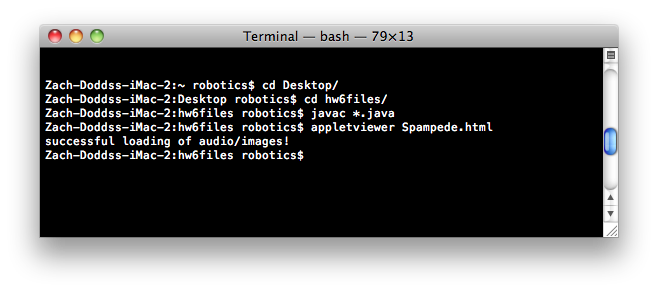
Running
appletviewer on a Mac
The basic idea is to open a terminal window, navigate to the directory that
holds both your compiled java code and
the Spampede.html file and then run
appletviewer Spampede.html
Here are some details:
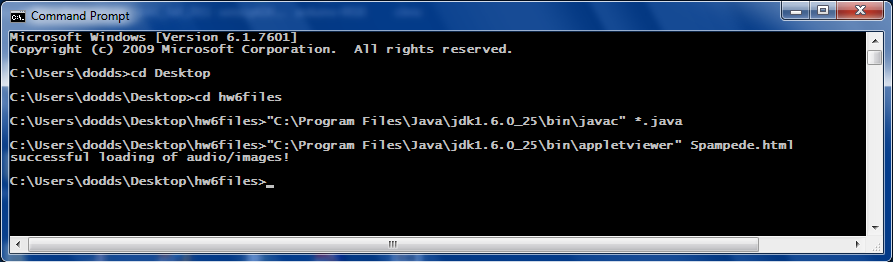
Running appletviewer on a PC
As with Mac OS X, the basic idea is to open a terminal window, navigate to the
directory that holds both your compiled java code and
the Spampede.html file and then run
appletviewer Spampede.html
Here are some details:
If you're using appletviewer, the print statements in your code will
appear in the terminal window from which you started the viewer.
Writing the applet
Once the above steps work for you, you're ready to write Spampede by
the modifying Spampede.java file with the following things in mind.
- Be sure to
create, in init and/or in reset, a SpamMaze
and make sure it is in a suitable starting configuration. There is already a data member named
this.themaze to hold the created object. This may already be done for you in the code,
if you are using the zero-argument constructor for SpamMaze.
- Draw the contents of the SpamMaze within the drawEnvironment
method already provided. This will require writing a nested loop to
create the 2d array of 10x10 pixel squares that represent the maze.
This drawEnvironment method will be called every so often by the cycle method to show the latest state of the maze. You should use different colors of your choice representing
walls, empty space, the head of the centipede and the body of the centipede.
You will want to use the fillRect command to accomplish this.
-
Update the spam within the SpamMaze named themaze. Within updateSpam
you can add (and/or remove) spam every so often -- though doing so
every cycle will probably be too fast!. You can also add spam as needed
(e.g., when one is eaten). But, you should make sure to have at least
one spam on the board at all times.
-
Keep track of the centipede (i.e., the "spampede"). The updatePede method is provided as a placeholder for where you would do this.
You might want a data member that keeps track of the centipede's current direction so that advancePede can be called appropriately --
the provided code has a data member private char dir that you might use for this.
In this case, key presses would simply change this internally-stored dir.
Keep in mind that no MazeCells are moving as the centipede crawls through the maze!
Rather, it's the data member named pedeCells of type LinkedList that's snaking its way through the 2d array of
MazeCellss by changing the cells to which it refers.
- Handle key presses. You will see a method that prints out certain
characters when track of the centipede (i.e., the "spampede"). When the
user presses the following keys, the centipede should change direction
as indicated:
- r : reverse, switching its head's position to its tail
- i : turn north
- j : turn west
- l : turn east
- k : turn south
- a : go into autonomous, spam-seeking mode ("AI")
If the centipede is already heading in the
direction that the user chooses, nothing changes.
If the user changes the centipede's direction so that it is moving
back on itself (from South to North, say, or West to East),
you may reverse direction, ignore the command, or
"terminate" the centipede.
As you write your code, please compile and rerun the applet often
to make sure you're on the right path. Use the appletviewer (or a web
browser with a Java Console)
to help with debugging and error-detection. Basically, this means many iterations
of the compilation, copying, and testing steps above.
A Reminder On What to Submit
Please be sure
to zip up the whole folder of files that makes up your Spampede applet
(including any sound and/or image files) into an archive named
hw6files.zip, and then submit it in the usual way.
Be sure your README file described at the very of this web page
is within that zip arive, too.
I want more!
If you haven't had enough of the Spampede.java file at the end of this
assignment, there are a couple of specific items and an open-ended invitation
to improve on the applet for optional bonus credit. (Up to 25
points in total.)
If you add optional
features, please explain them carefully in the README file.
- Enemy Pedes!: Allow there to be one or more "enemy"
pedes that use the multiBFS and/or other heuristics to play
against your pede. (This is worth extra bonus points since it is a
bit more challenging.)
- Speed up: You might want to have the rate at which the centipede
is moving to increase as the game progresses.
- Scoring: You might want to have a system of scoring with
a running total displayed as a label or text field or simply
drawn to the applet panel.
- Lives: Rather than resetting or stopping the game
after a single Spampede crash, keep
a text field (or label) with the number of lives remaining
and decrement it after each crash. When there are no lives left,
stop the game (though you might want to consider a "reset" button.)
- Levels: Rather than maintaining a single, static maze,
you may want to have the centipede advance to different mazes
after consuming enough spam.
- Wrapping: Allow the centipede to wrap around the
game board -- either in an unlimited fashion or through small
tunnels in the walls. Or you might consider a "hyperspace" square,
that "sends" cells to another spot on the board.
- General improvements: Feel free to add additional features
you think would enhance the Spampede applet: different kinds
of spam, sounds,
images, other graphical widgets like pull-down menus or text boxes, etc.