Harvey Mudd College
Computer Science 182a, Project 2
Due Sunday, February 13, 2011
"Finding edge cases": Implementing seam carving
Goals
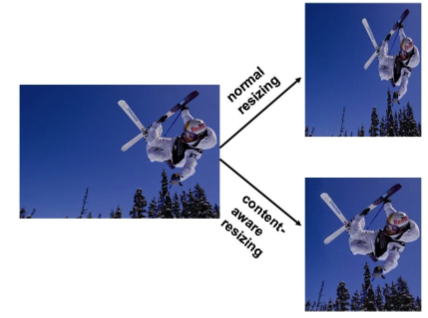
For this exercise, you will implement a version of the content-aware image resizing technique
described in Shai Avidan and Ariel Shamir's SIGGRAPH 2007 paper, "Seam Carving for Content-
Aware Image Resizing." The paper is available here: seamCarving.pdf.
The goal is to implement the method, and then examine and explain its performance on different
kinds of input images.
Tasks
First read through the paper, with emphasis on sections 3, 4.1, and 4.3. You might want to do this
after Tuesday's lecture (2/1), because that will also present some of the context involved.
Then, write functions to do the following tasks.
This assignment may be completed using either OpenCV or Matlab or PIL - the choice is
yours. You may work on your own or in teams of up to 3.
-
Compute the energy function at each pixel using the magnitude of the x and y gradients
(equation 1 in the paper). This requires making a choice of how to implement finding
the image derivative - be sure to document your choice in your write-up.
-
Compute the cumulative energy across the image. You will need one function to compute
this cumulative energy horizontally and one to compute it vertically.
-
Compute the optimal vertical seam given an image
-
Compute the optimal horizontal seam given an image
-
Reduce the image size by a specified amount in one dimension (width or height decrease)
-
Display the selected seam on top of an image.
-
Write a resizeH function (horizontal resize) that takes as input
a new
This function takes an input image and a parameter specifying the new width (less than the
original width) which the output image should have after resizing.
-
More generally, set up your program(s) so that you can play with the seam removal and
specify different combinations of horizontal and vertical seam-removal.
View the results in color, but note that the gradients should be computed with the grayscale
version of the image.
-
Try out your system on some of the images provided here: caResizeImages.zip,
as well as other images of your own choosing.
Coding hints
Matlab pointers:
-
Useful matlab functions include
imfilter, fspecial, imread, imresize, rgb2gray, imagesc,
imshow, and subplot
-
To plot on top of a displayed image, use imshow(im);
followed by hold on;
followed by plot(...) .
-
Be careful with
double and uint8 conversions as you go between computations with
the images and displaying them; filtering should be done with doubles.
For OpenCV, you might try one of the built-in edge-detection functions
in order to obtain edge energy, but it may be even easier to implement
the paper's very simple edge-energy function from scratch.
In addition,
there are a number of plotting functions that work atop images (in addition to
directly changing a pixel's value). See the CxCore library's
cvLine and subsequent functions at this link. That said,
it is perhaps easiest for this assignment to simply change the pixels along a seam to the appropriate color.
Demo and write-up
The write-up should be linked into the CS 182
wiki by 11:59pm on Sunday, 2/13.
For your write-up, create another web- or wiki-page to hold the write-up from this assignment.
As noted in the syllabus, the items below will be graded on a scale of up to B+. In order to
extend that grading scale up to an A, you should implement an extension of your own choosing.
For this project, that extension has to involve interacting with the physical
environment with vision.
-
Run your resizeH function on the provided ocean.jpg image with newWidth = 540.
Display the output in your write-up.
-
Display (a) the energy function output (total gradient magnitudes e1(I)) for the
provided image ocean.jpg, and (b) the two corresponding cumulative minimum energy
maps (M) for the seams in each direction - similar to the inset in the paper's Figure 1. Explain
in a sentence or two why these
outputs look the way they do given the original image's content.
-
For the same image ocean.jpg, display the original image together with (a)
the first selected horizontal seam and (b) the first selected vertical seam. Explain
briefly why these were chosen as the optimal seams for this image.
-
What if we were to modify the energy function to include only gradients in one
direction, i.e., only one of the addends in equation 1? Explain in a setence or
two how the output (selected
seams) would qualitatively change? Choose any image where we might expect a difference,
and show an illustrative example using the original and modified energy function.
-
Examples and testing!
Now, for the real results! Use your system with different kinds of images and
seam combinations, and see what kind of interesting results it can produce. The goal is
to form some perceptually pleasing outputs where the resizing better preserves content
than a blind resizing would, as well as some examples where the output looks unrealistic
or has artifacts.
Include results for at least one more of the four provided images, as well as at least
two images of your own
choosing. Include at least one new example of "good" outcomes
and at least one new example of "bad" outcomes. Be creative in the images
you choose! Try to predict types of images where you might see something interesting
happen. It's certainly ok to fiddle with the parameters (seam sequence, number of seams, etc) to
look for interesting good and/or "bad" outcomes.
For each distinct image you use, include (a) the
original input image, (b) your chosen resized image (using seam carving), (c)
the result one would get if instead a simple resampling were used (Matlab and OpenCV have functions named
imresize and cvResize for this - PIL has one, as well),
(d) the input and output image dimensions, and
(e) a brief qualitative explanation of what we're seeing in the output.
Extension possibilities
These are some ideas for possible extensions. Feel free to come up with your own instead... .
However, remember that this week's extension should involve interacting with the physical
world visually! Be sure to include a description of what you chose - and how it went - in
your write-up.
-
Work on obtaining data from our Kinect and then demonstrate that you can use that data -- this
would be an excellent starting point for any - or all - of the teams thinking of using
the Kinect. We have one; if it works out, we will be able to obtain others. It is completely
OK for this to be an effort across/shared by many teams. Each team should show that it
has code that accesses and analyzes (at least to some very limited extent) the Kinect data.
-
Get started with one of the robots in the lab: demonstrate that you can
- 1. move around programmatically
- 2. take and analyze images from the robot
- Though it depends on the robot, ideally your robot would servo it using visual input -- for example,
having it follow an object of a particular color.
-
Build a tracking system that extends your SPAM-finder so that it runs on live video sequences.
Finding SPAM is wonderful, though tuning the system to find another object -- and showing where
that object is in each frame of the video -- is what is important here. For example, Matt Keeter
demonstrated a system that tracks spam from image to image during last week's lab.
It's likely that OpenCV would be necessary for this extension. Again, this is an example
of visual servoing, in this case in visual space instead of physical space.
-
Also, if you'd like simply to concentrate on seam-carving, that is OK, too. For this extension, you
could add a human-interactive element of your choosing, e.g., allowing a use to specify
which portions of the image to keep (assign very high edge energy) or to remove (assign
very low edge energy), as noted in the seam-carving paper.
Thanks to K. Grauman for this assignment, and to Avidan and Shamir for the algorithm!