Harvey Mudd College
Computer Science 182a
Assignment 3
Due Friday, March 11, by 11:59pm
Image stitching and auto-mosiacking: 2d visual geometry
Thanks to A. Efros for the inspiration for this assignment!

Goals
For this assignment, you will create image mosaics
and composites, first from hand-selected
features and then from automatically-selected features.
There are many opportunities for extensions -- either using robots
and/or the Kinect or in exploring additional capabilities with
the 2d image geometry that is at the heart of this project.
Part 1: hand-crafted homographies
This part of the assignment is, in part, data-collection and groundwork for the
automated image-stitching application in part 2. You may use
OpenCV, Matlab, or PIL - or another system, if you'd like.
-
Image-gathering For this hw, you should take (or find online) at least
five images and post them on your write-up webpage. In order to best illustrate the 2d geometry
of images, there are a few constraints on the images you take:
- a predominantly planar image, at an angle
One of the images should be of a predominantly planar scene, e.g., with a building facade, ground-plane image, interior
wall, floor, or ceiling, or some other mostly planar subject. Many times we naturally take
such pictures so that the plane being imaged is parallel to the camera's image plane, i.e.,
we "look directly at it." However be sure you avoid this here -- the image's
plane should be facing in a different direction than the camera. Your goal will then be
to rectify the image so that it looks as if you'd taken it head-on.
- four overlapping images from a single point The other four images
may be of any scene, but should have substantial (~30-50%) pairwise overlap. In addition,
they should be taken from the same place -- the camera will rotate from shot to shot, but
you should try to keep the camera's translational motion near zero. Because the
ultimate goal will be to auto-stitch these images together, it may help to turn off
autofocus and autoexposure, if that is possible on your camera. If not, you might get very
interesting image mosaics -- and this is OK, too! Your four images should be taken from four
points of view that form, roughly, the vertices of a rectangle. That is, two of them should be
"above" the other two. Also, make sure that the four images overlap both horizontally and vertically:
this will ensure there are enough features to match from image to image.
-
You may certainly take more images than only four! In particular, an extension
of your auto-stitching system could include building a full panorama, which would require
many more images. Also, you may want to take lots of images and choose the "best" four for
this and the next assignment.
Tasks for Part 1
Planar warping of a known quadrilateral
The first image-warping piece of this assignment will use your predominantly planar image.
Choose four corners of the image of square or rectangle, whose image coordinates
will not form a rectangle if the scene was viewed "at an angle" as mentioned above.
Then, create a 3x3 homography H
that maps the pixel coordinates of those corners into a rectangle of appropriate aspect
ratio. Finally, warp the entire image according to that homography H.
In your write-up you should include the raw image, the 3x3 H, and the resulting "unwarped" image.
Image compositing
In addition, you should create a composite image that warps one image
into a quadrilateral within a second image. This warping should use
an appropriate homography so that the composite "looks right" geometrically in the
target image. You might use your source image from above or other images
entirely. The choice of the subject and the target is entirely up to you:
there are a number of interesting composites you might create... .
For example, you could put fake graffiti on buildings or chalk drawings
on the ground (taken from other images) -- or you could replace a road sign
with a personal portrait - or spam!
You should use the capabilities built in to OpenCV or Matlab to do this. In OpenCV,
- cvGetPerspectiveTransform will take in correspondences and
produce the 3x3 homography between the two sets of points. A perspective transformation
is another name for a homography.
- cvWarpPerspective will apply a homography (such as obtained from the above
function) that warps a source image to a destination version.
- Details on both are available at this reference page
and some source code to use as a starting point is available here.
and in Matlab, you should use the built-in help routine to investigate the functions
- cp2tform, imtransform, tformarray, tformfwd, tforminv, and cpselect.
In particular, cpselect and imtransform will do most of the work here.
A two-image, hand-sitched mosaic
From your set of four overlapping images taken from the same point, choose two of the images
and hand-select the pixel-coordinates of four corresponding points between the two images.
Then, create at least two mosaics from the two images:
- One that remaps the second image into the coordinate system of the first -- and on top
of the first.
- One that remaps the first image into the coordinate system of the second -- and on top
of the second.
The key here is creating a function or sequence of functions that places the
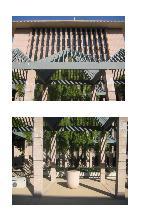
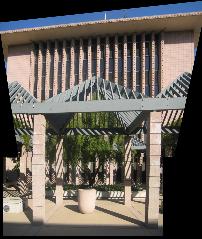
images into the same pixel plane, i.e., coordinate system. The three images at the top
of this page (on the left) are an example of this hand-built mosaicking run on
two images of Sprague.
There are a number of interesting features you might include in your
mosaic:
-
You might create a mosaic by spatially blending images taken at different times (day vs.
night) or during different seasons -- presumably ones you already have or find
elsewhere!
-
You could create a mosaic by spatially blending a historic photograph with a modern picture
of the same place.
-
Or, try building another interesting/bizarre mosaic, e.g., one with multiple copies of the
same person at different locations.
Write-up
In your write-up for this part, be sure to include
- The original images -- please scale them down to a reasonable display size, but make
sure that the entire images are available for download.
- The planar homography example, including a visualization of the points chosen, the
estimated 3x3 homography, and the resulting fronto-parallel image.
- The hand-stitched mosaics from the pair of images you chose, along with a
visualization of the corresponding points chosen in each of the two images. The
mosaics are (1) the second image remapped to the first's coordinate system
and (2) the first image remapped to the second's images coordinate system.
Part 2: automatically-matched mosaics
This part of the assignment automates the procedure that
was human-driven above.
In particular, you'll build a system that takes in
two images. With those images the system then should
- extract Harris corners (see the code provided below)
- determine a subset of the Harris corners to use
- compute a feature descriptor for each of those corners
- match those feature descriptors bewteen two images
- use a method robust to outliers (RANSAC) to compute the best resulting homography
- create the resulting mosaic
Our approach will follow the "MOPs" paper, i.e.,
Multi-Image Matching using Multi-Scale Oriented
Patches by Brown et al. (2005). Our implementatione will make a few simplifications. Read the description below and then look
over the paper, making sure you understand the sections this project asks you to implement! We will also discuss some of these
techniques in more detail in class.
Tasks for Part 2
-
extracting corners Start with the Harris Interest Point (corner) Detector
(Section 2). We won't worry about muti-scale - rather, we will use only the highest-resolution scale
on the initial image Also, don't worry about sub-pixel accuracy.
Re-implementing Harris is a thankless task - so you can use Alyosha Efros's sample code (for those using matlab):
harris.m. OpenCV has an API call
cvCornerHarris that populates an output image with each pixel's
Harris corner strength. I used a "block" size of 7 (the size of the patch
with which the Harris matrix is computed)
and an aperture size of 3 (the size of the derivative operator's patch).
Feel free to adjust as necessary.
This note provides some
example code that might be helpful in setting up your
cvCornerHarris call.
You will need to keep only local maxima, i.e., pixels where the corner strength is greater than at any of the eight neighbors.
Also, omit corners found in the outermost 22 columns and rows of the image.
-
culling the features Implement Adaptive Non-Maximal Suppression (Section 3 in the paper). Keep
the 500 features with the greatest radii of support.
-
describing each feature Compute a 64-value descriptor for each feature that remains
after the adaptive non-maximal suppression. Don't worry about rotation-invariance - just extract axis-aligned
8x8 patches. Note that it's extremely important to sample these patches from a surrounding 40x40 window to have a nice
big, blurred descriptor. I used the pixel
values with horizontal coordinates [ x-21, x-15, x-9, x-3, x+3, x+9, x+15, and x+21 ] along with the same spacing vertically to
gather the 64 values. Your system should be made insensitive to
changes in intensity (sometimes called "bias/gain-normalization") by
subtracting the mean and dividing by the standard devision of the 64 values. This will result in 64-component
vectors whose mean is 0.0 and whose variance is 1.0. (The matlab function for finding the standard deviation of a
vector v is std(v,1).) Also, just use pixel values; we won't implement the paper's
wavelet-indexing approach.
-
matching features
Implement Feature Matching (Section 5). That is, you will need to find pairs of features
between the two images that look
similar and are thus likely to be good matches. If you're using matlab, you may find
dist2.m useful for fast distance
computations. For thresholding, use the simpler approach due to Lowe of thresholding on the ratio between the first
and the second nearest neighbors -- consult Figure 6b in the paper for picking the threshold. (Section 6 does not
need to be part of your implementation.) Finally, you should implement the 4-point RANSAC as described in
class to compute a robust homography estimate between the two input images.
Note on homographies: If RANSAC chooses four points in which three (or all four) are very close to being collinear, the
homography created from their correspondences will be (almost) singular - and the results will become numerically too
large/infinite. There are many ways to handle this, but one reasonable way is to check the area of the four triangles that can
be formed from the four points that RANSAC chooses. If the smallest of those four areas is less than a threshold, simply throw
out that set of four points. To be as robust as possible, your code should check these areas in both of the two images being
matched, though it almost always suffices to check only one.
Note to OpenCV users: OpenCV has some idiosyncrasies in how it computes homographies and uses homographies to transform
individual points, as you will want to do in this case. (It's less odd in how it uses them to warp images.) For
computing homographies from four or more pairs of corresponding points, use cvFindHomography. For applying the
resulting homography to individual points, you can use cvPerspectiveTransform. The code at this link demonstrates how to create, assign, and use the data structures needed for
these API calls.
Note to Matlab users: Matlab's maketform function only allows 4 corresponding points in creating a homography. You may use
the script at this link in order to
create the best homography from more than four points (best in the
least-squared-error sense). You will also need
this helper function in the same directory . An example of how to use
these two matlab functions appears at
this link.
-
Creating the mosaic
Finally, combine these steps with your work from Part 1 in order to output a mosaicked image that includes
the pixels of both of the input images: auto-mosaicking!
Write-up
In your write-up for this part, be sure to include pictures of the intermediate results for
two overlapping images of your choice, as well as the
final mosaic created. The intermediate results include
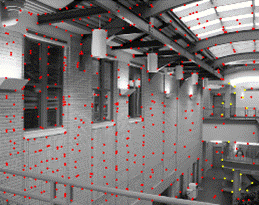
- the Harris corners
- the 500 corners preserved after adaptive non-maximal suppression
- the top 50 (or so) ratio-distance matches in each of the two images (just show the corners, it's OK
to leave it to the imagination which corners matched which)
- at least four of the inlier matches after RANSAC has run
- your resulting mosaic!
In addition, you should include a brief description of any detours or personalized
design decisions you made -- and where any difficulties arose, if any.
Please include an archive file of all of your code, as well as
the results from at least one successful run and one unsuccessful run,
along with an explanation of why the unsuccessful run did not work!
Extensions
For full credit, you should include at least one extension for this project's
assignment - it can be of
your own choosing or a variant on one of the ideas below. If you do, be sure to include an
example in your write-up and an explanation of the results!
- Make further progress with a longer-term project you are considering for
this course, e.g.,
- A robot-based system you're working on (or starting...)
- A kinect-based system you're working on (again, you could start one as well)
- Alternatively, if you're interested in extending the auto-mosaicking itself,
that is certainly a possibility, e.g.,
- Enable your system to handle more than two images at once. Here, it will have to
decide which images match with which and will need to choose one coordinate system
to warp the other images into.
- Create a system that determines the "odd image out." That is, when provided with four
images -- three of the same scene and one of a different scene, your system should
be able to cluster them into the appropriate groups of 3 and 1. Credit for this
idea to Sesame Street's "Which one of these is not like the others?"
-
Add multiscale processing for corner detection and feature description
-
Add rotation invariance to the descriptors
- Implement panorama-stitching or panorama-recognition, in which the images wrap around to form a loop.
- Other possibilities - or combinations with previous projects - are possible: mosaic-carving, perhaps?