This week we will complete the implementation of our Unit
Calculation language: Unilang. This homework asks you to use
Java to implement the Unicalc application that you completed
in Scheme in the previous homework. Because Java is organized around
creating
and combining data structures, we will Java-ize
Unicalc by writing a Quantity class.
In the second part of the assignment, you'll then be able to leverage
this work in order to implement the language based on
the unit-conversion
capability. Implementing the language will require you to have a
Tokenizer class (you have the option to use the one we've provided, if
you wish),
to write a Parser class, and to write an Evaluator
class. Examples and, optionally, starting points
for the Parser and Evaluator are provided via links at the top-level
assignment page.
Why so much code provided? I'd prefer to write the
application myself... .
Please do! With the support code we are balancing two valid concerns:
on one hand, the deep understanding that a from-scratch implementation
provides and, on the other hand, enough examples and framework to build
familiarity with what are certainly intricate - and important! -
computational ideas. Feel free to use as much - or as little - of the
support code as you wish. One important thing we do
ask if you implement from scratch is to use (or
replicate) our toString conventions, so that we
can check your results efficiently!
Because the .java files you write this
week will be
interdependent, keep them all in a single folder/directory. That way,
java will be able to find classes as it needs to.
If you are using Dr. Java, keeping everything in one directory
should work out-of-the-box.
If you are using a terminal window (on Mac or on PC), you can compile
everything in the current directory with
> javac *.java
> java OpenList
0 points
While it's not required, I found it very helpful to
add the nonstatic methods
public Object second() ...to my OpenList class, because the second and third elements of lists get accessed lots of time in what follows!
public Object third() ...
40 points
This problem asks you to implement the Unicalc application in Java by building a class named Quantity. A starting Quantity.java file is available the top-level assignments page in hw5.zip. You don't have to start with this file, if you'd like to implement from scratch (please be sure your toString method for Quantity objects matches ours, however!) On the other hand, you're more than welcome to use the provided Quantity.java as a starting point, if you wish... .
{ 9.8, [meter], [second, second] }
Note that a Quantity is delimited by curly
braces. It will always contain three elements.
An object of type Quantity can also hold only a
value - and it will always be a double
value:
{ 42.0, [], [] }
Here, we are illustrating the provided toString
function, along with the OpenList
class you wrote last week. The curly braces are used to help
distinguish objects of type Quantity
from objects of type OpenList. We encourage you
to use your own OpenList class again
for this assignment -- and to augment it with any functions that may be
helpful! If you'd prefer, you may also start with our OpenList
solution, which is part of the hw5.zip starter
files.
Here is an overview of what capabilities Quantity.java should have
 private double quant; // the multiplier
 private OpenList num; // the numerator, an OpenList of Strings (units)
 private OpenList den; // the denominator, also an OpenList of Strings (units)
 public Quantity(double q, OpenList n, OpenList d) ... // constructor
 public toString() ... // prints objects of type Quantity
 public static OpenList getDB() ... // gets a pre-prepared database of units
 public equals( Object o ) // returns true if this and o are the same
 public equals( Quantity q ) // returns true if this and q are the same

 public double getQuant(); // "getter" - returns the multiplier
 public OpenList getNum(); // "getter" - returns the numerator
 public OpenList getDen(); // "getter" - returns the denominator

 // These six are translations from last week's Scheme code...
 // you may replace these with others, as long as functionality is preserved
 public static Quantity simplify(Quantity Q); // simplifies the input, Q
 public static Quantity multiply(Quantity Q1, Quantity Q2); // multiplies the inputs
 public static Quantity divide(Quantity Q1, Quantity Q2); // divides the inputs
 public static Quantity conv_unit(String unit, OpenList DB); // looks up unit in DB
 public static Quantity norm_unit(String unit, OpenList DB); // normalizes unit in DB
 public static Quantity norm(Quantity Q, OpenList DB); // normalizes Q in DB

 // These next two are new for this week... ! See the notes below.
 public static Quantity negate(Quantity Q); // returns negative of Q
 public static Quantity plus(Quantity Q1, Quantity Q2, OpenList DB); // norm(Q1,DB) + norm(Q2,DB)
public static void main(String[] args); // You won't need to use this
For details of these methods take a look at this page from last week.
Presuming the numerators and denominators are sorted We will test your code only with Quantity lists whose numerators and denominators have units in sorted order. You're welcome to include a call to sort in the constructor of a Quantity, just to be sure! A sort routine is provided in the provided OpenList class - or you might use your own! Mergesort, perhaps?
How do I compare two Strings in Java?
As in the
merge method that was part of last week's OpenList
class, you will want to use the method compareTo
String s1 = "apple";compareTo returns a negative value if this (the calling object) is earlier in the dictionary (i.e., ASCII order) than the input argument s2. If they're equal 0 is returned. If s2 is earlier, a positive number is returned. The compareTo method is fully documented at this link. There is also a compareToIgnoreCase, but to be consistent with our tests, please use compareTo here.
String s2 = "zebra";
if (s1.compareTo(s2) < 0) ... // this will be true!
Like OpenLists, objects of
type Quantity are not
meant to be changed. Rather, the methods above return new
objects of
type Quantity based on their inputs. Indeed, six
of the methods
above are based on last week's Unicalc.scm
assignment, a solution to which
is posted at the top-level assignment page, if you'd like to use it.
The reason
that these six are all static is to more closely
resemble their
Scheme counterparts.
Also, there is no need to write convert itself,
as it is an application of divide.
Two new methods There are two new methods that were not part of the Scheme unicalc application:
Testing your code You should write a JUnit testing class for your Quantity class, like you did last week, called QuantityTester. A starting QuantityTester.java file is provided for you. You should include at least 1 test per method (more, where appropriate, e.g., you'll probably want to test a valid addition and an invalid addition).
A Tokenizer.java file provided for you in the code at the top-level assignment page. You may want to improve it or create your own tokenizer, but neither of these is required. See the optional extra credit portion of the assignment for additional ideas... .
30 points
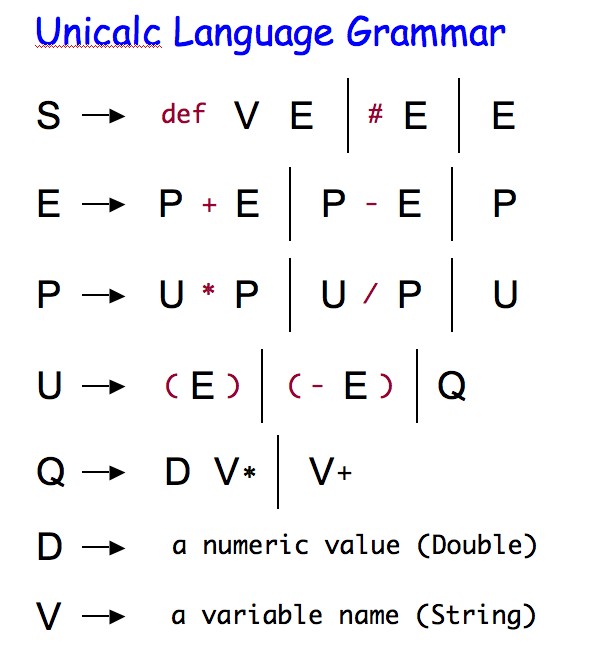
This problem asks you to implement a Parser for the Unicalc language,
whose grammar is as follows:
Technical note on the grammar
The rule for Q uses the asterisk, not as "times,"
but meaning "zero or more of the preceding symbol." It also uses the
plus sign, not as addition, but meaning "one or more of the
preceding symbol." Both of these are implemented in the provided Q
method in
Parser.java.
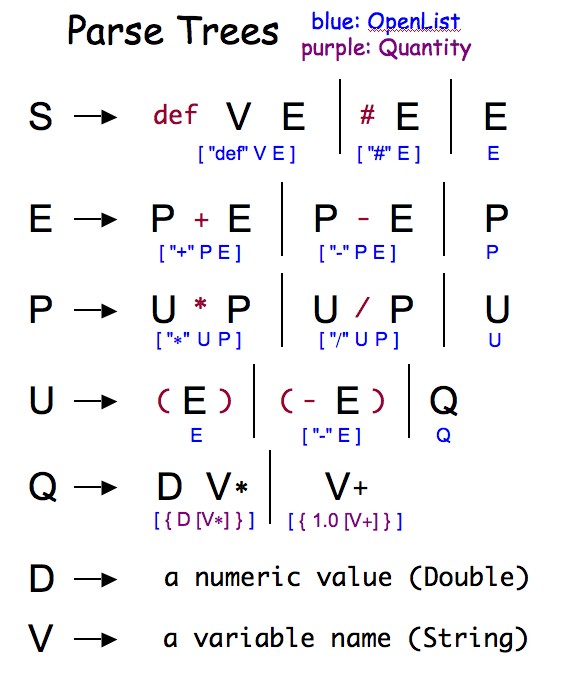
The Parser class To do this, you should write a Parser class in a file named Parser.java. This should implement a recursive-descent parser for the above grammar, yielding an OpenList that represents the parse tree for a provided set of valid tokens. There is a starting point for such a class available in the startingFiles.zip archive at the top-level assignment page. In particular, that provided code already implements a number of methods for checking if there are remaining tokens (and what they are). In addition, it provides an implementation of Q(), for the Q nonterminal symbol.
Overview of parsing
The method that will begin all the work - even though all of that work
will be
delegated recursively - is parse:
public OpenList parse(String[] tokens)
This method should return a new object of type OpenList
that represents the parse tree for that set of
tokens.
We will not test your code on invalid sets of tokens. Here is a simple
example of each one - keep in mind
that they can be composed, as well. Also, double quotes have been added
to highlight strings, but
they will not be printed by Java.
USER INPUT PARSE TREEand here is a concise summary of the resulting parse tree from each expression in the grammar:
---------- ----------
def x 42 ["def", "x", [{ 42.0, [], [] }]]
# 1 joule ["#", [{ 1.0, ["joule"], [] }]]
1 foot + 1 inch ["+", [{ 1.0, ["foot"], [] }], [{ 1.0, ["inch"], [] }]]
1 foot - 1 inch ["-", [{ 1.0, ["foot"], [] }], [{ 1.0, ["inch"], [] }]]
1 second * 2 hz ["*", [{ 1.0, ["second"], [] }], [{ 2.0, ["hz"], [] }]]
1 second / 2 hz ["/", [{ 1.0, ["second"], [] }], [{ 2.0, ["hz"], [] }]]
(1 cm) [{ 1.0, ["cm"], [] }] // note - no extra nesting!
(- 1 cm) ["-", [{ 1.0, ["cm"], [] }]]
42.42 meter [{ 42.42, ["meter"], [] }]
meter [{ 1.0, ["meter"], [] }]
42 [{ 42.0, [], [] }]
2+3*4 [+, [{ 2.0, [], [] }], [*, [{ 3.0, [], [] }], [{ 4.0, [], [] }]]]
Other methods for Parser Recursive-descent parsing uses a method for each nonterminal in the grammar - except for D and V in the case of this problem. One way to build up to the full grammar is to implement one nonterminal method at a time, for example, from the bottom towards the top. So, you would implement and test U(), and then P(), and then E(), and finally S().
Testing your code You have two options for testing your parser. You can either write a JUnit test called ParserTester.java or you can use the main method in Parser to test your class. We have not provided the ParserTester class, so if you would like to create one, use one of your other tester classes as a template (or ask me or the grutors for help). If you use the main method for testing, copy and paste the tests you ran into a text file called ParserTests.txt and submit it with the rest of your files.
30 points
This part completes the unicalc language. Here, you should build an Evaluator class that has at least the following four things:
private OpenList env; // the environment - a unit-database association list!
 public Evaluator(OpenList env) ... // constructor
 public Quantity evaluate(OpenList parseTree) ... // returns the result, a Quantity
 public static void main(String[] args) ... // for testing
There is a starting file for Evaluator.java, which evaluates Quantitys; it is available from the startingFiles.zip archive at the top-level assignment page. Again, its use is 100% optional.
What does everything evaluate to?
Well, every valid statement
in the Unicalc language evaluates to an object of type Quantity,
that is, a
quantity list. For example, the parse tree which is simply a list of a Quantity
naturally evaluates to that Quantity object.
Many of the others are clear: addition, subtraction, negation,
multiplication, division, and normalizing. Some of these operations
(addition and normalizing) require a
database of units... this database is the
environment in which each expression
is evaluated. The data member env
(already at the top of
Evaluator.java is provided for this purpose.
This environment env starts out empty -- meaning
that every unit
is a basic, irreduceable unit. However, as you define units with def,
conversions become possible. These are considered next.
The two parse trees whose evaluations may not be clear are these:
[ ["mile", { 5280.0 ["foot"] [] }]
]
[
["league", { 0.125, ["mile"], [] }],
["mile", { 5280.0 ["foot"] [] }]
]
[
["mile", { 1760.0, ["yard"], [] }],
["league", { 0.125, ["mile"], [] }],
["mile", { 5280.0 ["foot"] [] }]
]
You have two options for testing your evaluator. You can either write a JUnit test called EvaluatorTester.java or you can use the main method in Evaluator to test your class. We have not provided the ParserTester class, so if you would like to create one, use one of your other tester classes as a template (or ask me or the grutors for help). If you use the main method for testing, copy and paste the tests you ran into a text file called EvaluatorTests.txt and submit it with the rest of your files. You can submit your tests with or without the -debug option.
Here are some examples, including
the printout of the tokens, parse tree, value, and environment each
time. You should try some more of your own too.
def mile 5280 foot
The tokens are < def, mile, 5280, foot >
The parseTree is [def, mile, [{ 5280.0, [foot], [] }]]
The value is { 5280.0, [foot], [] }
The current env is
[[mile, { 5280.0, [foot], [] }]]


def yard 3 foot
The tokens are < def, yard, 3, foot >
The parseTree is [def, yard, [{ 3.0, [foot], [] }]]
The value is { 3.0, [foot], [] }
The current env is
[[yard, { 3.0, [foot], [] }], [mile, { 5280.0, [foot], [] }]]


1 mile + 2 yard
The tokens are < 1, mile, +, 2, yard >
The parseTree is [+, [{ 1.0, [mile], [] }], [{ 2.0, [yard], [] }]]
The value is { 5286.0, [foot], [] }
The current env is
[[yard, { 3.0, [foot], [] }], [mile, { 5280.0, [foot], [] }]]


def x 2 mile - 1 foot
The tokens are < def, x, 2, mile, -, 1, foot >
The parseTree is [def, x, [-, [{ 2.0, [mile], [] }], [{ 1.0, [foot], [] }]]]
The value is { 10559.0, [foot], [] }
The current env is
[[x, { 10559.0, [foot], [] }], [yard, { 3.0, [foot], [] }], [mile, { 5280.0, [foot], [] }]]


x / 1 foot
The tokens are < x, /, 1, foot >
The parseTree is [/, [{ 1.0, [x], [] }], [{ 1.0, [foot], [] }]]
The value is { 1.0, [x], [foot] }
The current env is
[[x, { 10559.0, [foot], [] }], [yard, { 3.0, [foot], [] }], [mile, { 5280.0, [foot], [] }]]


# x / 1 foot
The tokens are < #, x, /, 1, foot >
The parseTree is [#, [/, [{ 1.0, [x], [] }], [{ 1.0, [foot], [] }]]]
The value is { 10559.0, [], [] }
The current env is
[[x, { 10559.0, [foot], [] }], [yard, { 3.0, [foot], [] }], [mile, { 5280.0, [foot], [] }]]


3 yard yard + 1 foot * 2 foot
The tokens are < 3, yard, yard, +, 1, foot, *, 2, foot >
The parseTree is [+, [{ 3.0, [yard, yard], [] }], [*, [{ 1.0, [foot], [] }], [{ 2.0, [foot], [] }]]]
The value is { 29.0, [foot, foot], [] }
The current env is
[[x, { 10559.0, [foot], [] }], [yard, { 3.0, [foot], [] }], [mile, { 5280.0, [foot], [] }]]
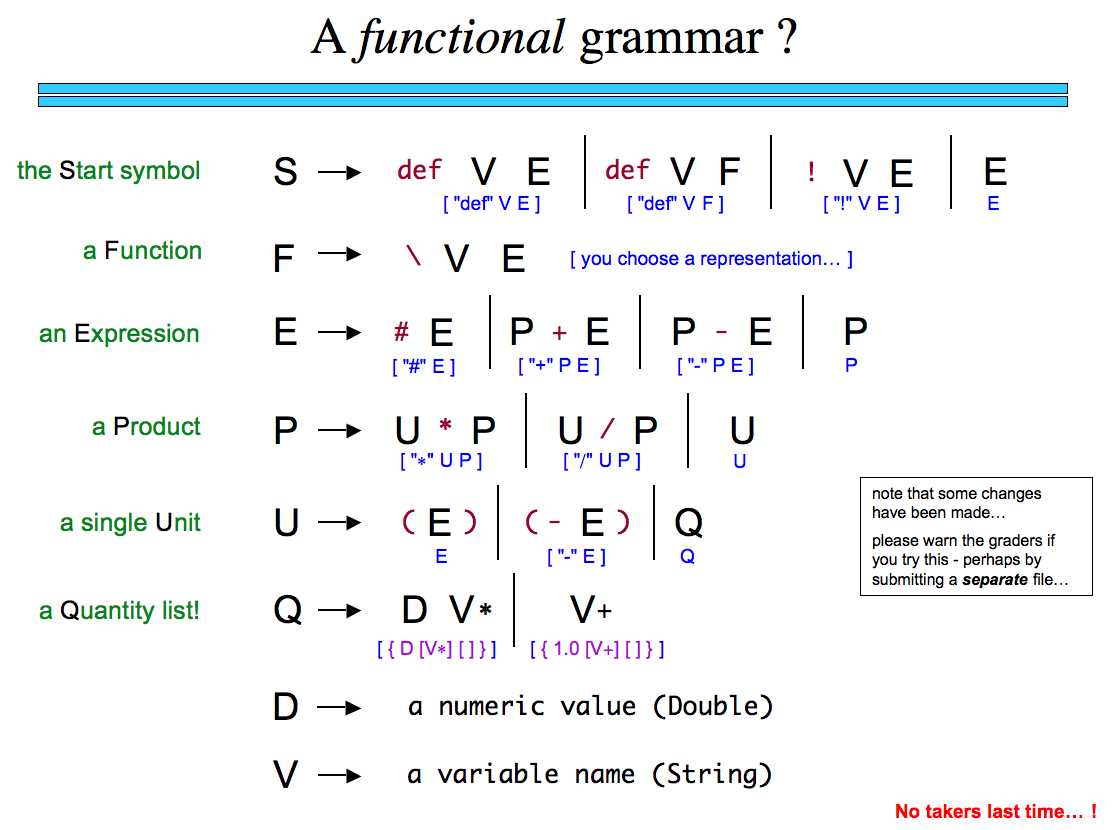
Functions! For up to an additional +25 points (and this won't return next week...), provide an implementation of functions in the Parser and Evaluator of the unicalc language. How to design and implement this is 100% up to you. In the spirit of the add-your-own-feature option (below) however, please be sure
Personalizing For up to +5 points, improve the unicalc-language with whatever feature you'd like... . Here are the rules, however: