CS157 Computer Animation

Inverse Kinematics Lab


In this lab you'll build a simple inverse kinematics engine. You should work in pairs to complete these labs.
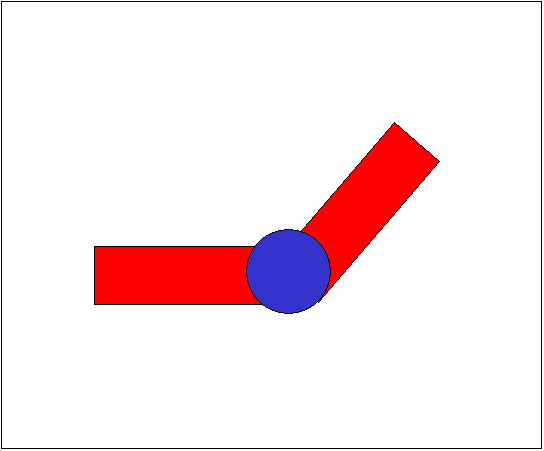
  1. Consider the simple two-link structure shown below.

    1. Annotate the figure above using DH notation using variable names for link lengths (li) and angle (θi). Clearly identify how these lengths and angles are measured in the figure. (All joints rotate about <0,0,1>.)


    2. Write the end effector position and orientation in terms of the link lengths and angles.
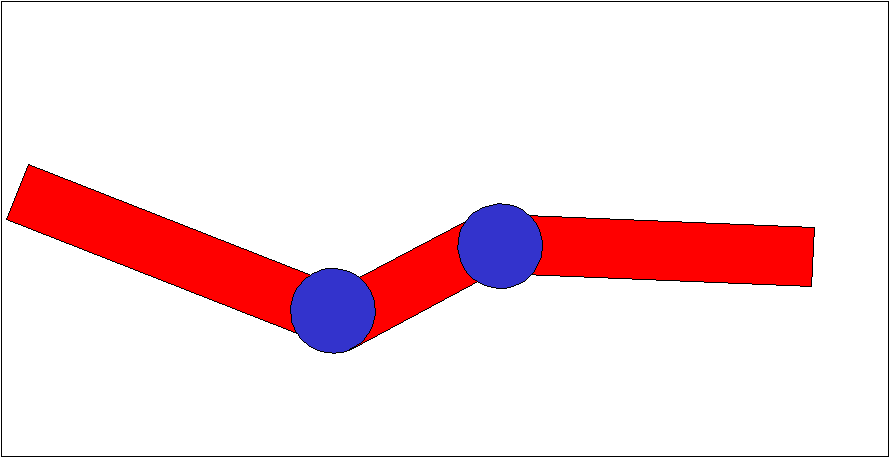


  2. Repeat the previous exercise for the three-link structure shown below.


  3. Next you'll implement a simple IK program.
    1. Download the IK skeleton project, unzip it and compile.

    2. The first step is to implement the computeGlobals function. This function computes the global angles of the links. The global angle of link i is the angle the link makes with the neutral position of the root. The function also computes the global positions of the ends of the links. (You'll need to use the global variables linkLens and numLinks.) Once you've completed this function the program should display the inital link configuration with lengths each equal 10 and angles π/2 and 3π/2.

    3. Next you need to implement the computeJacobian function using the algorithm we discussed in lecture. Store the Jacobian in the global variable J.

    4. When the user drags the end effector, the move function is called. The move function first calls the computeJacobian function. Next it calls the computePseudoInverse, which computes the pseudo-inverse of the Jacobian, and stores it in the matrix Jplus. If J is invertible, then Jplus is its inverse. If J is not invertible, but dS = J dθ has a solution, then Jplus dS = dθ.

      The pseduo-inverse function has been written for you!

    5. You do, however, need to compute dθ based on ds=[dx dy] and Jplus.

    6. Next you want to compute the new position of the end effector give the change in angle dθ. Note, since we have used a linear approximation in computing J, the new position will not be exactly what we want. Compute the error in our approximation of the end effector position and print it out. Change the function to return true.

    7. Run the program and try moving the end effector. If you move slowly enough the results will probably be pretty good. But we want to make the program more robust. When the error is too much, we can improve our method by moving in two steps; first to the half-way point and then to the destinations. And we could repeat this recursively to get better and better approximations. (This is what the rdepth parameter is in the move function.) What is a good error value? Experiment to find a value that provides good tracking without too much slow down. (Use a maximum recursive depth of 10.)

    8. Now the only problem is that we can't always satisfy a move request since some are simply not feasible. When we exhaust our recursive depth without finding a good solution, we should restore the initial values and return false.

    9. At this point your program should be able to handle more links. Add a third one and see how it works!
That is it. Zip your solution and upload it to your wiki.

Last updated March 2012