Computer Animation, Spring 2012
Subdivision Surface Modeling
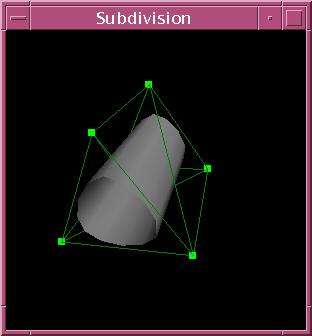
Overview
The goal of this assigment is to introduce you to mesh representation,
curve/surface smoothing, and modeling.
You will create a basic interactive
modeling program for generating smooth surfaces.
Your program will read a set of triangles from a .ray file, build a
"control" mesh from these triangles (shown in green above),
and displays
it in a window using OpenGL. As the program executes, a user can repeatedly
subdivide the mesh using the Loop
algorithm to produce a
smooth subdivision surface
for display (shown in
gray above).
The user may also drag vertices of the control mesh
with the mouse; the subdivision surface should be updated continuously
in the display.
Your program will manage a hierarchy of meshes.
Level 0 is the control mesh and level n+1 is obtained from level n through one application
of the Loop subdivision algorithm. Only level 0 and the last mesh, which we call the smooth surface mesh, are displayed. We support a maximum of
10 meshes.
-
level 0: control mesh (displayed and the user is allowed to move vertices)
-
level 1: intermediate mesh (not displayed)
-
level 2: intermediate mesh (not displayed)
-
...
-
level n-1: intermediate mesh (not displayed)
-
level n: smooth surface mesh (displayed)
You'll
construct the topology of each mesh once. If the user moves vertices
of the control mesh, you'll update the geometry of the other
meshes using
the subdivison rules.
What You Have to Do
The following is a list of features
that you will implement. The number in parentheses corresponds to
how many points it is worth.
-
Subdivision:
Implement the Loop subdivision algorithm. When the user selects "subdivide" from the menu, you'll subdivide the current
smooth surface mesh to create the next mesh in the hierarchy.
-
Redefine the control and/or smooth surface meshes(5):
Allow the
user to reset the control mesh to be the current smooth surface mesh.
Allow
the user undo the last level of subdivision (when there is one) by resetting
the smooth surface mesh to the mesh at the previous level in the
hierarchy. (Do not discard the finest mesh; if a subsequent subdivision command is issued you should not
need to recompute the topology of the
finer mesh.)
-
Smooth shading:
Calculate normals at all vertices. Provide the
normals to OpenGL when drawing the smooth surface mesh.
-
Textures: Support textures. Instead of just subdividing vertex
positions, subdivide texture coordinates as well.
The input file
provides a flag indicating whether texture are to be used and, if so, texture
coordinates for each vertex.
Display the smooth surface mesh textured.
-
Orthogonal dragging:
Let the user drag control points of the
control mesh.
The user should left click with the ALT key held to
select the vertex to move. Mouse movements should translate into movements
orthogonal to the
viewing direction. Notes:
(1) You should provide feedback
to the user as to the vertex selected.
(2) For each mesh in the hierarchy,
you need to recompute its new geometry but you should not recompute its
topology
. (These notes apply to all dragging options as described below.)
-
Normal dragging:
Let the user drag control points of the control mesh.
Mouse movements should translate into movements in the normal
direction of the vertex.
-
Multiple vertex dragging:
Allow selection of multiple vertices (e.g.,
by clicking with shift down) and move them all with the same dragging motion.
-
Original model:
Create a (non-trivial) model with textures of a mountain
terrain, cityscape, fish, human, horse, bunny, or something else recognizable.
Getting Started
You should use the skeleton code provided here, which
is able to load a .ray file and display it, write out a control mesh to a ray file, and
provides UI support.
You will need to augment the data structure
so that the geometry can easily be updated when the user moves a vertex
of the control mesh.
(THINK THIS THROUGH CAREFULLY.)
Consider how you'll
update normals and texture coordinates. You will mainly need to modify
the following
files:
-
main.cpp: manages meshes and sets up UI framework.
-
Face.[cpp/h]: Face class.
-
Mesh.[cpp/h]: Mesh class, containing Vertices and Faces.
-
Vertex.[cpp/h]: Vertex class.
There are several support classes which you shouldn't need to touch:
-
ArcBall.[cpp/h]: Arcball rotation user interface.
-
Quaternion.[cpp/h]: Quaternion support class. Quaternions are used
for rotions in the arcball user interface.
-
Color.[cpp/h]: Color support class.
-
Vector.[h]: 3D vector support class.
-
Misc.h: Basic routines.
The project folder includes a variety of sample files. You will
find the syntax for the .ray files here .
What to Submit
You should submit zipped project folder with your model and an html writeup describing what you did and what works.
This assignment is adopted with minor modifications from the computer graphics
course COS426 at Princeton as taught by Tom Funkhouser.