Computer Science 60
Principles of Computer Science
Assignment 12: Spampede!
Due Wednesday December 11th at 5:30 pm
Please read the following carefully. There is a lot here!
- Pair programming is
permitted on all parts of this week's assignment.
- You will be submitting several files for this assignment. Please
zip all of your files into a single zip file named hw12files.zip
and then submit that zip file for your assignment. That way,
we know we'll be able to run your applet!
- This week, we ask that you also submit a file that is typically
submitted in any large software project: A text file called
README. We have provided a basic README file on the main assignment page. You
should edit this file and submit it. The README file
will constitute part of your score on this assignment. We ask that you
to list the features, possible missing features, and any additions
to the game that you've created.
- Previous students have identified some common mistakes that we think might be helpful to you!
- Check your x/y consistency! Make sure that you're using the same
conventions for storing x and y in each of your classes!
- Remember to reset your Pede!
Overview
This project introduces and practices a number of different techniques that
are common to software engineering, that is the design and
implementation of large software projects. Certainly this assignment can
only provide a hint at a very rich -- and important -- field.
The Spampede applet is a bigger and more complex beast than any
you have had to deal with in the past. Before you begin, we
provide you with an overview of the software design behind the Applet
you will create. Normally, it would be up to you, the developer
(or some team of developers),
to do this design, but because this is your first large-scale project,
we have done the class design for you.
The functionality of the application is broken down into three classes
that you will be responsible for:
- Maze.java:
Responsible for storing the walls and spam in the maze
You extended the Maze
class to incorporate more of the game's functionality.
- SpamMaze.java:
A subclass of Maze
that does everything a Maze
does AND keeps track of the spam that populates the board and location
of the centepede. This is the class that has all of the
functionality for playing the game including moving the pede,
populating the board with spam, determining whether the pede has hit a
wall, etc.
- Spampede.java: A
class that controls the functionality of the
Applet.
This class is responsible for displaying the board to the user,
handling the user's key strokes, and controlling the timesteps that
move the pede forward.It accomplishes some of these tasks by extending
the class SpampedeBase
SpamMaze.java
The overview
In this part of the assignment you will create a derived class named
SpamMaze that handles the model for the applet. A
derived class is simply an extension of the data and capabilities
(methods) available in the base class. Thus, by starting the code as in the
provided SpamMaze.java file:
import java.lang.Math;
import java.util.LinkedList;

class SpamMaze extends Maze
{
  // your code goes here...
}
You should keep in mind that any object of type SpamMaze
IS also an object of type Maze. In other words, a
SpamMaze can do everything a
Maze can do, and more!
This is identical to the relationship of every object with Java's
Object type. Object is the base class of all Java classes.
The data
Because a SpamMaze object represents the model for the Spampede
applet, it needs to keep track of (1) the maze, (2), the centipede, and (3)
the spam in the environment. Remember that (1) is already taken care of
because your SpamMaze is a derived class of Maze. To keep
track of (2) and (3), you should use lists of MazeCells. In
particular, you will declare two data members:
  // The data members representing the spam and the centipede
  private LinkedList<MazeCell> spamCells;
  private LinkedList<MazeCell> pedeCells;
Each of these is of type LinkedList<MazeCell>, which is the
Java-library version of a double-ended queue implemented via a linked
list. You will thus have access to the methods listed at
http://docs.oracle.com/javase/6/docs/api/index.html?java/util/LinkedList.html.
Notice especially the methods addFirst, addLast, removeFirst, removeLast,
getFirst, getLast, and get(int n). Each get
method is similar to peek in that it returns a value, but does not change the list.
You can ask the size of a list with size(), which returns an int.
How should we represent the head of the snake?
One way to do this is simply to decide that the first element of the pedeCells data member will
always be the head of the snake. Equivalently, you could use the last element. Either way, it
will be up to your code to make sure the head of the snake contains the 'S' character, that
the other cells in the snake contain the 'P' character, and that the snake is
updated appropriately.
Overview of Spampede.java
The Spampede applet gives a user control over a spam-seeking centipede.
Key presses from the keyboard change the direction of the centipede's
movement in order to intersect snacks (spam) that appear at random places
on the screen. For each snack consumed, the centipede grows
by one segment (a segment is simply one MazeCell). Variations
are welcome (see the extra credit section below)!
As a result, in this part of the assignment you will be modifying another derived
class, this one named Spampede, which is a child class of SpamBase, which is a child class of
Java's JApplet.
This means that your Spampede is itself an applet that will run in a Java-enabled browser from anywhere.
Setting up
The "starter" applet
Spampede.java and its html file Spampede.html are
provided
for you on the top-level assignments page.
There are some other files you'll need so you should download the full hw12 directory.
Finally, we have also
provided the following files which you may wish to use
(but they are totally optional):
- Spam.au, an audio file
- crunch.au an audio file
- spam.gif, an image of a can of Spam
Order of Tasks
|
Do the following things(this is the order that is recommended):
- Get ready to go!
- Download all files (hw12)
- add them to a new Eclipse Java project
- Run Spampede.java (see note below about modifying the window size!)
- MazeCell.java
- SpampedeBase.java
- Don't read it! - you can, but don't need to know how it works!
- SpampedeBasePanel.java
- Don't read it! - you can, but don't need to know how it works!
- Maze.java
- Read it!
- write Maze(String[] mazeStrings) - use toString() to test
- write getNorthNeighbor(MazeCell cell) - add tests to MazeTest.java to test
- write getSouthNeighbor(MazeCell cell) - add tests to MazeTest.java to test
- write getEastNeighbor(MazeCell cell) - add tests to MazeTest.java to test
- write getWestNeighbor(MazeCell cell) - add tests to MazeTest.java to test
- write getNeighbors(MazeCell center) - add tests to MazeTest.java to test
- write getRandomNeighboringCell(MazeCell start) - add tests to MazeTest.java to test
- write clearFlags() // won't need this until later! but it isn't too bad to write in advance
- Spampede.java - Display the board/key presses!
- Read it!
- write drawEnvironment() - run Spampede.java to test!
- read keyPressed(KeyEvent evt) and run Spampede.java to experiment
- write keyPressed(KeyEvent evt) - add print statements in the method and run Spampede.java to test
- SpamMaze.java - Get the spam and pede ready!
- Read it!
- write resetPedeAndSpam()
- write noSpam()
- write addSpam()
- write removeSpam()
- write getNextCell(char direction) // don't implement AI mode yet!
- write advancePede(char direction) // don't implement AI mode yet!
- Spampede.java - Make the game (other than AI/reverse) work!
- write updateSpam() - run Spampede.java or write test cases to test!
- write updateCentipede() - run Spampede.java or write test cases to test!
- SpamMazeTest.java - Write some test cases! Note - you are allowed to delete
the provided test cases and write ones that work with your code. In particular,
the provided test cases might not work with how/when you add in your body parts.
Here are some possible test cases:
- The destination 'D' is directly above the start
- The destination 'D' is directly below the start
- The destination 'D' is directly to the right of the start
- The destination 'D' is directly to the left of the start
- There is no destination 'D' in the Maze
- There are no open spaces next to the start
- There are other characters next to the start (other than 'D' and '*')
- Multiple destinations available on the board - should go toward the closest one
- The destination 'D' is at least 5 spaces away and requires traversing each direction
- For each of the tests above, make sure that you can use the same Maze object and call multiBFS multiple times on it and still get the correct answer.
- SpamMaze.java - Implement AI mode and reverse!
- write multiBFS(MazeCell start) - you'll need clearFlags() here! (Testing tips below)
- write getNextCell(char direction) // implement AI mode!
- write reversePede()
|
Additional tips for various methods
- Be sure to
create, in init and/or in reset, a SpamMaze
and make sure it is in a suitable starting configuration. There is already a data member named
this.themaze to hold the created object.
- Draw the contents of the SpamMaze within the drawEnvironment
method already provided. This will require writing a nested loop to
create the 2d array of 10x10 pixel squares that represent the maze.
This drawEnvironment method will be called every so often by the cycle method to show the latest state of the maze. You should use different colors of your choice representing
walls, empty space, the head of the centipede and the body of the centipede.
You will want to use the fillRect command to accomplish this.
-
Update the spam within the SpamMaze named themaze. Within updateSpam
you can add (and/or remove) spam every so often -- though doing so
every cycle will probably be too fast!. You can also add spam as needed
(e.g., when one is eaten). But, you should make sure to have at least
one spam on the board at all times.
-
Keep track of the centipede (i.e., the "spampede"). The updatePede
method is provided as a placeholder for where you would do this.
You might want a data member that keeps track of the centipede's current
direction so that advancePede can be called appropriately --
the provided code has a data member private char dir that you
might use for this.
In this case, key presses would simply change this internally-stored dir.
Keep in mind that no MazeCells are moving as the centipede crawls
through the maze! Rather, it's the data member named pedeCells of
type LinkedList that's snaking its way through the 2d array of
MazeCellss by changing the cells to which it refers.
- Handle key presses. You will see a method that prints out certain
characters when track of the centipede (i.e., the "spampede"). When the
user presses the following keys, the centipede should change direction
as indicated:
- r : reverse, switching its head's position to its tail
- i : turn north
- j : turn west
- l : turn east
- k : turn south
- a : go into autonomous, spam-seeking mode ("AI")
If the centipede is already heading in the
direction that the user chooses, nothing changes.
If the user changes the centipede's direction so that it is moving
back on itself (from South to North, say, or West to East),
you may reverse direction, ignore the command, or
"terminate" the centipede.
-
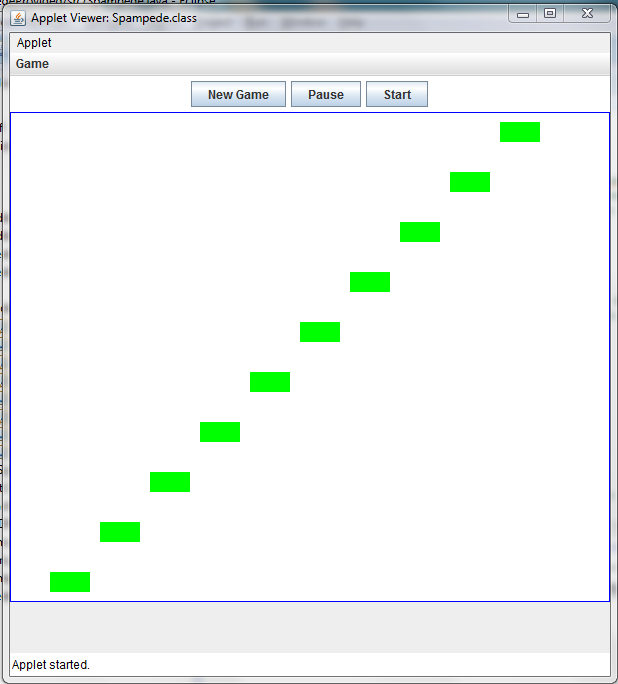
When you run Spampede.java in Eclipse, you will first get a very small window!
To get the regular size window, you must go to the Run Configurations dialog box.
You can do this by opening up the Spampede.java file and clicking
Run->Run Configurations. In the Run Configuration menu (shown below), click on
the "Parameter" tab and modify "Width" and "Height" to both be 600.
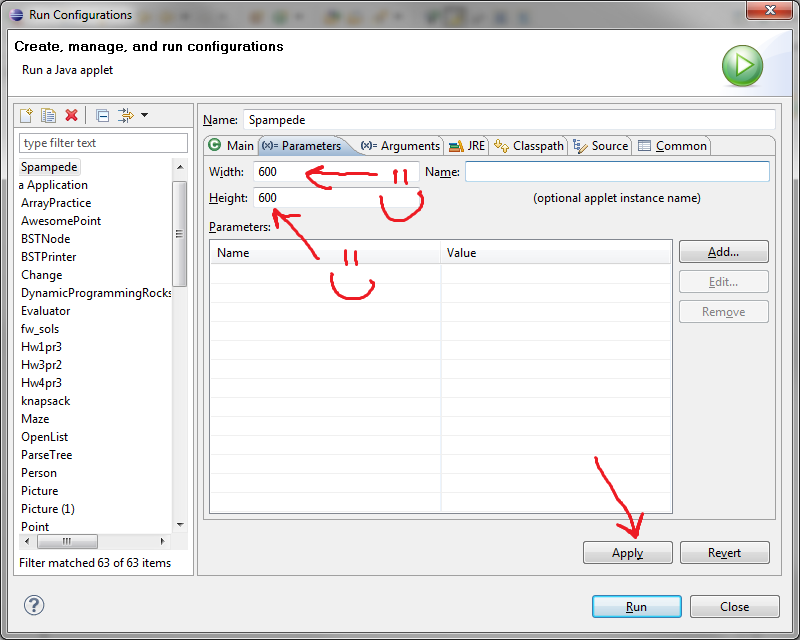
Now if you run Spampede.java you should see this:
A Reminder On What to Submit
Please be sure
to zip up the whole folder of files that makes up your Spampede applet
(including any sound and/or image files) into an archive named
hw12files.zip, and then submit it in the usual way.
Be sure your README file described at the very of this web page
is within that zip archive, too.
Extra Credit (10 points)
In addition to the extra credit described below, we'll have a unique type
of extra credit this week. While I know that many many CS60ers help their
classmates to debug the homework assignments, this week there will be an
extra insentive to do so! To earn these 10 extra credit points...
- Complete (and submit) hw12 by Sunday at 3pm
- Sign-up for a two-hour grutoring slot
here
- Go to your grutoring slot and check-in with the grutors - answer
questions and help people debug. Here are some important grutoring
guidelines
- Be friendly!
- Don't touch the person's keyboard or mouse
- Don't stand next to the person while you help them.
Sit or crouch down next to them.
- Don't be afraid to ask for additional help!
- Add a note to your README that you're doing this extra credit
I want more!
If you haven't had enough of the Spampede.java file at the end of this
assignment, there are a couple of specific items and an open-ended invitation
to improve on the applet for optional bonus credit. (Up to 20
points in total.)
If you add optional
features, please explain them carefully in the README file.
- Enemy Pedes!: Allow there to be one or more "enemy"
pedes that use the multiBFS and/or other heuristics to play
against your pede. (This is worth extra bonus points since it is a
bit more challenging.)
- Speed up: You might want to have the rate at which the centipede
is moving to increase as the game progresses.
- Scoring: You might want to have a system of scoring with
a running total displayed as a label or text field or simply
drawn to the applet panel.
- Lives: Rather than resetting or stopping the game
after a single Spampede crash, keep
a text field (or label) with the number of lives remaining
and decrement it after each crash. When there are no lives left,
stop the game (though you might want to consider a "reset" button.)
- Levels: Rather than maintaining a single, static maze,
you may want to have the centipede advance to different mazes
after consuming enough spam.
- Wrapping: Allow the centipede to wrap around the
game board -- either in an unlimited fashion or through small
tunnels in the walls. Or you might consider a "hyperspace" square,
that "sends" cells to another spot on the board.
- General improvements: Feel free to add additional features
you think would enhance the Spampede applet: different kinds
of spam, sounds,
images, other graphical widgets like pull-down menus or text boxes, etc.