Project 1B
Compressed Network Communication
INTRODUCTION:
When an application (e.g., shell) is to be used remotely, it is usually not sufficient to
simply replace local device I/O (e.g., between the user's terminal and the shell) with network
I/O. Remote sessions and network protocols add options and behaviors that did not exist when
the application was being used locally.
To handle this additional processing without making any changes to the application, it is
common to create client-side and server-side agents that handle the network communication
and shield the application from the complexities of the remote access protocols.
Such intermediary agents can implement valuable features (e.g., encrypting traffic for
enhanced security or compressing traffic to improve the performance and reduce the cost
of WAN-scale communication), completely transparently to the user and application.
In this project, you will build a multi-process telnet-like client and
server. This project is a continuation of Project 1A. It can be broken
up into two major steps:
- Passing input and output over a TCP socket
- Compressing communication between the client and server
RELATION TO READING AND LECTURES:
This lab will build on the process and exception discussions,
but it is really about researching and exploiting APIs.
PROJECT OBJECTIVES:
- Demonstrate the ability to research new APIs and debug code that exploits them
- Demonstrate ability to do basic network communication
- Demonstrate ability to do exploit a new library
- Develop multi-process debugging skills
DELIVERABLES:
A single tarball (.tar.gz) containing:
- C source modules that compile cleanly (with no errors or warnings).
You will have (at least) two source files:
lab1b-client.c and lab1b-server.c,
which should compile to the executables
lab1b-client and lab1b-server,
respectively.
- a Makefile to build the program
(compiling it with the -Wall and
-Wextra options)
and the tarball.
It should have distinct targets for the client and
server, but it should also have a default target
that builds both.
It should also have the (now) traditional clean and dist
targets.
- a README file describing the contents of the tarball and
anything interesting you would like to bring to our attention
(e.g., research, limitations, features, testing methodology).
PROJECT DESCRIPTION:
Study the following documentation:
Passing input and output over a TCP socket
Using Project 1A, with its --shell option, as a starting point,
create a client program (lab1b-client) and a server program (lab1b-server),
both of which support a mandatory
--port=port# switch.
The server will also support the --shell=program option.
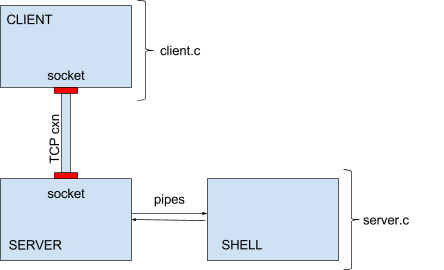
Your overall program design will look like the diagram above.
You will have a client process, a server process, and a shell process.
The first two are connected via TCP connection, and the last two are connected via pipes.
Different systems support different protocols, so the safest way to create your sockets
is for family AF_INET, type SOCK_STREAM. A more specific selection
(e.g. AF_INET6) might not work on some systems.
The client program
- The client program will open a connection to a server
(port specified with the mandatory --port=
command line parameter) rather than sending it directly
to a shell.
The client should then send input from the
keyboard to the socket (while echoing to the display), and input from
the socket to the display.
- Do the same translation of received carriage returns('\r')
into new line('\n') before sending them to the server.
- Include, in the client, a --log=filename option,
which maintains a record of data sent over the socket (see below).
- If a ^D is entered on the terminal, simply pass it through to
the server like any other character.
- if a ^C is entered on the terminal, simply pass it through to the
server like any other character.
- Continue the same non-canonical (character at a time, no echo)
terminal behavior you used in Project 1A.
- In the second part of this project we will add a
--compress switch to the client.
- If the client encounters an unrecognized argument it should print
an informative usage message (on stderr) and exit with a return code of 1.
If any system call fails, it should print an informative
error message (on stderr) and exit with a return code of 1.
- Before exiting, restore normal terminal modes.
- The testing scripts, if expected output is not seen within a reasonable
period of time, will kill the client by sending it a (catchable)
SIGTERM termination signal. You might want to catch this
signal, restore terminal modes, and exit cleanly. This clean
shut-down will ensure that any buffered stdio output
(which might otherwise be lost) is flushed out before the program exits.
For all of this testing, the client and server will be running on the same host
(localhost), but if you would like to add a --host=name
parameter you should be able to access a shell session from other computers.
The server program
- The server program will connect with the client, receive the client's
commands and send them to the shell, and will "serve" the client the
outputs of those commands.
- The server program will listen on a network socket (port specified with
the mandatory --port= command line parameter).
- Accept a connection when it is made.
- Once a connection is made, fork a child process,
which will exec a shell (program specified with the --shell= option)
to process commands received;
the server process should communicate with the shell via pipes
(as you did in Project 1A).
- Redirect the shell process's stdin/stdout/stderr to the appropriate pipe ends
(similar to what you did in Project 1A).
- Input received through the network socket should be forwarded
through the pipe to the shell.
Because the server forks the shell (and knows its process ID),
the processing of ^C (turning it into a SIGINT
to the shell) must be done in the server.
Similarly, when the server encounters a ^D it should
close the write side of the pipe to the shell
(as was done in project 1A).
- Input received from the shell pipes (which receive both stdout
and stderr from the shell) should be forwarded out to the
network socket.
- If the server gets an EOF or SIGPIPE from the shell pipes
(e.g., the shell exits), harvest the shell's completion status,
log it to stderr (as you did in project 1A), and exit with a return code of 0.
- If the server gets an EOF or read error from the network connection,
(e.g., the client exits), close the write pipe to the shell,
await an EOF from the pipe from the shell, and harvest and report
its termination status (as above).
- If the server encounters an unrecognized argument it should print
an informative usage message (on stderr) and exit with return code of 1.
If any system call fails, it should print an informative
error message (on stderr) and exit with an return code of 1.
- In the second part of this project we will add a
--compress switch to the server.
To send commands to the shell, you will need to start both the client and
the server. On the client side, the behavior should be very similar to
that of Project 1A, in that you will see your commands echoed back to
the terminal as well as the output from the shell. Do not display
anything (other than error messages) on the server side.
Note that we are not expecting you to become expert in how
compression in general or this particular form of compression works. Your task
is to understand it well enough to use it.
Choose a random port number (greater than 1024) for your testing.
Port numbers below 1024 are reserved.
Be advised that listens may remain active for several seconds after the server exits.
This means that you may get occasional socket-in-use errors if you restart the server before
the old listen is taken down.
Because the server is started independently from the client, it will have its own
stderr and stdout which go the terminal session from which it was started. If you
want to implement debug output from the server, you can send it to the server's
stdout (file descriptor 1).
Shut-down Order
If the client initiates the closing of the socket, it may not receive the last output from the shell.
To ensure that no output is lost, shut-downs should be initiated from the server side:
- an exit(1) command is sent to the shell, or the server closes the write pipe to the shell.
- the shell exits, causing the server to receive an EOF on the read pipe from the shell.
- the server collects and reports the shell's termination status.
- the server closes the network socket to the client, and exits.
- the client continues to process output from the server until itreceives an error on the network socket from the server.
- the client restores terminal modes and exits.
After reporting the shell's termination status and closing the network socket, the server should exit.
Otherwise it would tie up the socket and prevent testing new server versions. After your test is complete,
the client, server, and shell should all be gone. There should be no remaining orphan processes.
Suggested Implementation Order
- copy lab1a.c to lab1b-server.c
- add a --port argument and code to listen/accept on that port,
eliminate the mode-setting, cr/lf translation, and echoing code,
and do your reads/writes from the network socket rather than
stdin/stdout.
- use telnet localhost port# to connect to
and confirm the server runs a shell, passing input and output,
correctly handling ^C and ^D.
- copy lab1a.c to lab1b-client.c
- add --log option and log all input-to/output-from shell
and verify that data is being correctly logged.
- add --port= (and optional --host=) argument
and open connection to specified host and port.
- eliminate sub-process forking, pass keyboard input
to the network connection, and process output from
net network connection back to the display.
- test this client with (already known to be working) server.
- write simple test program to confirm you know how to use
libz compression:
- initialize a compression and decompression z-stream
- read input lines and compress them
- decompress them and print them
- upon receiving EOF shut down the z-streams
- add --compress switch to client and server, and
code to do data-stream compression and decompression.
It might be easier to start doing compression from server
to client, and then (after that is working) from client
to server.
Debugging communication between three processes can be very difficult.
If you study the supplied P1B_check.sh script, you will see
that each run of your program captures the log as well as standard
input and standard output from both the client and the server.
If you want to see what is in each of those files you can add lines
to that script to, after running your programs, echo headings and then
dump out (with the cat command) each of those files.
If the cause is not clear, add some diagnostic logging to stderr
to better understand what is and is not happening.
The --log option
To ensure that compression is being correctly done, we will ask you to add a
--log=filename option to your client. If this
option is specified, all data written to or read from the server should be logged
to the specified file.
Prefix each log entry with
SENT # bytes:
or
RECEIVED # bytes:
as appropriate. (Note the colon and space between the word bytes
and the start of the data).
Each of these lines should be followed by a newline character (even if the last character
of the reported string was a newline).
You can use our old friend fprintf to write out the start of the above
SENT/RECEIVED messages,
but it will be incapable of correctly writing the (non-ASCII, non-string) compressed data.
You will probably find it easier to use fwrite, which simply takes an address
and byte count, and writes those bytes directly to the associated file.
But, remember to write out a newline ('\n') after it.
Before running your program in a mode that creates a log file, please use the
ulimit command to ensure that your log file does not get too large, which
could happen if you have a bug in your program. ulimit 10000 should be
sufficient, but check out the ulimit man page for further details. Failing to limit the size of log files has filled
up the HSSEAS Linux servers' /tmp directories in the past, which makes the machines
hard to use for everybody, including you.
Sample log format output:
SENT 35 bytes: sendingsendingsendingsendingsending
RECEIVED 18 bytes: receivingreceiving
Compressed communication
The purpose of compression is to reduce the amount of space data takes up. In
communications scenarios, a compressed version of data will use less bandwidth to transmit
the same data than its uncompressed form would use. On the other hand,
compression will require processing at the sending and receiving end before
the data can be effectively used at the receiving process. Sometimes the benefits
in reduced bandwidth are worth the costs of extra processing and sometimes they
are not, so compression is not used by default in network communications.
While compression makes data difficult to read, unlike encryption it does
not provide any privacy for the data, since anyone who obtains the compressed
version of the data can use standard algorithms to decompress it. Thus,
compression is used for efficiency, not for privacy. When both efficiency and
privacy are desired, data is first compressed, then encrypted.
In this project, you will only perform compression, without encryption. You
will use a standard compression library to improve
efficiency of your socket communications.
- The LZW (Lempel-Ziv-Welch) compression library should already be installed on
departmental development machines, but if you are working on your own
system, you may need to find an appropriate repo and install the
associated packages for the library, header file and documentation.
To add libz to your build, you should add -lz
(search libz for unresolved external references) to the end of
your gcc commands.
- When working with a new library, it is often easiest to start with
a very simple application. A multi-process application like our
client, server, and shell is intrinsically complex.
You may find it much easier to get the
compression/decompression code working in a simple program that reads
from and writes to a pipe.
Then, after you have it working, you can integrate that code into your
client and server.
- Add a --compress
command line option to
your client and server which, if included, will enable compression
(of all traffic in both directions).
- Modify both the client and server applications to compress
traffic before sending it over the network and decompress it after
receiving it.
Note that you are not sending a continuous data stream in either
direction. Rather you are sending a series of independent
messages (each of which must be complete and an integer number
of bytes long).
Make sure that you choose the appropriate (Z_SYNC) option
when you are doing your compression (and decompression).
- Using these options, run a session and use the
--log option to verify that compression
and decompression are working properly. The --log
option should record outgoing data post-compression and incoming data
pre-decompression.
You should expect to see:
- no clear text going either to or from the shell
- a reduction in the number of bytes sent in both directions
- Do not include your --log files with your
submission; we will generate our own from your program.
The compression algorithm you are using is a progressive one, which becomes more
effective as it processes more data. As a result you may note very little
reduction in the character-at-a-time commands being sent to the shell.
Larger output coming back from the shell should, however, compress quite effectively.
Summary of exit codes
0 ... normal execution, shutdown on ^D
1 ... unrecognized argument or system call failure
SUBMISSION:
Your README file must include lines of the form:
NAME: your name
EMAIL: your email
ID: your student ID
And, if slip days are allowed on this project, and you want to use some,
this too must be included in the README file:
If, for instance, you wanted to use two slip-days, you would add the following
line:
Your name, student ID, and email address should also appear as comments at the top
of your Makefile and each source file.
Your tarball should have a name of the form lab1b-studentID.tar.gz.
You can sanity check your submission with this
test script.
We will test it on a departmental Linux server.
You would be well advised to test your submission on that platform before submitting it.
GRADING:
Points for this project will be awarded:
| value | feature |
| Packaging and build (15% total) |
| 5% | un-tars expected contents |
| 5% | clean build of correct programs w/default action (no warnings) |
| 3% | Makefile has working clean and dist targets |
| 2% | reasonableness of README contents |
|
| Communication (50% total) |
| 5% | input properly echos (character at a time) from client |
| 5% | client passes (character at a time) data between server and termimal |
| 5% | server passes (character at a time) data between client and shell |
| 5% | proper translation of input CR (from keyboard) into NL for shell input |
| 5% | proper translation of NL (from) into CR NL to display |
| 5% | ^D from client closes connection, restores terminal modes, exits RC=0 |
| 5% | ^C from client sends a SIGINT to shell |
| 5% | server properly logs shell termination status |
| 5% | --log= option properly reports sent data |
| 5% | --log option properly reports received data |
|
| Compression (25% total) |
| 5% | --compress reduces number of bytes sent over the wire in both directions |
| 5% | data is compressed before sending (tested with --log option) |
| 5% | data is decompressed after receiving (tested with --log option) |
| 5% | compressed commands sent to shell are properly decompressed before execution |
| 5% | compressed output sent by shell are properly decompressed before display |
|
| Code Review (10%) |
| 10% | correct library use |