Add variables
In this part of the assignment, we will add support for variables to our source language.
1 Overview
We will modify our language to support the following grammar:
\[ \definecolor{myblue}{RGB}{37, 104, 145} \newcommand{gt}[1]{{\color{myblue}\underline{#1}}\quad} \newcommand{gnt}[1]{\mathit{#1}\quad} \newcommand{\Program}{\gnt{Program}} \newcommand{\STR}{\gt{STR}} \newcommand{\Expr}{\gnt{Expr}} \newcommand{\Assignments}{\gnt{Assignments}} \newcommand{\INT}{\gt{INT}} \newcommand{\VAR}{\gt{VAR}} \newcommand{\ASSIGN}{\gt{:=}} \newcommand{\SEMI}{\gt{;}} \newcommand{\prod}{\rightarrow\quad} \newcommand{\alt}{\ |\ \quad} \]
\[ \begin{align} \Program \prod & \gt{printString} \STR \SEMI \\ \alt & \Assignments \gt{printNumber} \Expr \SEMI \\ \\ \Assignments \prod & \VAR \ASSIGN \Expr \SEMI \Assignments \\ \alt & \epsilon \\ \\ \Expr \prod & \Expr \gt{+} \Expr \\ \alt & \Expr \gt{-} \Expr \\ \alt & \Expr \gt{*} \Expr \\ \alt & \gt{(} \Expr \gt{)} \\ \alt & \INT\\ \alt & \VAR \end{align} \]
This grammar is slightly different than the one presented in class. This one allows us to make assignments only if we are going to print an expression. If you implemented the grammar from class, or another one close to it, that’s okay! The key thing is that we are able to make zero or more assignments before printing.
2 Parsing
The Happy documentation on parsing sequences of items can help with parsing the \(\Assignments\) sequence.
For \(\VAR\), you get to decide what syntax is appropriate for a variable. A common definition is:
- A variable must have at least one character.
- The first character must be a letter or an underscore:
[a-zA-Z_]. - Any remaining characters can be a letter, a digit, or an underscore:
[a-zA-Z0-9_].
3 Allocating & freeing space
A variable stores a value. We will choose to store each variable’s value on the stack. Doing so requires that we:
- Know how many variables a program has.
- At the start of the program, reserve space on the stack for the variables, by:
- Moving the base pointer (
rbp) to where the stack pointer (rsp) is.
Warningrbpis a callee-save register, so be sure to preserve the value bypushing it!- Moving the stack pointer “up” (via subtraction, because the stack grows towards lower addresses) by the number of bytes we need to allocate.
WarningOn MacOS, the stack pointer should be 16-byte aligned. Be sure to allocate space such that the
rspobeys this convention. In practice, this means padding the stack with space for an extra, unused variable, when the program has an odd number of variables. - Moving the base pointer (
- At the end of the program, free the variables’ memory by:
- Moving the stack pointer “down” (via addition) by the number of bytes we allocated.
- Restoring the old value of
rpb, bypopping it.
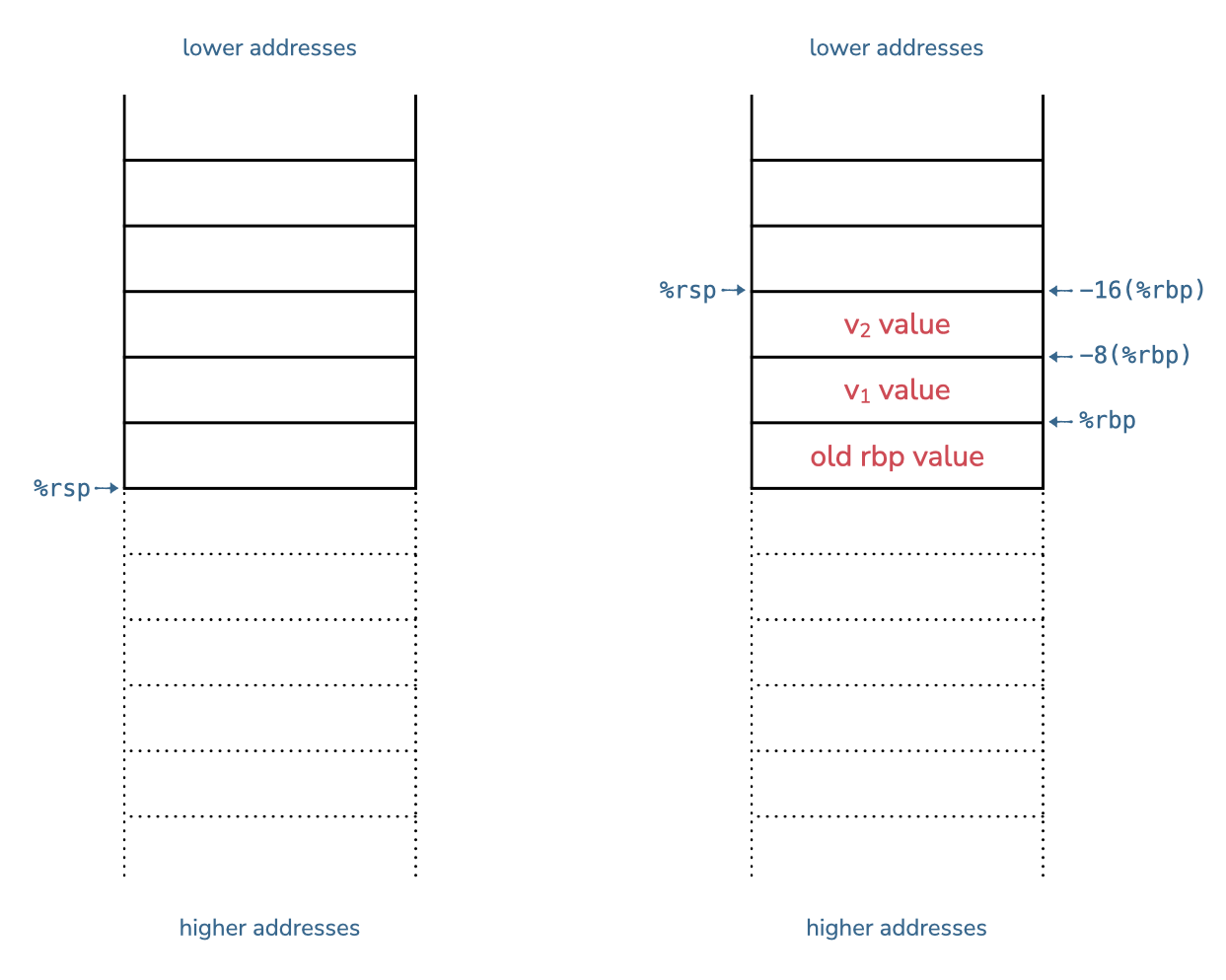
-8(%rbp), the value of variable \(v_2\) resides in memory address -16(%rbp). This address is also where %rsp points, and any additional pushes and pops will happen “above” the stack pointer. Freeing memory restores the stack to its “before” state.This scheme allows us to support programs with an arbitrary number of variables, which still uses push and pop to evaluate the results of expressions. The key constraints that this scheme enforces are that:
- The stack pointer, which is affected by
pushandpop, always stays “above” the memory we allocate for variables, and - Each variable has a dedicated space on the stack: the offset for the base pointer stays the same for a given variable, throughout the program’s execution.
To access variables, we use base + offset addressing, to treat the stack more like an array.
4 Emitting code
For assignment and expressions, the compiler needs to emit code that uses the variable’s location on the stack. A variable’s location on the stack is expressed via an offset from the base pointer (rbp).
For example, the location of the first variable we allocate will be: -8(%rbp) (i.e., 8 bytes “above” the base pointer, so that the last bit of the value will bump against the base pointer).
To help with emitting, I recommend first creating a table that maps variable names to locations (e.g., offsets). Then, in the emit phase, you can use this table to replace hmc variable names with x86-64 locations.