Hw 5 Pr2: Run-length Image Compression
(50 points)
Ultimately, all data in a computer is represented with 0's and 1's. We've explored how numbers are symbols are represented in binary, but in this problem we'll explore the representation of images using 0's and 1's. You should write your solutions in a file named hw5pr2.py and submit this file in the usual way. There is a starter file (with some graphics support) in this zip archive: hw5.zip To avoid any special instructions for running IDLE, these helper files and libraries read and write png image files, which you can then view (or edit or re-save) using Mac OS's or Windows's built-in preview programs. To start, try out the function testBinaryImage() in the hw5pr2.py file. It is for creating black and white images for this problem. So far, they've worked on all Windows/Mac computers we've been able to try... .Overview
Let's begin by considering just 8-by-8 black-and-white images such as the one below: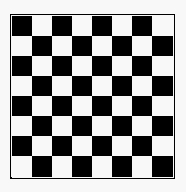 Each cell in the image is called a "pixel". A white pixel is represented by the digit 0 and a black pixel
is represented by the digit 1. The first digit represents the pixel at the top left corner of the image. The next digit represents the pixel in the top row and the second column. The eighth bit represents the pixel at the right end of the top row. The next bit represents the leftmost pixel in the second row and so forth. Therefore, the image above is represented by the following binary string of length 64:
Each cell in the image is called a "pixel". A white pixel is represented by the digit 0 and a black pixel
is represented by the digit 1. The first digit represents the pixel at the top left corner of the image. The next digit represents the pixel in the top row and the second column. The eighth bit represents the pixel at the right end of the top row. The next bit represents the leftmost pixel in the second row and so forth. Therefore, the image above is represented by the following binary string of length 64:'1010101001010101101010100101010110101010010101011010101001010101'Of course, another way to represent that same string in python is
'1010101001010101'*4
The background story
So now what? Here's the gratuitous background story: You've been hired by MASA ("Mudd Air and Space Administration"). MASA has a deep space satellite that takes 8-by-8 black-and-white images and sends them back to earth as binary strings of 64 bits as described above. In order to save precious energy required for transmitting data, MASA would like to "compress" the images sent into a format that uses as few bits as possible. One way to do this is to use the run-length encoding algorithm. Imagine that we have an image that looks like this, for example: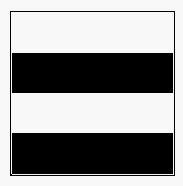 Using our standard sequence of 64 bits, this image is represented by a binary string beginning with 16 consecutive 0's (for two rows of white pixels) followed by 16 consecutive 1's (for two rows of black pixels) followed by 16 consecutive 0's followed by 16 consecutive 1's.
Run-length encoding (which, by the way, is used as part of the JPEG image compression algorithm)
says: Let's represent that image with the code "16 white, 16 black, 16 white, 16 black". That's a much shorter description than listing out the sequence of 64 pixels "white, white, white, white, ...".
Using our standard sequence of 64 bits, this image is represented by a binary string beginning with 16 consecutive 0's (for two rows of white pixels) followed by 16 consecutive 1's (for two rows of black pixels) followed by 16 consecutive 0's followed by 16 consecutive 1's.
Run-length encoding (which, by the way, is used as part of the JPEG image compression algorithm)
says: Let's represent that image with the code "16 white, 16 black, 16 white, 16 black". That's a much shorter description than listing out the sequence of 64 pixels "white, white, white, white, ...".
Run-length encoding
In general, our run-length coding represents an image by a sequence (called a "run-length sequence") of 8-bit bytes:- The first bit of each byte represents the bit that will appear next in the
- The final seven bits contain the number in binary of those bits that appear consecutively at the current location in the image.
The functions to write
Whew! So here's your job:- Write a function called
compress(S)that takes a binary stringSof length less than or equal to 64 as input and returns another binary string as output. The output binary string should be a run-length encoding of the input string. You may need a helper function or two - you may name these whatever you like. Also, you may want to copy a function or two from the previous hw problem or the lab or in-class Quiz this week!
- Write a function called
uncompress(C)that "inverts" or "undoes" the compressing in yourcompressfunction. That is,uncompress(compress(S))should give backS. Again, helper functions are OK, as is using this week's previous problems and/or lab code you've written.
- Your
compressfunction will sometimes give output that is actually longer than its input. In a comment, explain what is the largest number of bits that yourcompressalgorithm could possibly use to encode a 64-bit string/image.
- Be sure to test your compression algorithm on several test images of your own design. Here are a few test images that we are providing (for your viewing and compressing pleasure):
- Alien: "0"*8 + "11011011"*2 + "0"*8 + "00001000" + "01000010" + "01111110" + "0"*8
- Smile: "0"*8 + "01100110"*2 + "0"*8 + "00001000" + "01000010" + "01111110" + "0"*8
- Five: "1"*9 + "0"*7 + "10000000"*2 + "1"*7 + "0" + "00000001"*2 + "1"*7 + "0"
>>> compress( 64*'0' )
'01000000'

>>> uncompress( '10000101' )   # 5 1's
'11111'

>>> compress( '11111' )
'10000101'

>>> Stripes = '0'*16 + '1'*16 + '0'*16 + '1'*16
>>> compress(Stripes)
'00010000100100000001000010010000'

>>> uncompress('00010000100100000001000010010000')
0000000000000000111111111111111100000000000000001111111111111111