 The Importance of the Product Backlog on a Scrum Development Project
Date: Jul 25, 2012
Sample Chapter is provided courtesy of Addison-Wesley Professional.
Kenneth S. Rubin discusses the crucial role of the product backlog in achieving fast, flexible value-delivery flow in the presence of uncertainty.
In this chapter I describe the important role that the product backlog plays on a Scrum development project. I begin by describing the different types of items that typically populate a product backlog. Next I discuss four characteristics of a good product backlog and how good backlog grooming helps ensure that those characteristics are achieved. I then describe why the product backlog is a key element in managing fast, flexible flow at both the release and sprint level. I end by discussing how we determine which and how many product backlogs we should have.
Overview
The product backlog is a prioritized list of desired product functionality. It provides a centralized and shared understanding of what to build and the order in which to build it. It is a highly visible artifact at the heart of the Scrum framework that is accessible to all project participants (see Figure 6.1).
)
Figure 6.1. The product backlog is at the heart of the Scrum framework.
As long as there is a product or system being built, enhanced, or supported, there is a product backlog.
Product Backlog Items
The product backlog is composed of backlog items, which I refer to as PBIs, backlog items, or simply items (see Figure 6.2).
)
Figure 6.2. Product backlog items
Most PBIs are features, items of functionality that will have tangible value to the user or customer. These are often written as user stories (although Scrum does not specify the format of PBIs). Examples of features include something brand-new (a login screen for a new website), or a change to an existing feature (a more user-friendly login screen for an existing website). Other PBIs include defects needing repair, technical improvements, knowledge-acquisition work, and any other work the product owner deems valuable. See Table 6.1 for examples of the different types of PBIs.
Table 6.1. Example Product Backlog Items
PBI Type |
Example |
Feature |
As a customer service representative I want to create a ticket for a customer support issue so that I can record and manage a customer’s request for support. |
Change |
As a customer service representative I want the default ordering of search results to be by last name instead of ticket number so that it’s easier to find a support ticket. |
Defect |
Fix defect #256 in the defect-tracking system so that special characters in search terms won’t make customer searches crash. |
Technical improvement |
Move to the latest version of the Oracle DBMS. |
Knowledge acquisition |
Create a prototype or proof of concept of two architectures and run three tests to determine which would be a better approach for our product. |
Good Product Backlog Characteristics
Good product backlogs exhibit similar characteristics. Roman Pichler (Pichler 2010) and Mike Cohn coined the acronym DEEP to summarize several important characteristics of good product backlogs: Detailed appropriately, Emergent, Estimated, and Prioritized. Much as the INVEST criteria (see Chapter 5) are useful for judging the quality of a user story, the DEEP criteria are useful for determining if a product backlog has been structured in a good way.
Detailed Appropriately
Not all items in a product backlog will be at the same level of detail at the same time (see Figure 6.3).
)
Figure 6.3. Product backlog items are different sizes.
PBIs that we plan to work on soon should be near the top of the backlog, small in size, and very detailed so that they can be worked on in a near-term sprint. PBIs that we won’t work on for some time should be toward the bottom of the backlog, larger in size, and less detailed. That’s OK; we don’t plan to work on those PBIs anytime soon.
As we get closer to working on a larger PBI, such as an epic, we will break that story down into a collection of smaller, sprint-ready stories. This should happen in a just-in-time fashion. If we refine too early, we might spend a good deal of time figuring out the details, only to end up never implementing the story. If we wait too long, we will impede the flow of PBIs into the sprint and slow the team down. We need to find the proper balance of just enough and just in time.
Emergent
As long as there is a product being developed or maintained, the product backlog is never complete or frozen. Instead, it is continuously updated based on a stream of economically valuable information that is constantly arriving. For example, customers might change their mind about what they want; competitors might make bold, unpredictable moves; or unforeseen technical problems might arise. The product backlog is designed to adapt to these occurrences.
The structure of the product backlog is therefore constantly emerging over time. As new items are added or existing items are refined, the product owner must rebalance and reprioritize the product backlog, taking the new information into account.
Estimated
Each product backlog item has a size estimate corresponding to the effort required to develop the item (see Figure 6.4).
)
Figure 6.4. Product backlog items are estimated.
The product owner uses these estimates as one of several inputs to help determine a PBI’s priority (and therefore position) in the product backlog. Also, a high-priority, large PBI (near the top of the backlog) signals to the product owner that additional refinement of that item is necessary before it can be moved into a near-term sprint.
As I will discuss in more detail in Chapter 7, most PBIs are estimated in either story points or ideal days. These size estimates need to be reasonably accurate without being overly precise. Because items near the top of the backlog are smaller and more detailed, they will have smaller, more accurate size estimates. It may not be possible to provide numerically accurate estimates for larger items (like epics) located near the bottom of the backlog, so some teams might choose to not estimate them at all, or to use T-shirt-size estimates (L, XL, XXL, etc.). As these larger items are refined into a set of smaller items, each of the smaller items would then be estimated with numbers.
Prioritized
Although the product backlog is a prioritized list of PBIs, it is unlikely that all of the items in the backlog will be prioritized (see Figure 6.5).
)
Figure 6.5. Product backlog items are prioritized.
It is useful to prioritize the near-term items that are destined for the next few sprints. Perhaps it is valuable to prioritize as far down in the backlog as we think we can get in Release 1. Going beyond that point at anything other than a gross level of prioritization is likely not worth our time.
For example, we might declare that an item is destined for Release 2 or Release 3 according to our product roadmap. However, if we are early in the development of Release 1 features, spending any of our valuable time worrying about how to prioritize features that we might work on someday in Release 2 or Release 3 is likely not a good investment. We might never end up actually doing a Release 2 or Release 3, or our ideas surrounding those releases might change significantly during the development of Release 1. So time spent prioritizing that far out has a high probability of being wasted.
Of course, as new items emerge during the course of development, the product owner is responsible for inserting them in the correct order based on the items that currently exist in the backlog.
Grooming
To get a good, DEEP product backlog, we must proactively manage, organize, administer, or, as it has commonly come to be referred to, groom the product backlog.
What Is Grooming?
Grooming refers to a set of three principal activities: creating and refining (adding details to) PBIs, estimating PBIs, and prioritizing PBIs.
Figure 6.6 illustrates some specific grooming tasks and how they affect the structure of the product backlog.
)
Figure 6.6. Grooming reshapes the product backlog.
At the appropriate time, all PBIs need to be estimated to help determine their order in the backlog and to help decide whether additional refinement work is warranted. Also, as important information becomes available, new items are created and inserted into the backlog in the correct order. Of course, if priorities shift, we’ll want to reorder items in the backlog. And as we get closer to working on a larger item, we’ll want to refine it into a collection of smaller items. We also might decide that a particular backlog item is just not needed, in which case we’ll delete it.
Who Does the Grooming?
Grooming the product backlog is an ongoing collaborative effort led by the product owner and including significant participation from internal and external stakeholders as well as the ScrumMaster and development team (see Figure 6.7).
)
Figure 6.7. Grooming is a collaborative effort.
Ultimately there is one grooming decision maker: the product owner. However, good product owners understand that collaborative grooming fosters an important dialogue among all participants and leverages the collective intelligence and perspectives of a diverse group of individuals, thereby revealing important information that might otherwise be missed. Good product owners also know that by involving the diverse team members in the grooming, they ensure that everyone will have a clearer, shared understanding of the product backlog, so less time will be wasted in miscommunications and handoffs. Such collaborative efforts also go a long way toward bridging the historical gap between the business people and the technical people.
Stakeholders should allocate a sufficient amount of time to grooming based on the nature of the organization and the type of project. As a general rule, the development team should allocate up to 10% of its time each sprint to assisting the product owner with grooming activities. The team will use this time to help create or review emergent product backlog items as well as progressively refine larger items into smaller items. The team will also estimate the size of product backlog items and help the product owner prioritize them based on technical dependencies and resource constraints.
When Does Grooming Take Place?
The Scrum framework only indicates that grooming needs to happen; it doesn’t specify when it should happen. So when does grooming actually take place?
Using sequential development, we try to capture a complete and detailed description of the requirements up front, so little or no requirements grooming is scheduled after the requirements have been approved. In many organizations these baselined requirements may be changed only via a separate change control process, which is discontinuous to the primary development flow (see Figure 6.8).
)
Figure 6.8. Outside-of-primary-flow grooming with sequential projects
As such, grooming during sequential development is an exceptional, unplanned, outside-of-primary-flow activity that we invoke only if we need to, making it disruptive to the fast flow of delivered business value.
Using Scrum, we assume an uncertain environment and therefore must be prepared to constantly inspect and adapt. We expect the product backlog to evolve constantly rather than being locked down early and changed only through a secondary process for handling exceptional, undesirable occurrences. As a result, we must ensure that our grooming activities are an essential, intrinsic part of how we manage our work.
Figure 6.9 illustrates the various times when grooming might be performed.
)
Figure 6.9. When grooming happens
Initial grooming occurs as part of the release-planning activity (see Chapter 18 for details). During product development, the product owner meets with the stakeholders at whatever frequency makes sense to perform ongoing grooming.
When working with the development team, the product owner might schedule either a weekly or a once-a-sprint grooming workshop during sprint execution. Doing so ensures that grooming occurs on a regular schedule and enables the team to account for that time during sprint planning. It also reduces the waste of trying to schedule ad hoc meetings (for example, determining when people are available, finding available space, and so on).
Sometimes teams prefer to spread out the grooming across the sprint, rather than block out a predetermined period of time. They take a bit of time after their daily scrums to do some incremental grooming. This grooming doesn’t have to include all of the team members. For example, after a daily scrum the product owner might ask for help refining a large story. Team members who are knowledgeable and interested stick around and assist the product owner. The next time, different team members might assist.
Even if teams have regularly scheduled workshops or take some time each day to look at the backlog, most teams find that they naturally do some grooming as part of the sprint review. As everyone involved gains a better understanding of where the product is and where it is going, new PBIs are often created or existing PBIs are reprioritized, or deleted if they are no longer needed.
When the grooming happens is less important than making sure it is well integrated into the Scrum development flow, to ensure flexible and fast delivery of business value.
Definition of Ready
Grooming the product backlog should ensure that items at the top of the backlog are ready to be moved into a sprint so that the development team can confidently commit and complete them by the end of a sprint.
Some Scrum teams formalize this idea by establishing a definition of ready. You can think of the definition of ready and the definition of done (see Chapter 4) as two states of product backlog items during a sprint cycle (see Figure 6.10).
)
Figure 6.10. Definition of ready
Both the definition of done and the definition of ready are checklists of the work that must be completed before a product backlog item can be considered to be in the respective state. An example of a definition-of-ready checklist for product backlog items is given in Table 6.2.
Table 6.2. Example Definition-of-Ready Checklist
Definition of Ready |
|
|
Business value is clearly articulated. |
|
Details are sufficiently understood by the development team so it can make an informed decision as to whether it can complete the PBI. |
|
Dependencies are identified and no external dependencies would block the PBI from being completed. |
|
Team is staffed appropriately to complete the PBI. |
|
The PBI is estimated and small enough to comfortably be completed in one sprint. |
|
Acceptance criteria are clear and testable. |
|
Performance criteria, if any, are defined and testable. |
|
Scrum team understands how to demonstrate the PBI at the sprint review. |

A strong definition of ready will substantially improve the Scrum team’s chance of successfully meeting its sprint goal.
Flow Management
The product backlog is a crucial tool that enables the Scrum team to achieve fast, flexible value-delivery flow in the presence of uncertainty. Uncertainty cannot be eliminated from product development. We must assume that a stream of economically important information will be constantly arriving and that we need to organize and manage the work (manage the product backlog) so that this information can be processed in a rapid, cost-effective way while maintaining good flow. Let’s examine the role of the product backlog in supporting good release flow and sprint flow.
Release Flow Management
The product backlog must be groomed in a way that supports ongoing release planning (the flow of features within a release). As illustrated in Figure 6.5, a release can be visualized as a line through the product backlog. All of the PBIs above the release line are targeted to be in that release; the items below the line are not.
I have found it useful to actually partition the product backlog using two lines for each release, as illustrated in Figure 6.11.
)
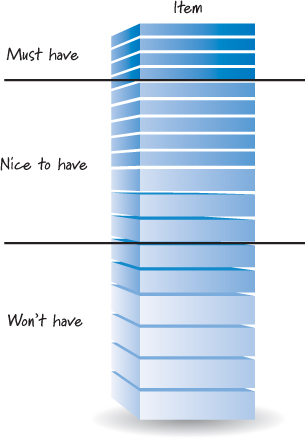
Figure 6.11. Release-level view of the product backlog
These two lines partition the backlog into three areas: must have, nice to have, and won’t have. The must-have features represent the items that we simply must have in the upcoming release or else we don’t have a viable customer release. The nice-to-have features represent items we are targeting for the next release and would like to include. If, however, we run short of time or other resources, we could drop nice-to-have features and still be able to ship a viable product. The won’t-have features are items that we’re declaring won’t be included in the current release. The second line, the one that separates the won’t-have items from the others, is the same as the Release 1 line shown in Figure 6.5.
Maintaining the backlog in this fashion helps us better perform ongoing release planning, as I will discuss in Chapter 18.
Sprint Flow Management
Product backlog grooming is essential for effective sprint planning and the resulting flow of features into a sprint. If the product backlog has been detailed appropriately, the items at the top of the backlog should be clearly described and testable.
When grooming for good sprint flow, it is helpful to view the product backlog as a pipeline of requirements that are flowing into sprints to be designed, built, and tested by the team (see Figure 6.12).
)
Figure 6.12. The product backlog as a pipeline of requirements
In this figure we see that larger, less-well-understood requirements are being inserted into the pipeline. As they progress through the pipeline and move closer to the time when they will flow out to be worked on, they are progressively refined through the grooming activity. At the right side of the pipeline is the team. By the time an item flows out of the pipeline, it must be ready—detailed enough that the team can understand it and be comfortable delivering it during a sprint.
If there is ever a mismatch or unevenness between the inflow and outflow of items, we have a problem. If the flow of groomed, detailed, ready-to-implement items is too slow, eventually the pipeline will run dry and the team won’t be able to plan and execute the next sprint (a major flow disruption or waste in Scrum). On the other hand, putting too many items into the pipeline for refinement creates a large inventory of detailed requirements that we may have to rework or throw away once we learn more (a major source of waste). Therefore, the ideal situation is to have just enough product backlog items in inventory to create an even flow but not so many as to create waste.
One approach that Scrum teams use is to have an appropriate inventory of groomed and ready-to-implement items in the backlog. A heuristic that seems to work for many teams is to have about two to three sprints’ worth of stories ready to go. So, for example, if the team can normally do about 5 PBIs per sprint, the team grooms its backlog to always have about 10 to 15 PBIs ready to go at any point in time. This extra inventory ensures that the pipeline won’t run dry, and it also provides the team with flexibility if it needs to select PBIs out of order for capacity reasons or other sprint-specific constraints (see Chapter 19 for a deeper discussion of this topic).
Which and How Many Product Backlogs?
When deciding on which and how many product backlogs to form, I start with a simple rule: one product, one product backlog, meaning that each product should have its own single product backlog that allows for a product-wide description and prioritization of the work to be done.
There are, however, some occasions when we need to exercise care when applying this rule to ensure that we end up with a practical, workable product backlog structure. For example, in some cases, it’s not always clear what constitutes a product; some products are very large; sometimes we have multiple teams that aren’t interchangeable; other times there are multiple products and a single team. Let’s examine each of these special instances to see how they affect our single-backlog rule.
What Is a Product?
An issue with the one-product-one-product-backlog rule is that it isn’t always clear exactly what constitutes a product. Is Microsoft Word the product, or is it simply one facet of a larger product called Microsoft Office? If we sell only the product suite, do we have a product backlog for the suite, or do we have a product backlog for each individual application in the suite (see Figure 6.13)?
)
Figure 6.13. The product backlog is associated with the product.
When I worked at IBM, the customer-facing answer to the question “What is a product?” was “Whatever has its own unique product ID (PID) number.” The beauty of that answer was its simplicity. IBM sold products from a catalog, so if you could put a PID on it, salespeople could include it on an order form and therefore it was a “product.” Although the IBM answer may seem overly simplistic, I suggest that we use it as our starting point. A product is something of value that a customer would be willing to pay for and something we’re willing to package up and sell.
Using this rule becomes more complicated if we form component teams whose purpose is to create one component of a larger product that a customer would buy (see Chapter 12 for a deeper discussion of component teams). For example, when I purchased my portable GPS, I didn’t buy the routing algorithm; I purchased a portable device that would give me accurate graphical and auditory turn-by-turn directions. The routing “component” was simply one of many that came together to create a device that a customer like me would be willing to buy.
If the GPS manufacturer created a routing team to develop the routing component, is there a product backlog for that component? Or is there just one product backlog corresponding to the entire GPS, with the routing features woven into that product backlog?
And to make things even more interesting, what if the same routing component could be placed into multiple GPS products (each with its own PID)? Would we be more inclined to create a separate product backlog for a component if it could be shared among various device products?
As you can see, once we start asking these questions, we can go a long way down the rabbit hole. To help extricate ourselves, it helps to remember that our goal is to minimize the number of component teams and therefore the need for component product backlogs. Think about what you create that is packaged, delivered, and adds end-customer value. Then align your product backlog with that offering.
Large Products—Hierarchical Backlogs
Whenever possible, I prefer one product backlog even for a large product like Microsoft Office. However, we need to be practical when applying this rule. On a large product development effort to create something like a cell phone, we can have many tens or hundreds of teams whose work must all come together to create a marketable device. Trying to put the PBIs from all of these teams into one manageable product backlog isn’t practical (or necessary).
To begin with, not all of these teams work in related areas. For example, we might have seven teams that work on the audiovisual player for the phone, and another eight teams that work on the web browser for the phone. Each of these areas delivers identifiable value to the customer, and the work in each area can be organized and prioritized at a detail level somewhat independent of the other areas.
Based on these characteristics, most organizations address the large-product problem by creating hierarchical backlogs (see Figure 6.14).
)
Figure 6.14. Hierarchical product backlogs
At the top of the hierarchy we still have the one product backlog that describes and prioritizes the large-scale features (perhaps epics) of the product. There would also be one chief product owner, as I will discuss in Chapter 9, at this level. Each of the related feature areas then has its own backlog. So the audiovisual player area has a backlog that contains the PBIs for the seven teams that work in that area. The PBIs at the feature-area level will likely be smaller in scale (feature or story size) than the corresponding items in the product backlog. In Chapter 12 I will discuss the release train concept that is based on a three-level enterprise backlog model: the portfolio backlog (containing epics), the program backlog (containing features), and the team backlogs (containing sprintable user stories).
Multiple Teams—One Product Backlog
The one-product-one-product-backlog rule is designed to allow all of the teams working on the product to share a product backlog. Aligning all of the teams to a single backlog enables us to optimize our economics at the full-product level. We get this benefit because we put all of the features into one backlog and make them compete for priority against all other features, ensuring that the highest-priority features from the full-product perspective are identified and prioritized to be worked on first.
If all of our teams are interchangeable, so that any team can work on any PBI in the one shared backlog, we actually get to realize the prioritization benefit enabled by the single product backlog. But what if the teams aren’t interchangeable? For example, a team that works on the Microsoft Word text-layout engine probably can’t be assigned to work on the Microsoft Excel calculation engine. While not ideal, in some cases, not every team can work on every item in the product backlog.
To work within this reality, we must know which items in the product backlog each team can work on. Conceptually, we need team-specific backlogs. In practice, however, we don’t actually create product backlogs at the team level. Instead, we have team-specific views of the shared backlog (see Figure 6.15).
)
Figure 6.15. Team-specific view of the product backlog
As shown in Figure 6.15, there is one backlog, but it is structured in such a way that teams see and choose from only the features that are relevant to their skill sets.
Notice, too, that in Figure 6.15 the highest-level item in the team C backlog is derived from an item that is not a very high priority in the product-level backlog. If the teams were interchangeable, team C’s backlog would correspond to much higher-priority product-level backlog items. This lack of flexibility is why many organizations strive for a high level of shared code ownership and more interchangeable teams, so that they too can reap the benefits that come from having teams that can work on multiple areas of the product.
One Team—Multiple Products
If an organization has multiple products, it will have multiple product backlogs. The best way to handle multiple product backlogs is to assign one or more teams to work exclusively on each product backlog (see the left side of Figure 6.16).
)
Figure 6.16. Scenarios for multiple product backlogs
In some instances, however, one team ends up working from multiple product backlogs (see the right side of Figure 6.16). As I will discuss in Chapter 11, our goal should be to minimize the amount of multi-projecting that teams or team members perform. The first, and often the best, solution is to have the team work on one product at a time. In each sprint the team works only on the items from one product backlog.
However, if organizational impediments force us to have the single team work on multiple products concurrently, we might consider merging the PBIs for all three products into one product backlog. This would require that the product owners for the three products come together and reach a single prioritization across all of the products.
Even if we choose to maintain three separate product backlogs, every sprint someone (presumably the product owner for the team) will need to assemble a prioritized set of PBIs from the three backlogs (perhaps based on a preallocation of the team’s time to each product during the sprint) and present those to the team for its consideration and commitment.
Closing
In this chapter I discussed the crucial role of the product backlog in achieving fast, flexible value-delivery flow in the presence of uncertainty. I emphasized a number of structural and process issues surrounding the product backlog, such as what types of items are in the product backlog and how to groom the product backlog to obtain several desirable product backlog characteristics. I concluded by addressing the issue of which and how many product backlogs we should have. In the next chapter I will discuss how product backlog items are estimated and how those estimates are used to measure velocity.
In this chapter I describe the important role that the product backlog plays on a Scrum development project. I begin by describing the different types of items that typically populate a product backlog. Next I discuss four characteristics of a good product backlog and how good backlog grooming helps ensure that those characteristics are achieved. I then describe why the product backlog is a key element in managing fast, flexible flow at both the release and sprint level. I end by discussing how we determine which and how many product backlogs we should have.
Overview
The product backlog is a prioritized list of desired product functionality. It provides a centralized and shared understanding of what to build and the order in which to build it. It is a highly visible artifact at the heart of the Scrum framework that is accessible to all project participants (see Figure 6.1).
Figure 6.1. The product backlog is at the heart of the Scrum framework.
As long as there is a product or system being built, enhanced, or supported, there is a product backlog.