Handing I/O

In the OS/161 codebase and the homework, it talked about interrupts. I sort of have a bit of an idea of what they are, but it's pretty fuzzy. Can you explain them to me?

Totally!
Before There Were Interrupts
Here's a diagram of the hardware of an early computer system (modern ones are much the same, although the I/O devices would be different—your phone has a touch screen, not a tape drive).
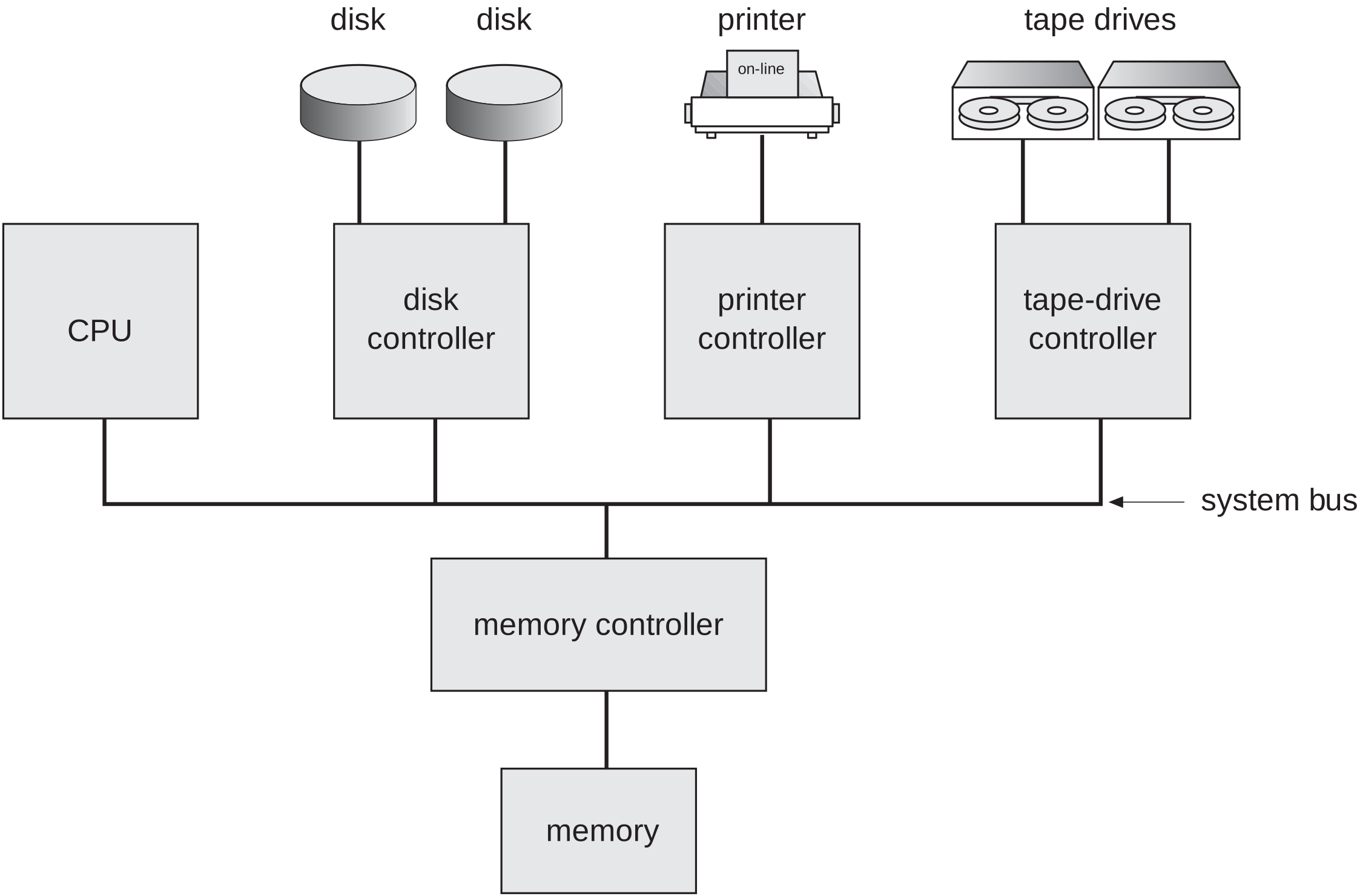
Image credit: Silberschatz and Galvin, Operating System Concepts
The key aspect is that the CPU can talk to both memory (where it gets its instructions and data) and I/O devices (like disks, tape drives, and printers). All the hardware is connected together over a common communications channel known as the system bus.

In early computers there was a single shared bus and only one device could talk at a time. Today's machines have multiple separate busses, typically PCIe for high-speed devices like graphics cards and NVMe SSDs, and USB for slower devices like keyboards and mice, with memory being connected to the CPU over its own separate bus (or busses).
-
True, but that doesn't really matter for our discussion. We can imagine a single shared bus for simplicity.
In early computers (without much, if any, of an operating system), the easiest way to work with an I/O device was to ask it to do something and then wait for it to be done.
Python pseudo-code for this would look like
def read_from_disk(diskno, sectorno):
    disk_controller.send_command(cmd="read", disk=diskno, sector=sectorno)
    while not disk_controller.is_done():
        pass
    return disk_controller.get_data()
This approach is known as busy waiting, because the program is essentially repeatedly asking, “Are we there yet?” until the disk controller says, “Yes”. Below is a timing diagram of this process.
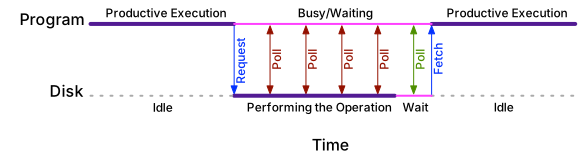
Polling Is Inefficient
The problem with busy waiting is that it's inefficient. The CPU is doing nothing while waiting for the disk controller to finish, which is a waste of CPU time that could be used to do other work.
Also, if the CPU constantly polls the I/O device, it would dominate the system bus and perhaps distract the disk controller from doing its work. So the CPU generally needs to wait a short time between polls. But now there can be a delay between when the disk controller finishes and when the CPU notices it's done. Depending on the system, it's also possible for the disk controller to be idle until the CPU notices that it's finished, thus wasting its time, too.

It would be better for the disk controller to tell the CPU when it's done, rather than the CPU constantly asking.
-
Exactly, and that's what interrupts are for.
Interrupts
An interrupt is a signal to the CPU that an event has occurred that needs immediate attention. The CPU can then stop what it's doing, save its state, and jump to a special piece of code called an interrupt handler that deals with the event.
A Clock/Timer Interrupt
Let's set aside the disk device for a moment and imagine a different device: a clock. The clock device is going to help the computer keep track of the passage of time by sending a tick interrupt to the CPU every second.
When the CPU receives the tick, it stops what it's doing, saves its state, and jumps to the interrupt handler for the clock. The interrupt handler can then update the system time and do anything else that needs to be done every second.
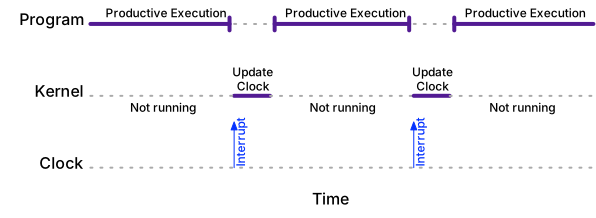
A tick interrupt is one of the simplest kinds of interrupt. We didn't do anything to cause it, and there's nothing we need to ask the clock when we get it (the clock could tell us the time, but with a tick every second, we can just keep track of the time ourselves).

In OS/161, there is a clock device that sends a tick interrupt to the CPU at 100 Hz, or 100 times a second.
-
That's right. OS/161 uses this interrupt to implement timesharing, where each process gets a slice of CPU time before the next process gets a turn.
A Disk Interrupt
Let's go back to the disk device. With interrupts, instead of our program busy waiting for the disk controller to finish, once the request is sent, the CPU can go off and do other work (i.e., the kernel can schedule another process to run). Let's call the original program “Program A” and the second “Program B.”
When the data is ready, the disk controller sends an interrupt to the CPU. The CPU stops what it's doing, saves its state, and jumps to the interrupt handler for the disk. The interrupt handler can then read the data from the disk controller.
We now have a choice, because we have two programs that are both able to run, Program A, whose data is now ready, and Program B, which was running when the interrupt happened. Which program to run next is a scheduling decision.
Trade-offs
For I/O-related interrupts like our disk example, here are some of the trade-offs:
- We want interrupt handling to be quick, not least because while we're handling one interrupt, we won't be noticing any others. So we want to resume normal execution as soon as possible.
- When a higher-priority process becomes able to run, we want it to resume running quickly.
- We want to avoid starvation, where a process never gets to run because there's always something more important to do.
Process prioritization and the decision of what to run next is the job of the process scheduler (which we'll discuss later). In timesharing systems (including Linux, macOS, Windows, and OS/161), the scheduler is invoked regularly by a timer interrupt, so there is little advantage to specifically calling the scheduler from an I/O interrupt handler.
To make interrupt handling fast, a common approach is to have the interrupt handler be as minimal as possible, grabbing data and stashing it away. If the data needs additional processing, an internal task inside the kernel (known as a tasklet in Linux) can be scheduled to do the work.
-
What if two devices send interrupts at the same time?
-
The CPU can only handle one interrupt at a time, so it has to choose which one to handle first. The choice is usually based on the priority of the interrupting device. The CPU can be programmed to ignore interrupts from devices with lower priority while it's handling an interrupt from a higher-priority device.

But that's a detail we'll mostly gloss over in this class. We'll generally just use a binary on/off approach to interrupts rather than worrying about priorities.
Polling vs. Interrupts

So interrupts are best and polling is a discardable relic of the past?
-
Not quite…
-
Sometimes, it turns out that polling is actually more efficient than interrupts.
Suppose, for example, that we're downloading an OS update that is 1 GB in size and it takes 100 seconds. If we get an interrupt for every network packet, there will be 1 million interrupts, or about 10,000 per second. That's a lot of interrupts! It might be more efficient to poll the network card every 10 ms to collect all the packets that have come in since the last poll. (We will need the network card to be able to buffer packets for us, but that's a reasonable assumption.)
-
Interrupts seem more complicated. Making programmers use them seems like a lot of work.
-
Remember, we're talking here about code inside the operating system, not in user programs. For user programs, the operating system provides an idealized machine that is synchronous, so the fact that the program was stopped and then restarted is invisible to the program.
-
Oh, right… Phew!
-
But in this class, we're writing the operating system kernel code…
-
Oh, right… Oh, dear!
Reminder: Application Code and I/O
The idealized machine that the operating system provides in the form of processes is synchronous. From a user program's perspective, a call to read just waits for the data to be ready, and then returns it. The fact that behind the scenes the program was stopped and then restarted is invisible to the program.
Deeper Dive: I/O and User Programs
That said, some user programs themselves have other work they could do while waiting for I/O. For such programs, there are a few options:
- Non-Blocking I/O: The program can ask not to be suspended while I/O happens. It can then go off and do other work and check back later to see if the I/O is done. On Unix-like systems,
- The
O_NONBLOCKflag for theopenandfcntlsystem calls sets a file descriptor to non-blocking mode (although this mode only makes a difference for “slow” devices like terminals and network connections). - The program can use the
selectorpollsystem calls to wait for I/O on multiple file descriptors at once.
- The
- Asychronous I/O: The program can ask the kernel to notify it when I/O is done. This approach mirrors the interrupt-driven approach described above, except that instead of I/O devices sending interrupts to the CPU, the kernel is sending notifications to the program. On Unix-like systems,
- The
aio_readandaio_writefunctions can be used to perform asynchronous I/O. - Like interrupts, the program can choose to receive a signal when the I/O is done (although other notification mechanisms are available).
- More can be found about this in the
aioman page in Section 7 of the Linux manual pages.
- The
These aspects are an ever-evolving landscape. For example, unsatisfied by the aio interface, the Linux community has been working on a new interface called io_uring that is more efficient and flexible. It's a good example of how the kernel evolves to meet the needs of applications programmers.

Meh. That stuff about
aio_readwon't be on the test, right?-
These are advanced facilities. It's good to know they exist, but we're not going to make you use or implement them in this class.
(When logged in, completion status appears here.)