Parallelism vs. Concurrency

We've spent a lot of time talking about concurrency, but I've also heard people use the term “parallelism”. What's the difference?

Good question! Let's define some terms…
Definitions

This'll help. I know being precise about terms is important in computer science, but people don't always lay out the definitions.
Asynchrony
Literally, asynchrony means “not at the same time”. In programming, it means that we can set an action in motion then move on to the next action before the first one completes. We don't have to wait for the first action to finish before starting the next one.
In asychronous programming, we usually need some mechanism to deal with what happens once an asynchronous action finally does complete. As we've seen, in JavaScript, for example, we can use a Promise to represent the eventual completion of an asynchronous operation, and the then method to attach an action to be taken when the Promise is resolved.
In other aynchronous systems, we might have some kind of notification receiver that is triggered when the asynchronous action completes.
In operating systems like OS/161, we can also consider interrupts as a form of asynchrony. They tell us about something that happened while we were doing something else.
Concurrency
Concurrency is about overlapping durations. Two actions are concurrent if their durations overlap in time, but they don't have to literally happen at once.

I'm taking CS 134 and CS 140 concurrently.
-
That doesn't mean you're working on them simultaneously.
-
Exactly.
Concurrency problems often involve arbitrating access to shared resources among actions that are happening concurrently.
Synchronization mechanisms are about controlling concurrency, especially access to shared data. In other words, saying, “No, two things can't happen at the same time”, or, “Yes, two things can happen at the same time, but only if they follow these rules”.
Simultaneity
Simultaneity is about literally doing multiple actions at the same time. For simultaneity to occur, there must be multiple execution engines (e.g., processor cores) running code at the same time.
Some people call running multiple things simultaneously “running in parallel” or even call it “parallelism,” but in this class we'll use a more precise definition of parallelism.
Parallelism
Parallelism means taking advantage of multiple execution engines (e.g., CPU cores) to achieve speedup by doing some work simultaneously.
Note that simultaneity implies one form of concurrency, but a system with N actions to perform might only run M of them simultaneously (where M < N), so we will only know that some of the actions will run concurrently but we may not know which ones, and, in this scenario, some actions will not run concurrently.
Contention over accessing shared resources is the enemy of speedup.
Summary
Here's a video that explains the difference between concurrency and parallelism:
Techniques for Parallelism
Isolated Tasks
Consider the task of compiling OS/161 from scratch. When we run bmake, it's going to run lots of gcc commands, one to compile each source file.
- Each compilation command is an isolated task that can be run in parallel with the others.
- Because each compilation command is working on a different source file, they don't need to share any data.
- It's not required for any two specific compilation commands to run simultaneously, but it's okay if they do.
- No compilation command needs to happen before or after any other
gcccompilation command. - We cannot link the final executable (which also uses
gcc) until all the object files are created by the compilation.
The Idea of a Work Queue
One way to manage parallelism is to have a work queue that holds tasks that need to be done. We can have multiple worker threads that each take tasks from the work queue and do them.
Example: bmake
A program such as bmake can use the standard Unix facilities like fork, exec and waitpid along with an internal queue to manage parallelism. The pseudocode might look something like
const int MAX_WORKERS = 4;
int num_workers = 0;

while (more work to do) {
    if (num_workers < MAX_WORKERS) {
        fork a compiler process;
        num_workers++;
    } else {
        wait for a compilation task to finish;
        num_workers--;
    }
}

while (num_workers > 0) {
    wait for a compilation task to finish;
    num_workers--;
}
Example: Go
In Go, when we say go functionName(), we're creating a new goroutine to run the function, and it starts immediately.
It's fairly straightforward to create a work queue in Go. Here's an example:
package main

import (
    "fmt"
    "math/rand"
    "runtime"
    "sync"
    "time"
)

// Task represents a generic task to be executed
type Task func() Result

// Result represents the result of processing a task
type Result struct {
    filename string
    duration time.Duration
}

// generateImage creates a random image
func generateImage(filename string, width, height int) Task {
    return func() Result {
        // We'll just fake this...
        delay := time.Duration(rand.Intn(750)+250) * time.Millisecond
        time.Sleep(delay)
        return Result{filename, delay}
    }
}

// processImage applies a simple filter to the image
func processImage(filename string) Task {
    return func() Result {
        // We'll just fake this...
        delay := time.Duration(rand.Intn(750)+250) * time.Millisecond
        time.Sleep(delay)
        return Result{filename, delay}
    }
}

func worker(id int, tasks <-chan Task, results chan<- Result, wg *sync.WaitGroup) {
    defer wg.Done()
    for task := range tasks {
        fmt.Printf("Worker %d processing new task...\n", id)
        results <- task()
    }
}

const MAX_WORKERS = 4

func executeTasks(tasks []Task) time.Duration {
    numWorkers := runtime.NumCPU()
    if numWorkers > MAX_WORKERS {
        numWorkers = MAX_WORKERS
    }
    tasksChan := make(chan Task, len(tasks))
    resultsChan := make(chan Result, len(tasks))

    // Fill task channel
    for _, task := range tasks {
        tasksChan <- task
    }
    close(tasksChan)

    // Start worker pool
    var wg sync.WaitGroup
    for i := 0; i < numWorkers; i++ {
        wg.Add(1)
        go worker(i, tasksChan, resultsChan, &wg)
    }

    // Wait for all workers to finish
    go func() {
        wg.Wait()
        close(resultsChan)
    }()

    // Collect results
    var totalDuration time.Duration
    for result := range resultsChan {
        fmt.Printf("Processed %s in %v\n", result.filename, result.duration)
        totalDuration += result.duration
    }

    return totalDuration
}

func main() {
    numImages := 20
    var generateTasks []Task
    var processTasks []Task

    // Create image generation tasks
    for i := 0; i < numImages; i++ {
        filename := fmt.Sprintf("image_%d.png", i)
        generateTasks = append(generateTasks, generateImage(filename, 1000, 1000))
    }

    // Execute image generation tasks
    fmt.Println("Generating images...")
    genDuration := executeTasks(generateTasks)
    fmt.Printf("All images generated in %v\n", genDuration)
    fmt.Printf("Average time per image generation: %v\n", genDuration/time.Duration(numImages))

    // Create image processing tasks
    for i := 0; i < numImages; i++ {
        filename := fmt.Sprintf("image_%d.png", i)
        processTasks = append(processTasks, processImage(filename))
    }

    // Execute image processing tasks
    fmt.Println("\nProcessing images...")
    procDuration := executeTasks(processTasks)
    fmt.Printf("All images processed in %v\n", procDuration)
    fmt.Printf("Average time per image processing: %v\n", procDuration/time.Duration(numImages))

    fmt.Printf("\nTotal time: %v\n", genDuration+procDuration)
}
For brevity, we've removed the actual image generation and processing code from the example, but if you'd like to check that out, you can download the full code and run it on the CS 134 server. (Note that this full version can't run in Online GDB because the image files generated would use too much space and can't be viewed anyway.)

Meh. I don't want to read all that, can you break it down for me?
-
Sure…
Things to notice about the code:
- We've made a
Tasktype that represents a generic task to be executed, it's an anonymous function that returns aResult.Resultis a struct that holds the filename of the image and the duration of the task, but we could have made it anything we wanted.
- We have two functions,
generateImageandprocessImage, that create tasks to generate and process images, respectively.- The syntax looks a little strange because these are functions that return functions.
- We have a
workerfunction that takes tasks from a channel, executes them, and sends the results to another channel.- We create a fixed number of
workergoroutines to process the tasks.
- We create a fixed number of
- We have a
executeTasksfunction that manages the work queue.- It creates channels for tasks and results, fills the task channel, starts the worker pool, and collects the results.
- In
main, we create tasks to generate and process images, execute the tasks, and print out the results.
The code is a bit more complex than the previous examples, but it's a good example of how you can manage parallelism in Go using goroutines and channels.
-
It's another example of the power of the CSP model. We're using channels to communicate between goroutines, and we're able to manage parallelism in a way that's relatively easy to understand.
-
For you, maybe…
-
We won't have to code something like this, will we?
-
We won't expect you to write Go code in CS 134, but other problems you've worked on are at least as complex as this one. As far as principles go, it's not so out of reach.
-
Okay, I guess you're right.
Example: Swift
Here's very similar code in the language Swift, which has a TaskGroup concept that makes it easier to manage tasks and their results. We create a TaskGroup with withTaskGroup and add tasks to it with addTask. Calling waitForAll waits for all the image-creation tasks to complete before moving on to the image-processing tasks.
So Swift allows us to run tasks in parallel without having to build the infrastructure ourselves.
import Foundation

// Image creation simulation
func createImage(index: Int) async {
    print("Creating image \(index)")
    // Simulate I/O-bound image creation
    let startTime = Date()
    let waitTime = Double.random(in: 0.75...1.5)
    while Date().timeIntervalSince(startTime) < waitTime {
        // Busy-wait to simulate I/O-bound work
    }
    print("Finished creating image \(index)")
}

// Image processing simulation
func processImage(index: Int) async {
    print("Processing image \(index)")
    // Simulate CPU-bound image processing
    let startTime = Date()
    let waitTime = Double.random(in: 0.75...2.0)
    while Date().timeIntervalSince(startTime) < waitTime {
        // Busy-wait to simulate CPU-bound work
    }
    print("Finished processing image \(index)")
}

func processImages(totalCount: Int) async {
    await withTaskGroup(of: Void.self) { group in
        for i in 0..<totalCount {
            group.addTask {
                await createImage(index: i)
            }
        }
        // Wait for all images to be created
        await group.waitForAll()
        for i in 0..<totalCount {
            group.addTask {
                await processImage(index: i)
            }
        }
    }
    print("All images processed")
}

// Entry point
print("Running Image Processing Example:")

// Create a semaphore to wait for the async task to complete
let completionSemaphore = DispatchSemaphore(value: 0)

Task {
    await processImages(totalCount: 20)
    completionSemaphore.signal()
}

// Wait for the async task to complete
completionSemaphore.wait()

print("Done")
-
Why do you keep showing us all these different languages?
-
Well, you don't need to deeply understand the syntax and operation of each language, but seeing the same concept implemented in different languages is useful—it helps us understand the principles behind the code, rather than just the syntax. Another example is that you can see that Swift blends the idea of tasks with asynchrony via
async/await, where the Go code doesn't have asynchronous tasks. 
It also helps show that these concepts aren't isolated to one language. They're increasingly prevalent in modern programming languages.
-
Meh. Only took, like, 50 years.

Hay! I noticed that the Swift code doesn't have any explicit limit on how many things run at once.
-
That happens automagically in Swift. The runtime decides how many tasks to run at once based on the system's capabilities. That's probably what you would want, but Swift does the work of profiling the system and figuring out the best balance for you.

If you wanted to have more control, I've written a version of the Swift code that limits the number of tasks running at once. All we needed to do was add a semaphore. I wrote my own using Swift's “actor” feature—actors are a lot like the Monitor objects we saw earlier. It even uses continuations!
-
Uh, thanks, Rabbit. That's… great. But perhaps we don't need to go down that rabbit hole right now.
Rules for Isolated Tasks
-
You said the tasks should be isolated so they could run in parallel. Do they really need to share no data at all?
-
Well, technically, what we actually want is to have no data dependencies between the tasks.
If we want to make sure that two tasks won't interfere with each other, we can use Bernstein's conditions:
Given two tasks, \(T_1\) and \(T_2\), with
- Read sets \(R_1\) and \(R_2\) (the data they read), and
- Write sets \(W_1\) and \(W_2\) (the data they write),
we can run the tasks in parallel if
- \(R_1 \cap W_2 = \emptyset\) and \(W_1 \cap R_2 = \emptyset\) — they don't read each other's writes; and
- \(W_1 \cap W_2 = \emptyset\) — they don't write to the same data.

These seem like the obvious things to check, but it's good to have a name for them.
-
They're named after Arthur J. Bernstein, who wrote a paper in 1966 that laid out these conditions for the first time. And, yes, they are pretty straightforward.
-
Meh. I guess in 1966, it was easy to get your name on something.
Limitations of Parallelism
Oftentimes, some of the work can be split up and done in parallel, but some of it can't. For example, in the case of compiling OS/161, we can compile each source file in parallel, but we can't link the final executable until all the object files are created.
Amdahl's Law
Amdahl's Law is a formula that tells us how much speedup we can get from parallelizing a program. It's named after Gene Amdahl, who worked on the IBM 360 mainframe.
The formula is $$ \text{Speedup} = \frac{1}{(1 - f) + \frac{f}{n}}, $$
where
- \(f\) is the fraction of the task that can be parallelized.
- \(n\) is the number of cores.
Speedup Calculator
Speedup: 2
Play with the sliders to see how the speedup changes as you vary the fraction of the task that can be parallelized and the number of cores.
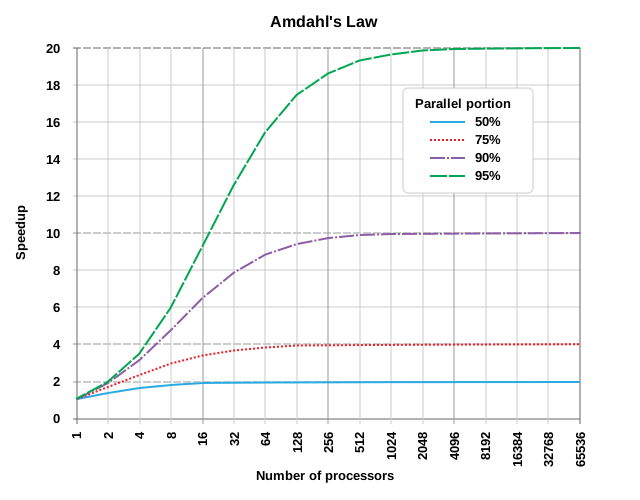
Image credit: Daniels220 via Wikimedia Commons (CC BY-SA 3.0).
-
Meh. Amdahl's Law means you shouldn't even try to parallelize things.
-
Well, not quite. It's a reminder that we can't just throw more cores at a problem and expect it to get faster. We need to think about how much of the work can be parallelized.
-
Actually, Amdahl's Law is pessimistic because it assumes that the amount of work is fixed. In reality, we can often increase the amount of work to take advantage of more cores and the serial portion remains about the same, so it becomes less significant. There's another law, Gustafson's Law, that takes this into account.
-
But let's not go too far down that rabbit hole right now.
But the big lesson is that when we want to paralellize things, we want as little coordination between the parallel tasks as possible. The more coordination we need, the less speedup we'll get. That's why the golden rule of parallelism is
- Make your tasks as independent as possible.
When to Use Which?
- Use concurrency when
- You need precise control over the execution of multiple threads or processes.
- You're dealing with shared resources that require careful synchronization.
- You need multiple things to be happening over the same time period.
- Use asynchrony when
- You're dealing with I/O-bound operations (e.g., network requests or file operations).
- You want to keep a user interface responsive while waiting for a long-running operation to complete.
- Use parallelism when
- You have multiple cores available and want to speed up your program by running parts of it simultaneously (but not necessarily all parts at once).
- You can break your work into independent tasks that can be run in parallel.
Takeaways
- Concurrency is about overlapping durations.
- Asynchrony is about not waiting for an action to complete before starting the next one.
- Parallelism is about running multiple things simultaneously to achieve speed-up*.
- Simultaneity is about literally doing multiple actions at the same time.
- Isolated tasks can be run in parallel, but don't need to be.
- They could be separate processes, or
- Chunks of work handled in a single process.
- Should obey Bernstein's conditions.
- Work queues can be used to manage parallelism.
- They're built into some languages, like Swift.
- In other languages, like Go, you might need to build your own.
(When logged in, completion status appears here.)