Page Replacement
If we redraw our view of Neovim's pages, this time showing not when a page was loaded but when it was last needed, we get a different picture:

Wow! A ton of these pages were used when Neovim loaded but weren't needed afterwards.

That's right.

Hay! This isn't the same picture I saw on the last page. What's going on here?
-
To get the information needed to draw this diagram, I switched to using the CS 134 server, which is a 64-bit machine. In this case, there are 1185 pages (4.6 MB) of code loaded for Neovim, of which we only actually needed 123 pages (492 KB), so, again, 90% of Neovim's pages were never used.

Also, of those 123 pages, 93 of them (75%) weren't touched after Neovim had been running for 20 seconds.
Page Traces
To further explore the idea of page replacement, we could look at a page trace—the sequence of pages that were needed over time. Unfortunately, the page trace for Neovim is too large for us to explore here (~43,305 page accesses!), so we'll look at a page trace from the ls program (only 1013 page accesses).
Here's a complete page trace of all the instruction-fetch accesses from the ls code itself (ignoring library calls).
2, 0, 20, 1, 14, 2, 0, 5, 1, 13, 4, 0, 5, 1, 6, 2, 12, 0, 1, 13, 5, 6, 0, 19, 7, 14, 15, 0, 19, 20, 12, 13, 7, 8, 0, 19, 14, 15, 7, 0, 19, 20, 12, 13, 7, 8, 0, 19, 14, 15, 7, 0, 19, 20, 12, 13, 7, 8, 0, 19, 14, 15, 7, 0, 19, 20, 12, 13, 7, 8, 0, 19, 14, 15, 7, 0, 19, 20, 12, 13, 7, 8, 0, 19, 14, 15, 7, 0, 19, 20, 12, 13, 7, 8, 0, 19, 14, 15, 7, 0, 19, 20, 12, 13, 7, 8, 0, 19, 14, 15, 7, 0, 19, 20, 12, 13, 7, 8, 0, 19, 14, 15, 7, 0, 19, 20, 12, 13, 7, 8, 0, 19, 14, 15, 7, 0, 19, 20, 12, 13, 7, 8, 0, 19, 14, 15, 7, 0, 19, 20, 12, 13, 7, 8, 0, 19, 14, 15, 7, 0, 19, 20, 12, 13, 7, 8, 0, 19, 14, 15, 7, 0, 19, 20, 12, 13, 7, 8, 0, 19, 14, 15, 7, 0, 19, 20, 12, 13, 7, 8, 0, 19, 14, 15, 7, 0, 19, 20, 12, 13, 7, 8, 0, 19, 14, 15, 7, 0, 19, 20, 12, 13, 7, 8, 0, 19, 14, 15, 7, 0, 19, 20, 12, 13, 7, 8, 0, 19, 14, 15, 7, 0, 19, 20, 12, 13, 7, 8, 0, 19, 14, 15, 7, 0, 19, 20, 12, 13, 7, 8, 0, 19, 14, 15, 7, 0, 19, 20, 12, 13, 7, 8, 0, 19, 14, 15, 7, 0, 19, 20, 12, 13, 7, 8, 0, 19, 14, 15, 7, 0, 19, 20, 12, 13, 7, 8, 0, 19, 14, 15, 7, 0, 19, 20, 12, 13, 7, 8, 0, 19, 14, 15, 7, 0, 19, 20, 12, 13, 7, 8, 0, 19, 14, 15, 7, 0, 19, 20, 12, 13, 7, 8, 0, 19, 14, 15, 7, 0, 19, 20, 12, 13, 7, 8, 0, 19, 14, 15, 7, 0, 19, 20, 12, 13, 7, 8, 0, 19, 14, 15, 7, 0, 19, 20, 12, 13, 7, 8, 0, 19, 14, 15, 7, 0, 19, 20, 12, 13, 7, 8, 0, 19, 14, 15, 7, 0, 19, 20, 12, 13, 7, 8, 0, 19, 14, 15, 7, 0, 19, 20, 12, 13, 7, 8, 0, 19, 14, 15, 7, 0, 19, 20, 12, 13, 7, 8, 0, 19, 14, 15, 7, 0, 19, 20, 12, 13, 7, 8, 0, 19, 14, 15, 7, 0, 19, 20, 12, 13, 7, 8, 0, 19, 14, 15, 7, 0, 19, 20, 12, 13, 7, 8, 0, 19, 14, 15, 7, 0, 19, 20, 12, 13, 7, 8, 0, 19, 14, 15, 7, 0, 19, 20, 12, 13, 7, 8, 0, 19, 14, 15, 7, 0, 19, 20, 12, 13, 7, 8, 0, 19, 14, 15, 7, 0, 19, 20, 12, 13, 7, 8, 0, 19, 14, 15, 7, 0, 19, 20, 12, 13, 7, 8, 0, 19, 14, 15, 7, 0, 19, 20, 12, 13, 7, 8, 0, 19, 14, 15, 7, 0, 19, 20, 12, 13, 7, 8, 0, 19, 14, 15, 7, 0, 19, 20, 12, 13, 7, 8, 0, 10, 16, 7, 4, 6, 0, 10, 13, 12, 11, 0, 9, 20, 10, 16, 0, 7, 8, 10, 20, 12, 4, 0, 9, 20, 10, 16, 0, 7, 8, 10, 20, 12, 4, 0, 9, 20, 10, 16, 0, 7, 8, 10, 20, 12, 0, 9, 10, 16, 7, 8, 20, 12, 4, 0, 9, 20, 10, 16, 0, 7, 8, 10, 20, 12, 4, 0, 9, 20, 10, 16, 0, 7, 8, 10, 20, 12, 0, 9, 10, 16, 7, 8, 20, 12, 4, 0, 9, 20, 10, 16, 0, 7, 8, 10, 20, 12, 4, 0, 9, 20, 10, 16, 0, 7, 8, 10, 20, 12, 0, 9, 10, 16, 7, 8, 20, 12, 4, 0, 9, 20, 10, 16, 0, 7, 8, 10, 20, 12, 4, 0, 9, 20, 10, 16, 0, 7, 8, 10, 20, 12, 0, 9, 10, 16, 7, 8, 20, 12, 4, 0, 9, 20, 10, 16, 0, 7, 8, 10, 20, 12, 4, 0, 9, 20, 10, 16, 0, 7, 8, 10, 20, 12, 0, 9, 10, 16, 7, 8, 20, 12, 4, 0, 9, 20, 10, 16, 0, 7, 8, 10, 20, 12, 4, 0, 9, 20, 10, 16, 0, 7, 8, 10, 20, 12, 0, 9, 10, 16, 7, 8, 20, 12, 4, 0, 9, 20, 10, 16, 0, 7, 8, 10, 20, 12, 4, 0, 9, 20, 10, 16, 0, 7, 8, 10, 20, 12, 0, 9, 10, 16, 7, 8, 20, 12, 4, 0, 9, 20, 10, 16, 0, 7, 8, 10, 20, 12, 4, 0, 9, 20, 10, 16, 0, 7, 8, 10, 20, 12, 0, 9, 10, 16, 7, 8, 20, 12, 4, 0, 9, 20, 10, 16, 0, 7, 8, 10, 20, 12, 4, 0, 9, 20, 10, 16, 0, 7, 8, 10, 20, 12, 0, 9, 10, 16, 7, 8, 20, 12, 4, 0, 9, 20, 10, 16, 0, 7, 8, 10, 20, 12, 4, 0, 9, 20, 10, 16, 0, 7, 8, 10, 20, 12, 0, 9, 10, 16, 7, 8, 20, 12, 4, 0, 9, 20, 10, 16, 0, 7, 8, 10, 20, 12, 4, 0, 9, 20, 10, 16, 0, 7, 8, 10, 20, 12, 0, 9, 10, 16, 7, 8, 20, 12, 4, 0, 9, 20, 10, 16, 0, 7, 8, 10, 20, 12, 4, 0, 9, 20, 10, 16, 0, 7, 8, 10, 20, 12, 0, 9, 10, 16, 7, 8, 20, 12, 4, 0, 9, 20, 10, 16, 0, 7, 8, 10, 20, 12, 4, 0, 9, 20, 10, 16, 0, 7, 8, 10, 20, 12, 0, 9, 10, 16, 7, 8, 20, 12, 4, 0, 9, 20, 10, 16, 0, 7, 8, 10, 20, 12, 0, 9, 10, 16, 7, 8, 20, 12, 4, 0, 9, 20, 10, 16, 0, 7, 8, 10, 20, 12, 0, 1, 7, 2, 20
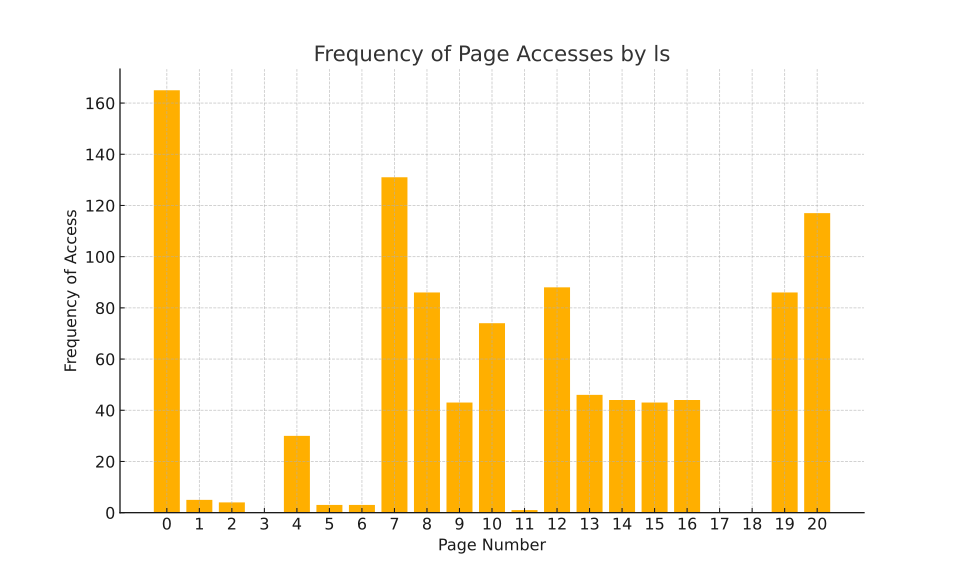
We can visualize this page trace in a couple of ways. First, we could look at how often each page was accessed:
-
Yeah, I can totally see that pages 3, 17, and 18 are never accessed.

And 1, 2, 5, 6, and 11 are pretty unloved, too.

And page 0 gets MORE access than any other page!
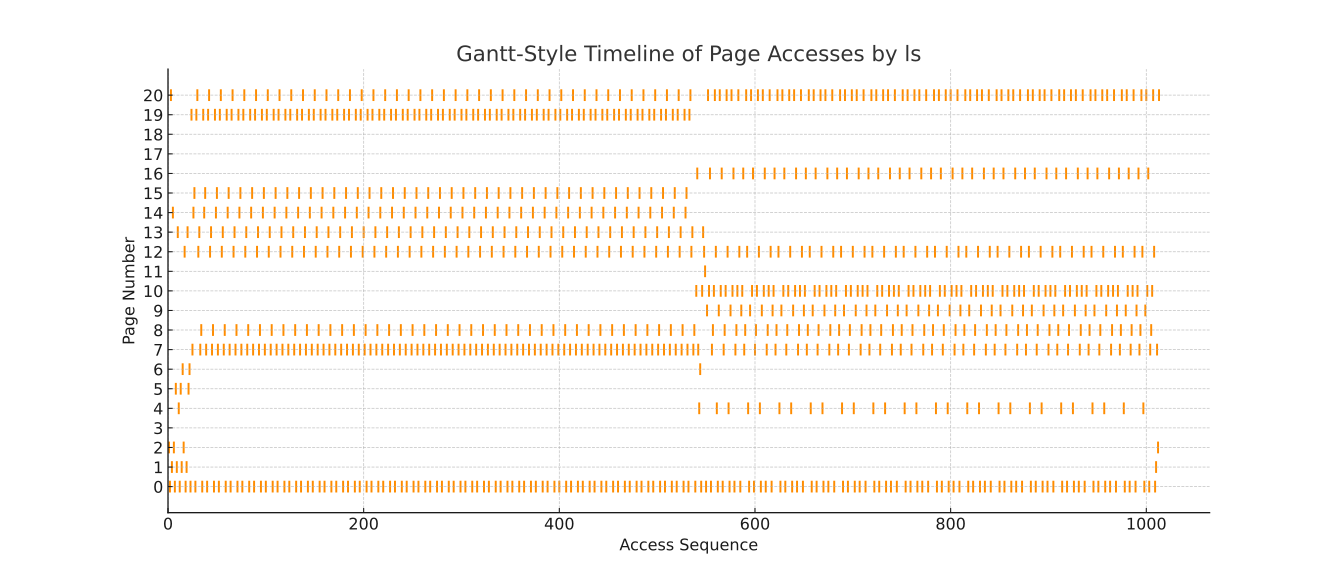
The graph makes it clear that some pages are accessed a lot, while others are accessed very infrequently or not at all. But a timeline view can also be helpful:
-
Whoa! You can totally see there's, like, a phase change halfway through this trace.

You know, I think
lsmight be able to live in about 10 pages of memory.-
But then we'd need a strategy for deciding which pages to keep in memory and which to evict.
Page-Replacement Strategies
Let's look at a few different strategies for deciding which page to replace when a new page is needed and there's not enough unused memory to load it.
First-In, First-Out (FIFO)
First-In, First-Out (FIFO) is the simplest page-replacement strategy. When a page needs to be replaced, the page that has been in memory the longest is chosen.
Below is a page-replacement simulator that runs our trace from ls using our chosen page-replacement strategy.
The diagram shows all the frames of physical memory in the system.
- Initially, all frames are empty, and colored gray.
- When a page is loaded into a frame, it changes color, shifting from
- light blue when it is first loaded, to
- purple when it has been in a frame a long time.
You can move forward through the trace by clicking the button to see the next page access, or you can use the button to skip ahead to the next page fault. (And then try to determine which page will be replaced yourself!). You can also adjust the long horizontal slider to jump to any specific point in the trace.
Visualization of Page Replacement
Next Page: XX
Status: Message
Total page faults: 0
FIFO Investigation

There are some long runs where no page faults occur. That's interesting.
-
So we can say that much of the time, the pages in memory are sufficient to handle the page accesses. So even though there are 21 possible pages, we don't do too badly with just 10 frames of memory to hold them.
-
I wonder what would happen if we changed the number of frames.
-
Let's find out.
Click the button below to enable more controls, including the ability to change the number of frames (and the page-replacement strategy, although right now we're only using FIFO).
Clicking this button also enables something else: A glimpse of the future! In the bottom-right corner of each frame, you'll see an indication of when its contents will be needed next. The square's color ranges between
- light green when it will be needed soon; and
- brown when it will be needed later.
-
Whoa! Dropping below 8 frames really makes the number of page faults skyrocket.
When a program has too few frames and the number of page faults increases dramatically, we say that the program is thrashing. The system is spending so much time swapping pages in and out of memory that it's not getting any real work done.
-
That glimpse into the future is really helpful. It shows that just because a page has been in memory a long time doesn't mean it's no longer needed. I think we should try for a better strategy.
Optimal Page Replacement
Click the button below to enable the optimal page-replacement strategy. This strategy replaces the page that won't be needed for the longest time.
The button also adds a second indicator to the frames. In the bottom-left corner of each frame, you'll see a small square whose color ranges between
- light green was last accessed recently; and
- brown was last accessed a long time ago.
Now go back to the simulator, use the dropdown to select the optimal strategy, and see how Optimal compares to FIFO.
-
Optimal is so much better than FIFO! It's like magic!
-
With 8 frames, it manages 117 page faults, which is way better than FIFO's 416.
-
Yes, but it's a bit too magical. In real life we can't see into the future.

Speak for yourself!
-
Hay! I noticed something. Scrubbing back and forward with the step slider, I noticed that the color for the “past” square and the color for the “future” square are often the same. Not always, but a lot. I think we could use that.
Least Recently Used (LRU)
Based on the idea that the future might often resemble the past, we can use the Least Recently Used (LRU) strategy. This strategy replaces the page that hasn't been accessed for the longest time.
Click the button below to enable the LRU page-replacement strategy (along with two others, Least Frequently Used and Random).
This time, set the number of frames to 11 and contrast LRU with FIFO and Optimal.
You can also look at the least frequently used (LFU) strategy, which (inspired by the histogram from earlier) replaces the page that has been accessed the fewest times overall. LFU “sounds a bit like” LRU, but it's a different strategy, and it's important to understand just how different it is.
-
I think I like LRU the best. It's close enough to Optimal, but without the future-seeing magic.
-
OMG, LFU is terrible! It's like it's trying to be bad. It's too weighted down by the past. When we hit the phase change in the middle, it does everything wrong—not replacing the pages that are no longer needed because they were accessed a lot in the past and throwing out the new pages that are just starting to be accessed.
-
I guess just because two terms sound a bit alike doesn't mean they're similar. LRU and LFU are very different.

And Random, well, that's just dumb. It's worse than FIFO! Meh.
-
Actually, let's not judge Random too harshly yet…
Pathological Cases
So far, we've looked at a real page stream from the ls command. But what if we had a pathological case, a page stream that was designed to make a particular strategy look bad?
-
I see it. If we have 11 pages and 10 frames, and we access them in order, LRU will replace a page every time because the page we need next will always be the one we just evicted.
-
Whoa! That's terrible! LRU is so bad in that case.
-
Can we see it in the simulator?
-
We can!
Click the button below to enable an option that provides a sequential page stream that will make LRU perform poorly. Then go back to the simulator and see how LRU does.
-
Whoa! LRU is basically acting exactly the same as FIFO, and both are terrible.

FWIW,
posix_madvisehas an optionPOSIX_MADV_SEQUENTIALthat tells the system that we're going to access pages in order.-
That's kinda weird. “Our regular algorithm actually can't handle this pathological case, so, uh, please tell us in advance if you're going to do it.”
-
Meh. Classic worse is better.
-
Hmm… what really intrigues me is how Random performs…
-
Meh. Are we done? I need to page out of here.
-
There's more to learn, but we've reached a good stopping point for now.
(When logged in, completion status appears here.)