Module 03.2: Haskell Data Types, Pattern Matching, and Type Classes
Module 03.1 gave us lists and tuples, Haskell's built-in ways to group data. Now we take a much bigger step:
We are going to define our own kinds of data.
That sounds simple, but it is one of the most important moves in the course. Once we can define the shape of data ourselves, we can model things like shapes, thermostat states, animals, trees, cards, and eventually even programs themselves.
That last point is worth keeping in the back of your mind:
code is data
We are not quite there yet, but this module lays the foundation.
By the end of this module, you should be able to:
- define a new Haskell data type using
data, - distinguish a type from its constructors,
- explain the difference between constructors that carry no data and constructors that carry associated values,
- use pattern matching to write functions over your own data types,
- explain how constructor functions fit the idea that functions are values,
- define and work with recursive data types,
- recognize the connection between the recursive structure of data and the recursive structure of functions,
- explain what a Haskell type class is,
- use
derivingwith common type classes such asShow,Eq,Ord, andRead, and - distinguish Haskell data types and type classes from object-oriented classes.
How to use this module
When you see a box labeled Gradescope question, answer that question in the Module 3.2 Completion assignment on Gradescope.
When you see Try it in ghci or Pause and think, the activity is there to help you understand the material. There is nothing to submit for those boxes unless the box explicitly says Gradescope question.
A Design Problem: Representing Shapes
Suppose we want to represent three kinds of shapes:
- circles,
- squares,
- right triangles.
Each shape has a position in the plane, represented by (x,y), plus whatever dimensions are needed to describe it.
We also want to support two operations:
- compute the area, and
- shift the shape by some
(Δx, Δy).
This is not yet a Haskell problem. It is a representation-design problem.
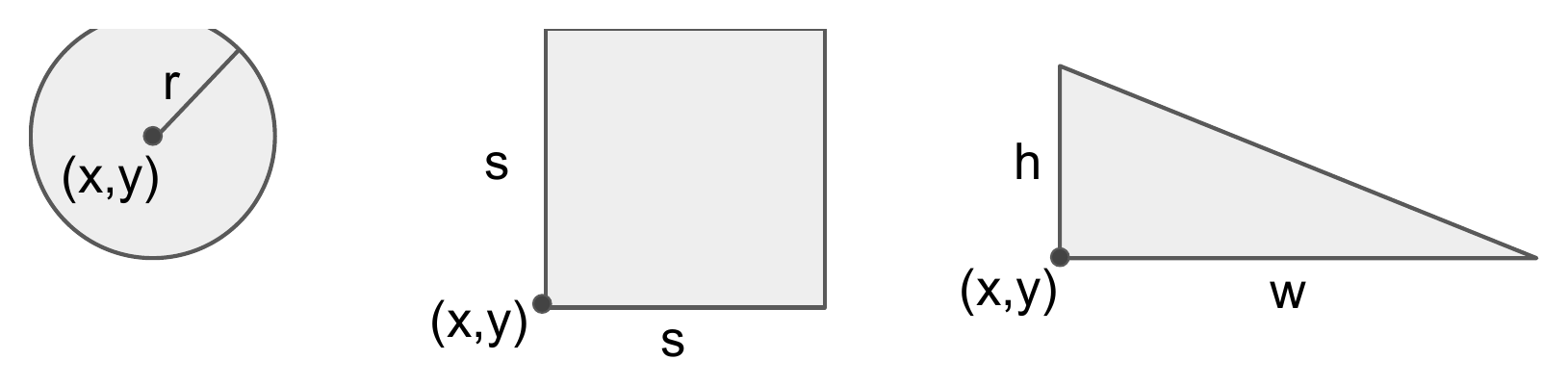
Each kind of shape needs a position plus its own set of dimensions.
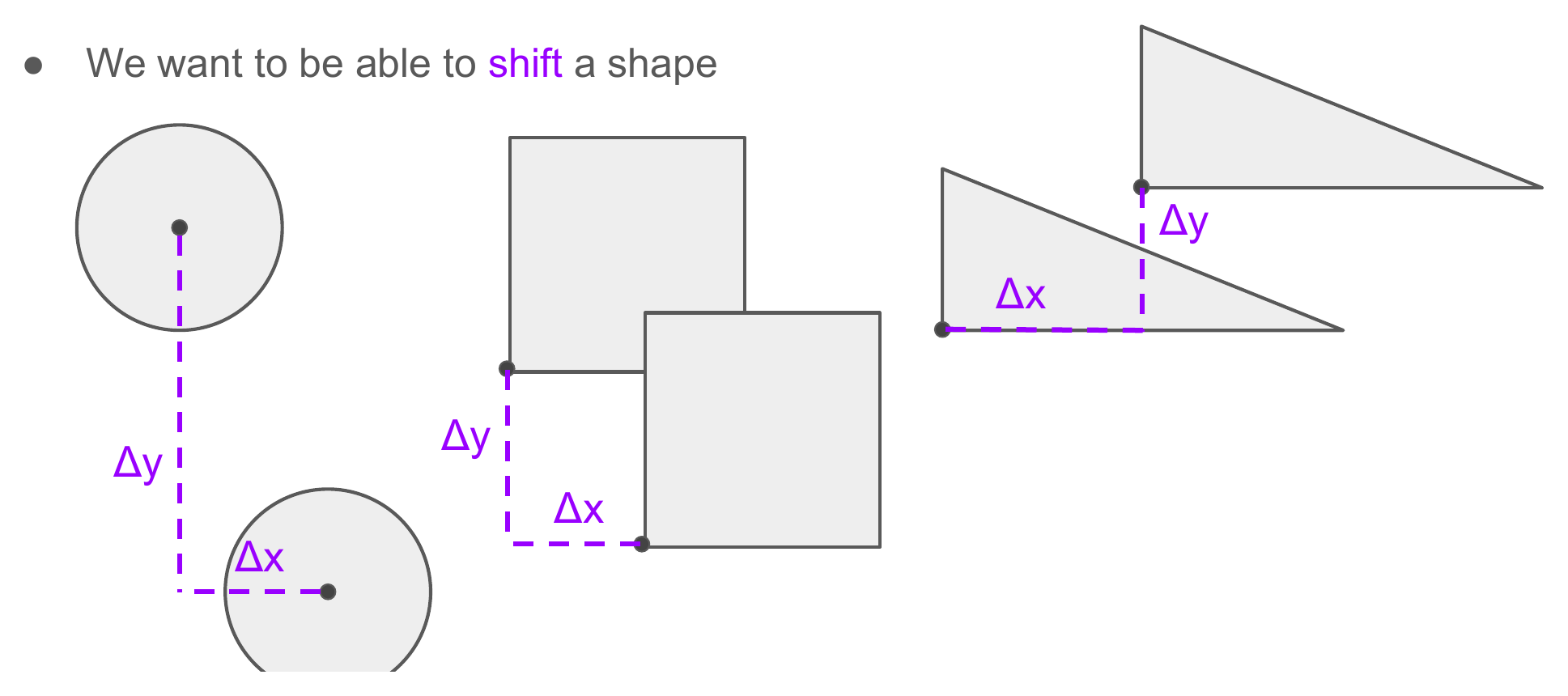
Shifting a shape means moving its position by (Δx, Δy) while keeping its dimensions unchanged.
Gradescope question: Object-oriented design sketch
Submit this response on Gradescope.
Describe your solution sketch for representing Circles, Squares, and Right Triangles, along with shift and area, using object-oriented thinking.
You do not need polished code. The goal is to make the design idea explicit before seeing a Haskell version.
One object-oriented approach
A natural object-oriented design is to define a base Shape class containing the common position, then subclasses for the different kinds of shape.
Conceptually:
Shape
  x
  y
  shift(dx, dy)
  area()

Circle : Shape
  radius

Square : Shape
  side

RightTriangle : Shape
  base
  height
The base class can provide the shared shifting behavior, while each subclass provides the appropriate implementation of area.
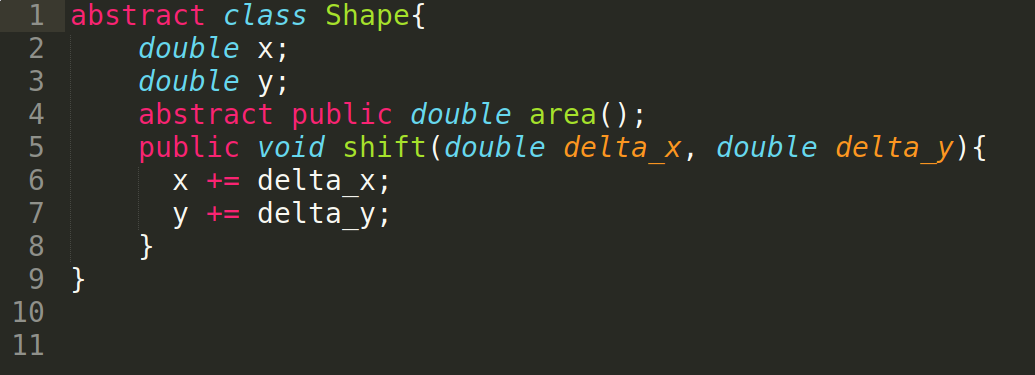
The base Shape class holds the shared position and the shared shift behavior; area is left abstract.
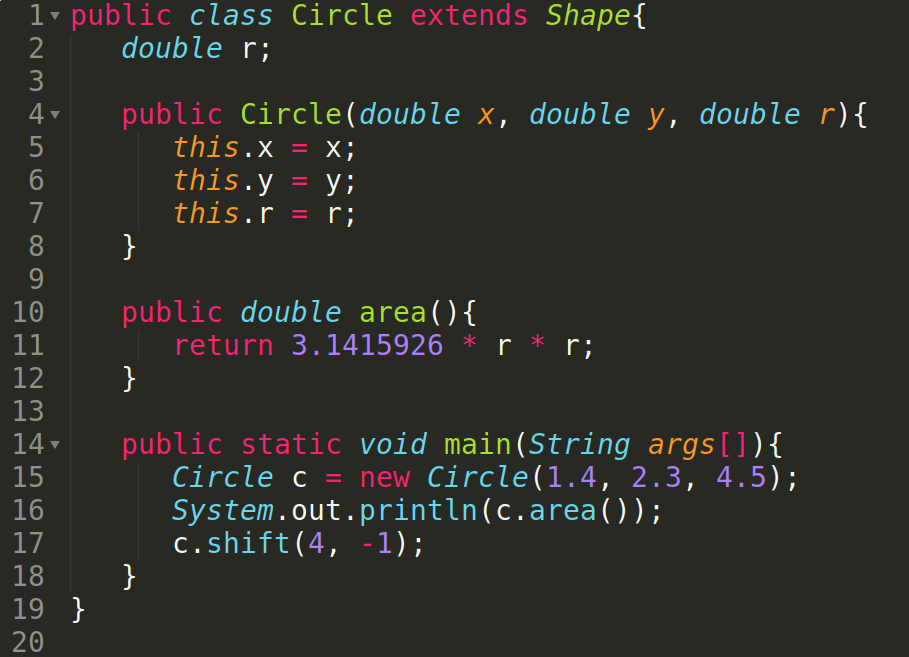
Each subclass supplies its own area. Square and RightTriangle follow the same shape.
The essential object-oriented perspective is:
A shape object knows which kind of shape it is, stores its own data, and knows how to perform operations such as
areaandshift.
Now let's solve the same problem in a functional style.
A Functional Representation: Define the Data First
In Haskell, we can define a new type using the data keyword:
data Shape
  = Circle Double Double Double
  | Square Double Double Double
  | RightTriangle Double Double Double Double
  deriving Show
Read this as:
A value of type
Shapeis either aCircle, aSquare, or aRightTriangle.
Each line beginning with Circle, Square, or RightTriangle is a constructor.
Here the constructors carry enough values to represent position and dimensions:
Circle        x y radius
Square        x y side
RightTriangle x y base height
For example:
c = Circle 1.0 2.0 4.5
s = Square 0.0 0.0 3.0
t = RightTriangle 2.0 5.0 3.0 4.0
All three values have type:
Shape
even though they were built using different constructors.
Functions operate across the constructors
Now we define a function that knows what to do with each possible shape:
area :: Shape -> Double
area shape =
  case shape of
    Circle _ _ r             -> pi * r * r
    Square _ _ s             -> s * s
    RightTriangle _ _ b h    -> 0.5 * b * h
The pattern tells us:
- which constructor was used, and
- what associated values it contains.
Similarly:
shift :: Shape -> Double -> Double -> Shape
shift shape dx dy =
  case shape of
    Circle x y r ->
      Circle (x + dx) (y + dy) r

    Square x y s ->
      Square (x + dx) (y + dy) s

    RightTriangle x y b h ->
      RightTriangle (x + dx) (y + dy) b h
Notice something important about shift.
In an imperative object-oriented program, shifting might mutate the existing object's coordinates.
In this Haskell version, shift does not change the original shape. It constructs and returns a new Shape value.
Two Points of View
The same design problem reveals a useful contrast.
Object-oriented perspective
We might say:
The circle knows how to compute its own area.
Operations are organized around objects and classes.
Functional perspective
We might instead say:
The
areafunction knows how to compute the area of every kind ofShape.
Operations are organized as functions over data.
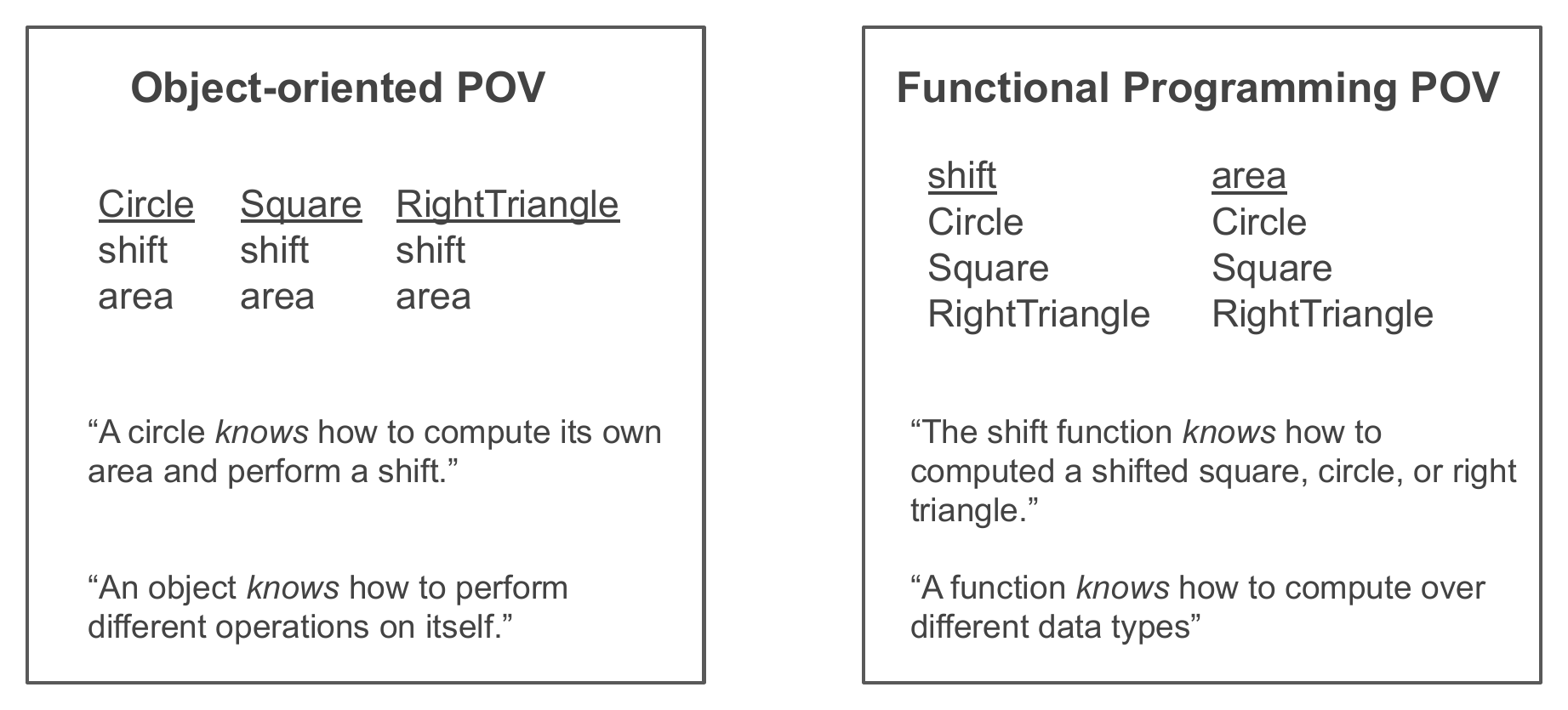
Same operations, same shapes — the two designs just group them along different axes.
These are different ways to organize a program. They are not simply "good" and "bad," and they are not mutually exclusive.
Haskell data types are not object-oriented classes
Shape may superficially look like a class hierarchy because it has variants named Circle, Square, and RightTriangle.
But Haskell data types are not classes. The underlying organization and semantics are different. There is no inheritance, no method dispatch, and no hidden state — a Shape value is just a tag saying which constructor built it, plus the values that constructor carried. We will come back to this contrast throughout the course.
Simple Data Types
The Shape constructors carry associated information. But a data type can be much simpler.
For example:
data CoinFlip = Heads | Tails
This defines:
- a new type named
CoinFlip, - a value constructor
Heads, - a value constructor
Tails.
We can ask ghci:
> :type Heads
Heads :: CoinFlip

> :type Tails
Tails :: CoinFlip
The same pattern works for a card suit:
data CardSuit
  = Clubs
  | Diamonds
  | Hearts
  | Spades
or a simple thermostat state:
data ThermostatSetting
  = Off
  | Cooling
  | Heating
Type names and constructor names
Haskell has an important naming convention:
- type names begin with uppercase letters
- constructor names also begin with uppercase letters
- ordinary function and variable names begin with lowercase letters
So:
CoinFlip
is a type name, while:
Heads
Tails
are constructor names.
Not every uppercase name is a type. Constructors are uppercase too.
You already knew one of these
Conceptually, Haskell's built-in Boolean type looks like:
data Bool = True | False
So user-defined data types are not an exotic special feature. We are learning the same mechanism that underlies familiar built-in types.
Why Can't ghci Print My New Values?
Suppose we define:
data CoinFlip = Heads | Tails
Then try:
> Heads
Surprisingly, ghci complains that it cannot show the value:
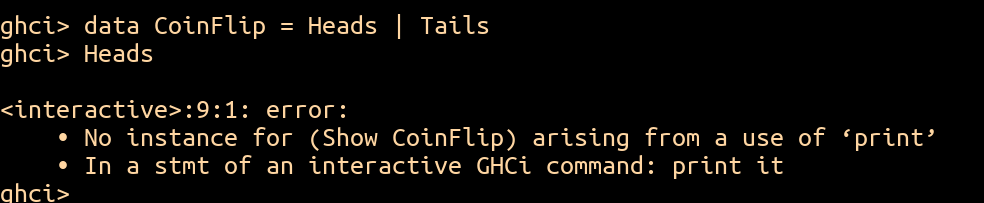
ghci wants to print the result, but nothing tells it how to turn a CoinFlip into text.
The problem is not that Heads is invalid. Its type is perfectly fine:
Heads :: CoinFlip
The problem is that the REPL wants to print the result, and Haskell does not automatically know how values of every user-defined type should be converted to text.
We can ask Haskell to generate that behavior:
data CoinFlip = Heads | Tails
  deriving Show
Now:
> Heads
Heads
works.
We will explain Show properly later in the module. For now, remember:
deriving Showletsghcidisplay values of your new type.
Functions on Data Types: isRunning
Let's define:
data ThermostatSetting
  = Off
  | Cooling
  | Heating
  deriving Show
Now we want:
isRunning :: ThermostatSetting -> Bool
with behavior:
Off      -> False
Cooling  -> True
Heating  -> True
There are many equivalent ways to write it.
Style 1: Pattern-match directly on function arguments
isRunning Off     = False
isRunning Cooling = True
isRunning Heating = True
Style 2: Use a case
isRunning setting =
  case setting of
    Off     -> False
    Cooling -> True
    Heating -> True
Style 3: Pattern-match with a wildcard
isRunning Off = False
isRunning _   = True
The wildcard _ says: "anything else."
Style 4: Use a wildcard in a case
isRunning setting =
  case setting of
    Off -> False
    _   -> True
Style 5: Use if
isRunning setting =
  if setting == Off
    then False
    else True
This version requires Haskell to know how equality works for ThermostatSetting.
So we need:
data ThermostatSetting
  = Off
  | Cooling
  | Heating
  deriving (Show, Eq)
Style 6: Observe that the Boolean expression is already the result
isRunning setting = setting /= Off
Style 7: Use currying
Recall that:
(/=) :: Eq a => a -> a -> Bool
Partially applying it to Off gives a function:
(/= Off)
so:
isRunning = (/= Off)
does the same job.
Now pause before moving on. These definitions have the same observable behavior, but they make different stylistic choices.
Gradescope question: Which style do you prefer?
Submit this response on Gradescope.
Which style or styles did you prefer, specifically for this problem of writing the isRunning function for thermostat settings?
Why do you prefer that style?
Gradescope question: Are some styles better in some situations?
Submit this response on Gradescope.
In your opinion, are there situations in which one style is better or worse than another?
Or do you think one of these styles is preferable for essentially all problems?
Are any of them styles you would avoid?
Gradescope question: Can behavior reveal the implementation?
Submit this response on Gradescope.
Suppose you were only allowed to apply isRunning to values and observe the results.
Do you think it would be possible to determine which of the implementations above was used?
There is no single correct answer to the style-preference questions.
For this course, we will often prefer direct pattern matching because it tends to be concise and makes the structure of the data explicit.
Data Types with Associated Values
A simple thermostat state such as:
Cooling
does not say what temperature we are cooling toward.
We can attach values to constructors:
data ThermostatSetting
  = Off
  | CoolTo Int
  | HeatTo Int
  | OutOfService String
  deriving (Show, Eq)
Now we can construct values like:
setting1 = Off
setting2 = CoolTo 20
setting3 = HeatTo 72
setting4 = OutOfService "Under repair"
All four values have type:
ThermostatSetting
but they were built with different constructors.
Constructors Can Be Functions
This is an important connection back to Module 02.2.
Consider:
Off
It needs no argument. It is already a complete value:
Off :: ThermostatSetting
But:
CoolTo
needs an Int before it can build a ThermostatSetting.
Ask ghci:
> :type CoolTo
CoolTo :: Int -> ThermostatSetting
So constructors that carry associated values are functions.
Likewise:
HeatTo       :: Int -> ThermostatSetting
OutOfService :: String -> ThermostatSetting
And for our earlier shape type:
Circle :: Double -> Double -> Double -> Shape
A constructor is therefore not merely a label. It can be a function that builds a value of the new data type.
Lining up the four constructors of that thermostat type:
| Constructor | Arguments it takes | What it is |
|---|---|---|
Off |
none | already a value: Off :: ThermostatSetting |
CoolTo |
one Int |
a function Int -> ThermostatSetting |
HeatTo |
one Int |
a function Int -> ThermostatSetting |
OutOfService |
one String |
a function String -> ThermostatSetting |
A constructor with no arguments is a finished value; a constructor that carries associated values is a function that produces one.
This fits perfectly with the earlier theme:
Functions are values.
The General Shape of a Data Declaration
The general pattern is:
data TypeName
  = Constructor1 Type Type ... Type
  | Constructor2 Type Type ... Type
  | ...
  deriving (...)
For example:
data ThermostatSetting
  = Off
  | CoolTo Int
  | HeatTo Int
  | OutOfService String
  deriving (Show, Eq)
A constructor can carry:
- zero values,
- one value,
- or several values.
If this notation reminds you of a grammar:
Thing ::= Form1
        | Form2
        | Form3
that resemblance is worth remembering. We will return to this idea when we represent programming-language syntax.
Design One Yourself: Animal
Now try defining a data type from a description.
We want an Animal where:
- every animal is either a
Cat,Dog, orBird, - every animal has a name, and
- every animal has an age.
Gradescope question: Define Animal
Submit this response on Gradescope.
What would the Haskell code look like to create a data type called Animal, where an Animal can be a Cat, Dog, or Bird, and each animal has a name and an age?
After you answer: one possible representation
Using String for the name and Int for the age:
data Animal
  = Cat String Int
  | Dog String Int
  | Bird String Int
  deriving Show
We could then construct:
b = Bird "Billy" 4
c = Cat "Carlita" 2
d = Dog "Dani" 8
Pattern matching extracts associated values
Suppose:
Bird "Billy" 5
We can pattern-match with:
Bird name age
which binds:
name = "Billy"
age  = 5
That lets us write functions directly around the structure of the constructors.
Gradescope question: Write ageBy
Submit this response on Gradescope.
Recall the Animal data type with Cat, Dog, and Bird constructors.
Write:
ageBy :: Int -> Animal -> Animal
which adds a number to an animal's age.
For example:
ageBy 3 (Bird "Billy" 5)
should evaluate to:
Bird "Billy" 8
After you answer: one possible solution
ageBy :: Int -> Animal -> Animal

ageBy m (Cat name n)  = Cat name (n + m)
ageBy m (Dog name n)  = Dog name (n + m)
ageBy m (Bird name n) = Bird name (n + m)
The important idea is the same one from list pattern matching:
the pattern tells us the shape of the value and gives names to the pieces inside it.
Pattern Matching on Associated Values
Let's return to the richer thermostat:
data ThermostatSetting
  = Off
  | CoolTo Int
  | HeatTo Int
  | OutOfService String
  deriving (Show, Eq)
Suppose isRunning should now depend on the current temperature:
isRunning :: Int -> ThermostatSetting -> Bool
One version is:
isRunning _    Off              = False
isRunning _    (OutOfService _) = False
isRunning temp (CoolTo t)       = temp > t
isRunning temp (HeatTo t)       = temp < t
Notice what pattern matching does here.
For:
CoolTo t
the pattern does two things at once:
- verifies that the value was built using
CoolTo, - extracts the associated temperature and binds it to
t.
The wildcard appears for values we intentionally do not need.
Try it in ghci - nothing to submit
Put the thermostat type and isRunning into a .hs file and try:
isRunning 80 (CoolTo 72)
isRunning 65 (CoolTo 72)
isRunning 65 (HeatTo 70)
isRunning 75 (HeatTo 70)
isRunning 70 Off
isRunning 70 (OutOfService "broken")
Before each one, predict the result by asking which pattern matches.
Recursive Data Types
In Module 03.1 we described lists recursively:
A list is either empty, or an element followed by another list.
Now we can define that structure ourselves.
data IntList
  = Empty
  | Cons Int IntList
  deriving Show
Read it carefully.
An IntList is either:
Empty
or:
Cons Int IntList
That second constructor contains another IntList.
The type refers to itself, so it is a recursive data type.
Compare it line by line with the verbal definition:
A list is either...          data IntList
  an empty list, or            = Empty
  an element and another list  | Cons Int IntList
Constructing values
list1 = Empty
list2 = Cons 6 Empty
list3 = Cons 10 (Cons 20 list2)
For example:
Cons 10 (Cons 20 (Cons 6 Empty))
is essentially our own version of:
[10,20,6]
Recursive data suggests recursive functions
Because the type has two constructors, our functions naturally have two cases.
For length:
intListLength :: IntList -> Int

intListLength Empty       = 0
intListLength (Cons _ xs) = 1 + intListLength xs
Compare this to ordinary Haskell lists:
myLength []     = 0
myLength (_:xs) = 1 + myLength xs
The syntax differs, but the recursive shape is the same.
Head and tail
intListHead :: IntList -> Int
intListHead Empty        = undefined
intListHead (Cons x _)   = x
intListTail :: IntList -> IntList
intListTail Empty        = undefined
intListTail (Cons _ xs)  = xs
There is no sensible integer to return as the head of Empty, so this version uses undefined, just as built-in head [] ultimately fails.
Mapping over our own list
intListMap :: (Int -> Int) -> IntList -> IntList

intListMap _ Empty       = Empty
intListMap f (Cons x xs) =
  Cons (f x) (intListMap f xs)
Again, the structure mirrors the datatype.
Write a Recursive Function: intListSum
Now do the same thing yourself.
Gradescope question: Write intListSum
Submit this response on Gradescope.
Given:
data IntList
  = Empty
  | Cons Int IntList
  deriving Show
write the Haskell function intListSum.
After you answer: one possible solution
intListSum :: IntList -> Int
intListSum Empty       = 0
intListSum (Cons x xs) = x + intListSum xs
This is a tiny function, but it captures one of the most important habits in functional programming:
Let the structure of the data guide the structure of the function.
Recursive Data Types Are Not Just Lists
A recursive type can branch.
For example:
data StringBinaryTree
  = Leaf String
  | Node String StringBinaryTree StringBinaryTree
  deriving Show
A StringBinaryTree is either:
- a
Leafcontaining aString, or - a
Nodecontaining: - a
String, - a left subtree,
- a right subtree.
This is recursive because Node contains two more StringBinaryTree values.
We can build bigger trees out of smaller ones, exactly the way Cons built bigger IntLists:
tree1 = Leaf "a"
tree2 = Leaf "b"
tree3 = Leaf "c"
tree4 = Node "f" (Leaf "d") (Leaf "e")
tree5 = Node "g" tree1 tree2
tree6 = Node "h" tree5 tree4
tree7 = Node "i" tree3 tree6
Each Node names two subtrees, and those subtrees can themselves be Nodes, all the way down to Leafs.
Recursive functions follow the constructors
To count nodes:
treeSize :: StringBinaryTree -> Int
treeSize (Leaf _) = 1
treeSize (Node _ left right) =
  1 + treeSize left + treeSize right
To compute height:
treeHeight :: StringBinaryTree -> Int
treeHeight (Leaf _) = 0
treeHeight (Node _ left right) =
  1 + max (treeHeight left) (treeHeight right)
To map a function over every stored string:
treeMap :: (String -> String)
        -> StringBinaryTree
        -> StringBinaryTree

treeMap f (Leaf s) =
  Leaf (f s)

treeMap f (Node s left right) =
  Node (f s)
       (treeMap f left)
       (treeMap f right)
This is the deeper pattern:
datatype constructors
        ↓
function cases
        ↓
recursive calls on recursive fields
The program follows the structure of the data.
That idea will become extremely important when our data is an abstract syntax tree representing a program.
Type Classes
We have now written:
deriving Show
and:
deriving (Show, Eq)
several times.
What are Show and Eq?
First recall the relationship between values and types:
'C'            :: Char
True           :: Bool
[True, False]  :: [Bool]
"Hello"        :: [Char]
A type class describes a family of types that support some common operations.
Very roughly:
values belong to types
types can belong to type classes
Eq
Types in Eq support equality operations:
==
/=
That is why this failed before we derived Eq for ThermostatSetting:

Without deriving Eq, the type has no ==, so setting == Off does not type-check. Adding Eq to the deriving clause generates it.
Ord
Types in Ord support ordering comparisons such as:
<
>
<=
>=
Ord depends on Eq: values must support equality in order to participate in Haskell's standard ordering class.
For a simple datatype, derived ordering follows constructor order.
For example:
data Size = Small | Medium | Large
  deriving (Show, Eq, Ord)
then:
Small < Medium
Medium < Large
Show
Types in Show can be converted to a String with:
show
This is also what allows ghci to display their values.
Read
Types in Read can be parsed from strings with:
read
For example:
read "4" + 2
works because the surrounding arithmetic tells Haskell that "4" should be read as a numeric type.
But:
read "4"
alone does not provide enough information about the desired result type.
You can supply it explicitly:
(read "4") :: Int
For your own datatype:
data CardSuit
  = Clubs
  | Diamonds
  | Hearts
  | Spades
  deriving (Show, Eq, Ord, Read)
you can write:
read "Clubs" :: CardSuit
and get:
Clubs
Num
Types in Num support familiar numeric operations such as:
+
-
*
There are many more type classes. We will introduce them as they become useful.
Type classes are not object-oriented classes
The name is unfortunately overloaded.
A Haskell type class and a Java/Python/C++ class are not the same concept. A type class is closer to an interface — a named set of operations — than to a class with fields and instances. A type "joins" a type class by providing (or deriving) those operations, and a single type can belong to many type classes at once.
Combining Data Types
Data types can be composed out of other data types.
For example:
data CardSuit
  = Clubs
  | Diamonds
  | Hearts
  | Spades
  deriving (Show, Eq, Ord)

data FaceValue
  = Two | Three | Four | Five | Six | Seven | Eight
  | Nine | Ten | Jack | Queen | King | Ace
  deriving (Show, Eq, Ord)
A card can be represented as a pair:
type Card = (FaceValue, CardSuit)
Here type creates a type alias. It gives another name to an existing type rather than defining a fundamentally new datatype.
Then we can define a recursive list of cards:
data CardList
  = Empty
  | Hand Card CardList
  deriving (Show, Eq, Ord)
and construct:
myHand =
  Hand (Two, Hearts)
    (Hand (Ace, Diamonds)
      (Hand (Ten, Spades) Empty))
None of the ingredients are fundamentally new:
- simple data types,
- tuples,
- recursive data,
- constructors with associated values,
- derived type classes.
The expressive power comes from combining them.
How the Pieces Fit Together
This module has introduced several pieces of syntax, but the important ideas are structural.
data lets us define the possible shapes of values
data Animal
  = Cat String Int
  | Dog String Int
  | Bird String Int
says exactly what forms an Animal value may have.
Constructors build values
Bird "Billy" 5
uses the constructor function Bird to build an Animal.
Patterns take those values apart
ageBy m (Bird name age) = ...
recognizes the constructor and extracts its fields.
Recursive data leads naturally to recursive functions
data IntList
  = Empty
  | Cons Int IntList
leads naturally to:
f Empty       = ...
f (Cons x xs) = ... f xs ...
Likewise, a binary tree with two recursive children naturally leads to two recursive calls.
Type classes describe shared capabilities across types
Show, Eq, Ord, and Read are not individual types. They describe families of types supporting common operations.
This is setting up "programs = data"
Soon we will define data types whose values represent the syntax of a programming language.
Once a program is represented as an ordinary Haskell value, we can pattern-match on that value and write functions over it.
One of those functions will be an interpreter.
That is where the material in this module starts connecting directly to the central ideas of programming languages.
A Useful Data Type You Already Have: Maybe
Before we move on, here's one more datatype worth knowing — not because you're about to design it yourself, but because it's already sitting in Haskell's standard library, built from exactly the ideas you just learned: a datatype with two constructors, one of which carries data.
Sometimes a computation might succeed, but it also might fail to produce a value.
For example, consider division:
10 / 2
works fine, but:
10 / 0
does not produce a meaningful numeric result.
One way to represent this possibility explicitly is with Haskell's Maybe type.
data Maybe a
  = Nothing
  | Just a
A value of type:
Maybe a
either contains:
Just value
where value :: a, or contains no value:
Nothing
For example:
Just 5    :: Maybe Integer
Nothing   :: Maybe Integer
The type tells us something important:
A result of type
Maybe amight contain ana, but it might not.
A simple use case: safe division
We can use Maybe to write division that explicitly handles division by zero:
safeDivide :: Double -> Double -> Maybe Double
safeDivide _ 0 = Nothing
safeDivide x y = Just (x / y)
Now:
safeDivide 10 2
produces:
Just 5.0
while:
safeDivide 10 0
produces:
Nothing
Instead of crashing or inventing a special numeric value, the function's type makes failure part of the result.
Using a Maybe value
To get at the value inside a Maybe, pattern match on its two possibilities:
describeResult :: Maybe Double -> String
describeResult Nothing =
  "No result"

describeResult (Just x) =
  "The result is " ++ show x
For example:
describeResult (Just 5.0)
produces:
"The result is 5.0"
while:
describeResult Nothing
produces:
"No result"
The important point is that Haskell makes us consider both cases:
Nothing
and:
Just x
Transforming a value inside Maybe
Here is another small example:
doubleMaybe :: Maybe Integer -> Maybe Integer
doubleMaybe Nothing =
  Nothing

doubleMaybe (Just x) =
  Just (2 * x)
So:
doubleMaybe (Just 3)
produces:
Just 6
and:
doubleMaybe Nothing
produces:
Nothing
Why use Maybe?
Use Maybe when a computation has a normal, expected possibility of producing no value.
Examples include:
- looking up something that might not exist,
- searching a list,
- parsing something that might fail,
- safely performing an operation such as division.
Instead of pretending that every computation succeeds, the type records the possibility of failure:
a
means:
there is definitely an a
while:
Maybe a
means:
there might be an a
Where This Leaves Us
You should now be able to read and write definitions such as:
data CoinFlip = Heads | Tails
  deriving Show
data Animal
  = Cat String Int
  | Dog String Int
  | Bird String Int
  deriving Show
and:
data IntList
  = Empty
  | Cons Int IntList
  deriving Show
More importantly, you should understand what these definitions mean:
- a datatype specifies possible forms of values,
- constructors create those values,
- constructors carrying data are functions,
- pattern matching identifies constructors and extracts their contents,
- recursive datatypes can contain values of their own type,
- recursive functions often mirror the shape of recursive data,
- type classes describe shared operations supported by many different types,
- a datatype can represent "no answer here" instead of crashing or faking one (
Maybe).
These ideas are the bridge from "learning Haskell" to using Haskell to study programming languages.
Finish the Module 3.2 Completion
At this point, you should have encountered the substantive Module 3.2 questions drawn from the existing module materials:
- the object-oriented shape representation,
- the three
isRunningstyle/reflection questions, - defining
Animal, - writing
ageBy, and - writing
intListSum.
If the current Gradescope assignment also contains the standard course-wide completion items, finish those as well.
Gradescope: Time spent
Submit this response on Gradescope if it appears in the Module 3.2 Completion assignment.
Approximately how much time did you spend on this module?
Gradescope: Remaining questions and thoughts
Submit this response on Gradescope if it appears in the Module 3.2 Completion assignment.
What lingering questions or thoughts do you have about this module?
That is the end of Module 03.2.