HW 4: Little Languages (Random Art and Regular Expressions)
This assignment has you build pieces of two little languages — small, domain-specific languages, each built for one job. One generates pictures; the other matches patterns in text. The unifying idea, as always, is programs as structured data — and you'll lean heavily on laziness along the way. There's also real room for creativity here — part of your grade is for genuinely trying to make something you think looks cool, not for how cool we think it turned out.
How you'll get materials and submit this assignment
Getting the starter code and turning in your work follows the same process as every homework this semester — see The Homework Workflow for the full walkthrough. In short: from the hw4 template repo, make your own private copy, clone it to the course server, and submit your test output and code on Gradescope. The rest of this page covers what the assignment actually asks of you.
This assignment (and future ones) asks you to read and understand a lot, in order to write comparatively little code — a common experience in programming-languages work. It's entirely reasonable to finish this assignment with around 50 lines of Haskell total. Getting each of those lines right is where the real work is.
What You'll Do
- Represent a small graphics language as an AST, and write an evaluator for it.
- Generate genuinely interesting pictures by randomly building expressions in that language — and extend the language yourself.
- Implement a lazy, list-based regular-expression matcher — no DFAs or NFAs, just laziness.
Checklist
- Get the assignment materials (see The Homework Workflow)
- Implement the random-art expression evaluator
- Implement
build, to generate interesting random art - Add at least three new expression constructors of your own
- Pick your favorite generated picture (and its expression)
- Implement lazy regular-expression matching for
Letter,Alt, andConcat - Turn in the assignment (see The Homework Workflow)
Collaboration
You can work with a partner on this assignment — if you do, you must cooperate on every part, follow the pair-programming rules from the syllabus at all times (even while writing prose or math), and share roles equally.
A Note on "Little Languages"
The term comes from a 1986 article by Jon Bentley, describing the benefits of what we'd now call domain-specific languages (DSLs): languages built for one specific job rather than general-purpose programming. SQL, MATLAB, and LaTeX are all DSLs you may have already met. Bentley's article centered on pic, a little language for drawing diagrams — which happens to be exactly the subject of the next two assignments after this one.
Part 1: Random Art
Background: From Expression to Image
We're going to build pictures out of something unexpected: a numeric expression. Suppose we have two floating-point variables, x and y, restricted to the range [-1, 1]. Define expressions recursively:
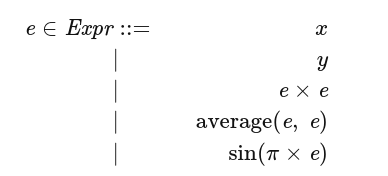
Read this as: an expression e is either the variable x or y, the product of two expressions, the average of two expressions, or the sine of π times an expression. Every expression must evaluate to a value in [-1, 1] — which is exactly why x and y themselves are restricted to that range too.
Now picture a 2-by-2 coordinate grid, x and y each ranging over [-1, 1]:
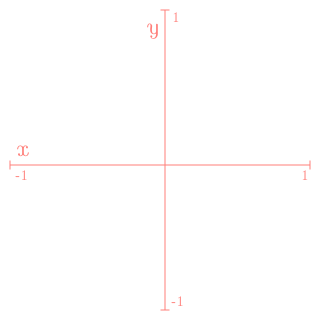
Figure 1: A 2-by-2 coordinate system.
Evaluate an expression at every point (x, y) in that grid, scale the result from [-1, 1] to a grayscale value between 0 (black) and 255 (white), and you get a picture. Here's average(x, y):
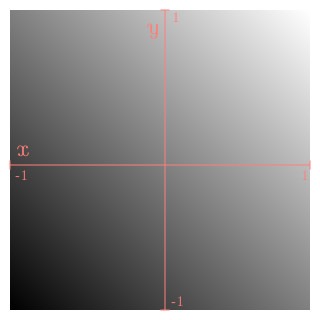
Figure 2: The picture generated by average(x, y).
Simple expressions make simple pictures. More complex expressions make more interesting ones — here's average(cos(π × x), sin(π × y)):

Figure 3: average(cos(π × x), sin(π × y)).
For really interesting pictures, you want really complex expressions — and rather than writing them by hand, the natural move is to define a data structure representing expressions, then randomly generate instances of it. Here's a picture generated from one such randomly-built expression (its actual expression is dozens of nested calls deep — not worth reproducing here):
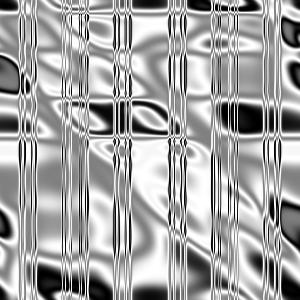
Figure 4: A picture generated from a randomly-built expression.
(Color pictures work the same way, just with three expressions — one each for red, green, and blue channels.)
To summarize, generating random art needs: a way to represent expressions, a way to evaluate one at a point, a way to turn a result into a pixel value, a way to do that across an entire grid, a way to render the resulting pixels as an image, and a way to generate interesting random expressions in the first place. Most of this is provided for you — you'll fill in the evaluator, extend the expression language, and fix the random generator.
The implementation uses the JuicyPixels library for image output — you won't need to use it directly, just have it available (it's already installed on the CS131 server).
The AST for this language:
data Exp = X                   -- x's value
         | Y                   -- y's value
         | Times Exp Exp       -- product of e1 and e2
         | Avg   Exp Exp       -- average of e1 and e2
         | SinPi Exp           -- sin (pi * e)
         | CosPi Exp           -- cos (pi * e)
  deriving (Show, Read, Eq, Ord)

type Point = (Float, Float)
Evaluating Expressions
eval :: Exp -> Point -> Float
Your task: complete eval in RandomArtEvaluation.hs.
Tip
Run ghci for this assignment as ghci -fobject-code — that compiles the code you're using interactively instead of interpreting it, which matters a lot for an assignment this compute-intensive.
Example
$ cd randomart
randomart$ ghci -fobject-code
Prelude> :l RandomArt
Prelude Main> eval X (1, 0)
1.0.
You can also generate the actual Figure 4 picture as a sanity check:
Prelude Main> toPNGgray "test" 300 (eval sampleExp)
which should produce a test.png matching Figure 4 above. Make sure you cd into the randomart directory before testing — it's easy to forget, since each part of this assignment lives in its own subdirectory.
Testing: from the randomart directory, runhaskell -itest test/EvaluationSpec.hs.
A Note on Laziness
You'll be working with infinite lists in this part of the assignment — if it's been a while, it's worth a quick review of lazy lists from Module 03.1.
Generating Random Art
Compile and run the random-art program (see the comments at the top of RandomArt.hs), and you'll get a boring picture — build is supposed to generate interesting random expressions, but doesn't yet.
build :: Int -> RandomFloats -> Exp
Your task: fix build in RandomArtEvaluation.hs. Its first argument is a maximum nesting depth; its second is an infinite list of random floats between 0.0 and 1.0.
A few tips:
- Giving every expression kind equal probability tends to produce mostly
X,Y, or tiny expressions likeTimes X Y— small expressions make boring pictures, so you need to actively discourage them. - Think about how to use the depth bound and the random numbers together to push toward deep, nested expressions rather than shallow ones.
splitRandomFloatsis provided to give you multiple independent streams of random numbers, useful when an operation needs more than one.
Don't expect every generated picture to be a masterpiece — looking through 100 pictures and finding 90 mediocre, 9 okay, and 1 genuinely striking is a completely normal outcome.
Testing: load the code with ghci -fobject-code then :load RandomArt, and try something like:
sequence_ [doGray 300 seed depth | seed <- [100..115], depth <- [4..10]]
which generates 112 grayscale pictures (plus matching .txt files with the expressions that made them) — plenty to get a feel for whether depth is helping. You don't have to wait for the whole batch to finish before looking at results as they appear.
If the grayscale results look promising and you want to see more, try color too:
sequence_ [doColor 300 seed depth | seed <- [100..130], depth <- [6..12]]
which generates 217 color pictures.
Enhance the Expressiveness of Your Language
Now make it yours: add at least three new constructors to Exp (defined in RandomArtAST.hs), and update build and eval in RandomArtEvaluation.hs to match.
A few guidelines:
- At least one new constructor must take three subexpressions.
- Every new expression must still produce a value in [-1, 1] given inputs in [-1, 1] — watch out for floating-point imprecision pushing you just outside the range even when the math looks safe on paper.
- Aim for genuinely different ideas, not simple variants of what's already there (e.g.
(e+e+e)/3orsin(2π×e)don't count as new ideas). Your new expressions don't need to be complicated — "does something visually interesting" is the actual bar. - Generate a lot of pictures with your new expressions to see whether they're actually making a difference. Iterate if the first idea doesn't move the needle.
Testing: from the randomart directory, runhaskell -itest test/StructureSpec.hs (these tests can't fully judge subjective/creative qualities — see below for more on that).
Additional Commentary and Helpful Hints
Is build "interesting"? Roughly, the autograder checks that: different seeds produce different depth-10 trees, average depth is at least 2/3 of the maximum, the maximum depth bound is respected (or nearly so), and all outputs land in [-1, 1].
Visualizing an expression directly can help you debug, beyond just generating whole pictures:
plotOneArg SinPi
plotTwoArg Avg
(There's also a plotThreeArg, for once you've added a three-argument constructor of your own.) Or, as a histogram:
histoOneArg SinPi
If a histogram shows <<< or >>>, your function is producing out-of-range values — a bug. If some output values never appear at all (other than possibly zero), your function may have a design flaw worth reconsidering.
On creativity: we're happy to accept a wide range of ideas, as long as your new expressions stay in range, aren't just recombinations of the existing four, and spread their output across the range rather than clustering. A good-faith attempt should be enough.
If you want to see where this idea goes with real sophistication, random-art.org represents expressions as directed graphs rather than trees — worth a look after you're done.
Submit Your Favorite Picture
Once everything's working, generate a bunch of pictures and pick exactly one favorite (if you're working with a partner, each of you picks your own). You'll submit both the image and the .txt file containing the expression(s) that generated it — submission details are covered above.
How this is graded
This part isn't about how cool your picture turns out to be — there's no "best" or "correct" answer. Full credit is for genuinely generating a batch of pictures and picking one you think is cool, whatever that means to you.
Part 2: Regular Expressions
Background: Regular Expressions
A regular expression (regexp) is a pattern that describes a set of strings. a*, for example, describes every string of zero or more as: {"", "a", "aa", "aaa", ...}.
More formally, given an alphabet Σ of characters:
- The empty string
εis a regexp, matching only the empty string. - Any single character in
Σis a regexp, matching only that character. .is a regexp matching any character.- If
e1ande2are regexps,e1 | e2is a regexp — alternation — matching anythinge1matches, ore2matches, or both. - If
e1ande2are regexps,e1 · e2is a regexp — concatenation — matching a string that starts with a match fore1, immediately followed by a match fore2. - If
eis a regexp,e*is a regexp — repetition — zero or more concatenations of matches fore.
A match is successful if some (possibly empty) prefix of the input string matches. So a matches aaab (which starts with a) but not baaa (which doesn't). And a* matches aaab in multiple ways at once — "", a, aa, and aaa are all valid prefix matches, since each represents some number of leading as.
We'll come back to many of these same ideas when this course covers parsing, in Module 6.
Lazy Regular-Expression Matching
Most regex engines use finite automata (DFAs or NFAs) under the hood. This one doesn't — it leans entirely on Haskell's laziness instead.
The provided regex directory has a partial implementation. The AST (which you won't modify) and the test cases are both worth reading closely before you start. A few pointers on the evaluator:
- The main function is
rexpMatches, which takes aRegExppattern and aTextstring, and returns every possible match found at the start of the text. - You'll complete the cases for
Letter,Alt, andConcat. rexpMatch(singular) builds onrexpMatchesto return just the first match, wrapped inMaybe— you'll learn more aboutJust/Nothingin Module 7, so don't worry about the details there yet.- The helper
prependAllMatcheswill likely be useful for buildingrexpMatches.
Your task: in RegexEvaluation.hs, complete rexpMatches for these three cases.
Letter
Matches exactly one character.
Example
$ cd regex
regex$ ghci
Prelude> :l RegexEvaluation
*RegexEvaluation> rexpMatches (Letter 'a') "aaab"
[("a","aab")] — the match, and what's left over. ("aa","ab") would not be valid, since Letter only ever matches a single character.
*RegexEvaluation> rexpMatches (Letter 'a') "baaa"
[] — Letter 'a' only matches at the very start of the string, and "baaa" doesn't start with 'a'.
Alt
Matches anything either of two given regexps matches.
Example
*RegexEvaluation> rexpMatches (Alt (Letter 'a') (Letter 'b')) "ab"
[("a","b")] — the first character matches Letter 'a'; Alt doesn't go on to also try matching 'b' afterward, since it means or, not then.
*RegexEvaluation> rexpMatches (Alt (Star (Letter 'a')) (Letter 'b')) "aab"
[("aa","b"),("a","ab"),("","aab")] — three separate matches from the Star (Letter 'a') side (matching zero, one, or two leading as), and none from the Letter 'b' side, since "aab" doesn't start with b.
*RegexEvaluation> rexpMatches (Alt (Star (Letter 'a')) (Letter 'b')) "b"
[("","b"),("b","")] — Star (Letter 'a') matches the empty prefix (zero as is always valid), and Letter 'b' matches the whole string.
Concat
Matches a string that starts with a match for the first regexp, immediately followed by a match for the second.
Hint: concatMap is worth knowing for this one.
Example
*RegexEvaluation> rexpMatches (Concat (Letter 'a') (Letter 'b')) "ab"
[("ab","")].
*RegexEvaluation> rexpMatches (Concat (Star (Letter 'a')) (Letter 'b')) "aaa"
[] — Star (Letter 'a') happily matches the leading as, but there's no 'b' left over afterward for the second half of the Concat to match.
Testing: from the regex directory, runhaskell -itest test/EvaluationSpec.hs.
Turning It In
Submit on Gradescope, under HW 04: Little Languages (Random Art and Regular Expressions):
- From the
randomartdirectory, run the full test suite one last time:runhaskell -itest test/Spec.hs. Copy the entire terminal output and paste it into the Random Art text box. - From the
regexdirectory, do the same:runhaskell -itest test/Spec.hs, and paste that output into the Regular Expressions text box. - Upload
RandomArtAST.hs(with your new constructors) andRandomArtEvaluation.hs, andRegexEvaluation.hs, to the same assignment (for our records). - Upload your favorite generated picture and its accompanying
.txtfile (see Submit Your Favorite Picture above).
The Homework Workflow covers the submission step in context.
Make sure your final code is committed and pushed to your repo as well, and double-check you've completed both parts (Random Art and Regular Expressions) — it's easy to finish one and forget the other lives in a separate directory.