Module 06.2: Practical Parsing with Parser Combinators
Module 06.1 gave us the conceptual picture:
concrete syntax  --->  abstract syntax
                parser
and a grammar that describes valid source structure.
Now we need to actually write parsers.
We are going to use the course's provided Haskell parser-combinator library:
import ParserCombinators
You do not need to understand how that library is implemented.
You need to understand how to use it.
The big idea is:
Build complicated parsers by combining small parsers.
This should feel familiar.
Earlier in the course, higher-order functions let us build new computations by passing functions to functions.
A parser combinator does the same thing for parsers:
A parser combinator takes one or more parsers and produces a new parser.
By the end of this module, you should be able to:
- read
Parser aas "a parser that produces ana," - run small parsers with
parse, - use primitive parsers for characters, text, symbols, identifiers, and numbers,
- sequence parsers with
<+>,<-+>, and<+->, - choose between alternatives with
<|>, - transform successful parse results with
>>=:, - replace a successful parse result with a fixed value using
>>:, - filter results with
<=>, - repeat parsers with
manyandsome, - parse delimited and separated structures with
parens,braces, andsepBy, - translate simple grammar rules into parser-combinator expressions,
- construct AST nodes directly while parsing, and
- understand enough precedence and associativity to complete the piq parser assignment.
How to use this module
The questions labeled Gradescope question are the completion questions for this redesigned version of Module 06.2.
The parser assignment contains many additional examples and tests. This module is meant to give you the conceptual and practical toolkit you need before starting it.
Background: CS81's notes on grammars and parsing
As in Module 06.1, if any of this feels familiar from CS81's computability unit, see 6.11: Context-Free Grammars and 6.12: Parsing for more background. Not required reading — this module is self-contained.
A Parser Produces a Value
The key type is:
Parser a
Read this as:
a parser that, when successful, produces a value of type
a.
Examples:
Parser Char
produces a character.
Parser String
produces a string.
Parser Double
produces a Double.
Parser Expr
produces an abstract syntax tree of type Expr.
That last one is our real destination.
A useful mental model
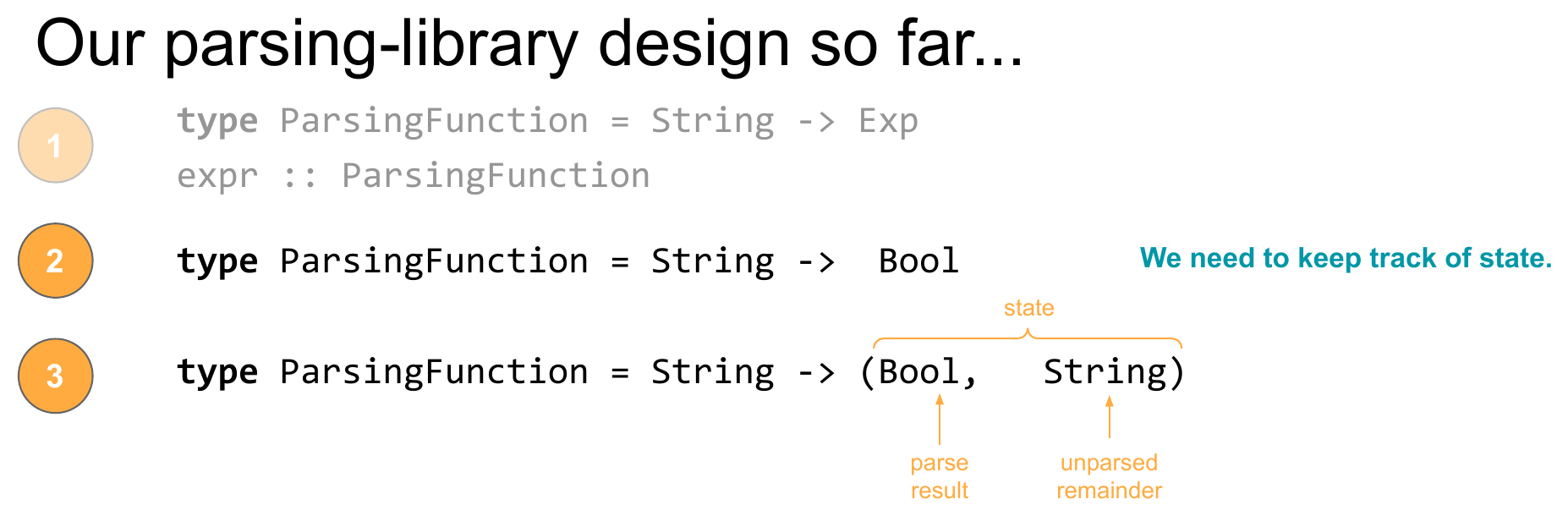
Internally, a parser must keep track of things such as:
- whether parsing succeeded,
- what value was produced,
- what input remains,
- where an error occurred.
But you do not need the implementation details.
For this module, think:
Parser a

input text
    |
    v
 parser
    |
    +---- failure
    |
    `---- value of type a
          + remaining input
Why does the parser need to keep track of remaining input?
Because we want to combine parsers.
If one parser consumes:
move
from:
move right 20
then the next parser should continue with:
right 20
The library handles this state management for us.
Running a Parser
Use:
parse
to run a parser on an entire input string.
Conceptually:
parse :: Parser a -> String -> a
For example:
parse double "2.5"
produces:
2.5
and:
parse identifier "size2"
produces:
"size2"
parse expects the parser to consume the whole input.
So this is fine:
parse number "42"
but a parser that successfully consumes only the beginning of an input will still cause parse to complain that unexpected input remains.
That is useful for testing.
Start Small: Primitive Parsers
The library already gives us parsers for common pieces of syntax.
Single characters
digit    :: Parser Char
letter   :: Parser Char
space    :: Parser Char
alphanum :: Parser Char
Examples:
parse digit "7"
-- '7'
parse letter "q"
-- 'q'
You can also ask for one particular character:
char 'x'
or, more commonly when parsing source syntax with optional preceding whitespace:
sym '('
sym ','
sym '+'
Exact text
text "move"
text "define"
text "pen-up"
recognizes exactly that sequence of characters.
For example:
parse (text "hello") "   hello"
-- "hello"
Notice that text skips leading whitespace.
Identifiers
identifier :: Parser String
recognizes:
letter followed by zero or more letters or digits
Examples:
x
size
size2
box17
Numbers
number :: Parser Integer
double :: Parser Double
For piq, double is especially useful because expression literals become numeric AST values.
parse double "-2.5"
-- -2.5
Gradescope question: Parser result types
Submit this response on Gradescope.
Give the result type produced by each parser:
digit
identifier
double
Then explain in one sentence what the type variable in Parser a represents.
Whitespace Is Mostly Handled for You
High-level library parsers such as:
text
sym
identifier
number
double
skip preceding whitespace.
That means:
parse (text "hello") " hello"
works.
So does:
parse (number <+> number) "3 4"
For piq, whitespace includes spaces, tabs, and newlines.
This matters because piq does not use newlines or semicolons as statement terminators.
These can mean the same thing:
x = 10
square x
and:
x = 10 square x
Do not build your parser around line boundaries.
Build it around the grammar.
Parser Combinators
A parser by itself recognizes one thing.
A parser combinator lets us make a larger parser out of smaller ones.
The most important questions are:
What should happen in sequence?
What are the alternatives?
What should repeat?
Which parsed results do I care about?
How do I turn those results into an AST?
The library gives us a small vocabulary for answering those questions directly.
Sequencing: Parse This, Then That
Suppose we want:
number number
We can sequence two number parsers with:
number <+> number
Example:
parse (number <+> number) "3 4"
produces:
(3, 4)
So:
p <+> q
means:
parse
p, then parseq, and keep both results as a pair.
Conceptually:
p result = a
q result = b

p <+> q
result = (a, b)
Sequencing several parsers
Be aware that:
p <+> q <+> r
produces nested pairs:
((pResult, qResult), rResult)
This looks slightly awkward at first, but we can later transform the result with a function.
Sometimes Syntax Matters but Its Value Does Not
Suppose we want to parse:
move 5
The word:
move
must be present.
But the AST probably does not need to store the literal string "move".
We care about the number 5.
Use:
p <-+> q
to:
parse
p, then parseq, but keep onlyq's result.
Example:
parse (text "move" <-+> number) "move 5"
produces:
5
There is a symmetric version:
p <+-> q
which keeps only p's result.
These operators are extremely useful for punctuation and keywords.
For example:
sym '(' <-+> expr <+-> sym ')'
means:
require parentheses, but return only the expression inside them.
The library already packages that common pattern as:
parens expr
Gradescope question: Keep the useful result
Submit this response on Gradescope.
Suppose:
identifier <=> (== "square") :: Parser String
expr                         :: Parser Expr
Why is:
identifier <=> (== "square") <-+> expr
likely more useful than:
identifier <=> (== "square") <+> expr
when building an AST?
Choice: Parse This or That
A grammar often contains alternatives:
factor ::= number | name | "(" expr ")"
The parser combinator:
p <|> q
means:
try parser
p; if it fails, try parserq.
So a factor parser can conceptually look like:
numberCase
  <|> variableCase
  <|> parenthesizedCase
This is one reason parser combinators are so convenient.
The Haskell structure can resemble the grammar structure.
grammar:

factor ::= number
         | name
         | "(" expr ")"
parser:

factor =
      numberCase
  <|> variableCase
  <|> parenthesizedCase
Repetition: Zero or More, One or More
Grammars often contain repetition.
The library provides:
many :: Parser a -> Parser [a]
some :: Parser a -> Parser [a]
Read:
many p
as:
parse
pzero or more times.
Read:
some p
as:
parse
pone or more times.
Example:
parse (many digit) "123"
produces:
"123"
because a Haskell String is a list of Char.
This makes grammar notation such as:
statement*
very natural:
many statement
A block containing zero or more statements then becomes conceptually:
braces (many statement)
Separated Lists
Procedure arguments and parameters are often comma-separated.
For example:
1, 2, x + 3
The library gives us:
sepBy p separator
which parses zero or more ps separated by separator.
Example:
parse (sepBy number (sym ',')) "1, 2, 3"
produces:
[1, 2, 3]
So if:
expr :: Parser Expr
then:
sepBy expr (sym ',')
has type:
Parser [Expr]
and:
parens (sepBy expr (sym ','))
is almost exactly what we need for procedure-call arguments.
Transforming Results
So far, parsers have mostly returned whatever they recognized:
double
returns a Double.
But we do not ultimately want:
2.5
We want:
Num 2.5
Suppose:
Num :: Double -> Expr
The combinator:
p >>=: f
means:
run parser
p, then apply functionfto the parsed result.
So:
double >>=: Num
has type:
Parser Expr
It reads a Double, then wraps it in the AST constructor Num.
Example:
input:
    2.5

double produces:
    2.5

Num transforms it into:
    Num 2.5
This is one of the most important moves in the whole assignment.
A parser does not just recognize syntax. It can construct the corresponding AST as it goes.
Constructors are functions
This should connect directly to Module 03.2.
If:
Num :: Double -> Expr
then Num is just a function that turns a Double into an Expr.
So it can be passed directly to >>=:.
That is why:
double >>=: Num
works so naturally.
Returning a Fixed AST Value
Sometimes the concrete syntax itself completely determines the AST value.
Suppose:
dot
corresponds to the AST constructor:
Dot
We can parse the keyword and then ignore the string result.
The combinator:
p >>: value
means:
if
psucceeds, ignore its result and returnvalue.
So:
identifier <=> (== "dot") >>: Dot
is a parser that:
- requires the keyword
dot, - returns the AST value
Dot.
This is a compact example of the whole concrete-to-abstract transition:
concrete syntax:  "dot"

        parser

abstract syntax:  Dot
Filtering Results
Sometimes a parser recognizes a broad category, but we want only some of its results.
Use:
p <=> predicate
to:
run
p, but succeed only if its result satisfiespredicate.
For example:
identifier <=> (\w -> length w > 3)
accepts an identifier only if it has more than three characters.
This is particularly useful for keywords and reserved names.
Whole-word keywords
Suppose we want the keyword:
dot
A tempting parser is:
text "dot"
but that can recognize the prefix of:
dotty
A better strategy is:
identifier <=> (== "dot")
Now the parser first reads the whole identifier.
Then it checks whether that complete name is exactly "dot".
User-defined names
The same mechanism can exclude reserved words:
identifier <=> (\w -> not (isReserved w))
This is the kind of parser we want for variable and procedure names.
Gradescope question: Filtering
Submit this response on Gradescope.
Explain what this parser does:
identifier <=> (\w -> not (isReserved w))
Why is this useful in a language that has keywords such as for, from, to, dot, and define?
The Core Toolbox
For the piq assignment, the most useful pieces of the library can be summarized like this:
| Goal | Tool |
|---|---|
| parse a decimal number | double |
| parse an identifier | identifier |
| parse exact text | text "..." |
| parse one symbol | sym 'c' |
parse p, then q, keep both |
p <+> q |
parse p, then q, keep q |
p <-+> q |
parse p, then q, keep p |
p <+-> q |
| choose between parsers | p <|> q |
| transform a result | p >>=: f |
| replace a result with a fixed value | p >>: v |
| accept only results passing a test | p <=> test |
| zero or more | many p |
| one or more | some p |
| separator-separated list | sepBy p sep |
| parse inside parentheses | parens p |
| parse inside braces | braces p |
You do not need to memorize every combinator in the complete library.
You should become comfortable reading and combining this core set.
Grammar Rules Become Parser Expressions
Now we can connect Module 06.1's grammar notation directly to Haskell.
Example 1: a number expression
Suppose:
data Expr
  = Num Double
  | Var String
  | ...
Grammar:
factor ::= number
Parser:
double >>=: Num
Example 2: a variable
Grammar:
factor ::= name
Parser:
name >>=: Var
Example 3: a parenthesized expression
Grammar:
factor ::= "(" expr ")"
Parser:
parens expr
Parentheses matter in the concrete syntax but do not need to survive in the AST.
Put the alternatives together
Grammar:
factor ::= number
         | name
         | "(" expr ")"
Parser shape:
factor =
      (double >>=: Num)
  <|> (name   >>=: Var)
  <|> parens expr
That is exactly the relationship we want:
The parser definition mirrors the grammar.
A Statement Example
Suppose:
square expr
should produce:
Square expressionAST
We can read the concrete pieces as:
identifier <=> (== "square") <-+> expr
which returns only the expression AST.
Then transform it:
identifier <=> (== "square") <-+> expr >>=: Square
Read this from left to right:
recognize "square"
then parse an expression
then wrap that expression in Square
The result is a:
Parser Stmt
For input:
square 12
we get something like:
Square (Num 12)
This is the basic pattern you will repeat throughout the assignment.
A Procedure Call Example
Consider:
box(20, 5)
Suppose the AST constructor is:
Call :: String -> [Expr] -> Stmt
The grammar is conceptually:
call ::= name "(" arguments ")"

arguments ::= expr ("," expr)*
            | empty
The useful parser pieces are:
name
and:
parens (sepBy expr (sym ','))
Sequencing them:
name <+> parens (sepBy expr (sym ','))
produces a pair:
(nameResult, argumentResults)
Then:
>>=: uncurry Call
can turn that pair into:
Call nameResult argumentResults
The resulting pattern is:
name
  <+> parens (sepBy expr (sym ','))
  >>=: uncurry Call
You do not need to memorize this exact line.
You should understand how it was derived from the grammar.
A Block Example
Suppose:
block ::= "{" statement* "}"
Then:
many stmt
parses zero or more statements.
And:
braces (many stmt)
parses them inside braces.
So:
{ dot square 3 }
might produce:
[Dot, Square (Num 3)]
while:
{}
produces:
[]
Notice again that braces are concrete syntax.
The AST only needs the list of statements.
Precedence and Associativity
The assignment's expression grammar is:
expr   ::= term   (("+" | "-") term)*
term   ::= factor (("*" | "/") factor)*
factor ::= number | name | "(" expr ")"
There are two things to understand.
Precedence comes from grammar levels
Because term handles multiplication and division before the surrounding expr combines terms with addition or subtraction:
x + 5 * 2
becomes:
Add
  (Var "x")
  (Mul (Num 5) (Num 2))
Associativity comes from how repeated pieces are combined
For:
10 - 3 - 2
we want:
Sub
  (Sub (Num 10) (Num 3))
  (Num 2)
which means:
(10 - 3) - 2
The assignment gives you a small helper pattern for combining a first operand with a list of subsequent operator/operand pairs from the left.
You do not need a broader theory of parsing algorithms here.
You need to be able to look at:
first operand: Num 10

remaining pieces:
[(Sub, Num 3), (Sub, Num 2)]
and see why left-to-right combination produces the desired AST.
More on precedence, associativity, and ambiguity
This is the same expr/term/factor precedence-encoding idea from Module 06.1 — see CS81's 6.12: Parsing if you want a deeper look at why ambiguous grammars are a problem and how grammar levels fix it.
Gradescope question: Precedence and AST shape
Submit this response on Gradescope.
What AST should be produced for:
10 + 2 * 3
assuming constructors:
Num :: Double -> Expr
Add :: Expr -> Expr -> Expr
Mul :: Expr -> Expr -> Expr
Briefly explain how the expr / term / factor grammar levels determine that shape.
Reading More Complicated Parser Expressions
As parsers get larger, two practical details matter.
Sequencing produces nested pairs
a <+> b <+> c
produces:
((aResult, bResult), cResult)
So a transformation might use a pattern:
>>=: \((aResult, bResult), cResult) -> ...
For a two-result pair, the ordinary Haskell helper:
uncurry
is often useful.
If:
f :: a -> b -> c
then:
uncurry f :: (a, b) -> c
which is exactly what we often need after <+>.
Parenthesize alternatives when transforming them
The assignment library's operators have precedence rules of their own.
When you combine transformed alternatives, prefer to write:
(p1 >>=: f) <|> (p2 >>=: g)
rather than relying on yourself to remember how all the parser operators group.
Clear parentheses are cheap.
Debugging an accidentally grouped parser is not.
The Whole piq Pipeline
The parser assignment completes a pipeline you have already built most of:
piq source file
      |
      v
    parser
      |
      v
     AST
      |
      v
   compiler
      |
      v
    Python
      |
      v
 preview / plotter
For example:
square 20
becomes:
Square (Num 20)
which the compiler can then translate into plotter commands.
The parser does not need to know how Square is eventually drawn.
The compiler does not need to know whether the programmer wrote:
square 20
or some other concrete syntax that happened to produce the same AST.
The AST is the boundary between those concerns.
That separation is one of the recurring ideas of the course.
How to Approach the Assignment
When you reach a parser TODO, avoid staring at the whole language.
Instead:
- Find the corresponding grammar rule.
- Identify the smaller parsers you already have.
- Ask whether the rule requires:
- sequence,
- choice,
- repetition,
- separators,
- delimiters,
- filtering.
- Decide which concrete-syntax results should be discarded.
- Decide which results are needed to build the AST.
- Combine the parsers.
- Transform the result into the appropriate AST constructor.
- Test the smallest piece before moving on.
For example:
forLoop
looks complicated as a whole.
But structurally it is just:
"for"
name
"from"
expr
"to"
expr
block
That is a sequence of smaller parsers whose interesting results are:
name
from-expression
to-expression
block
Those four values are exactly what the For AST constructor needs.
This is the mindset to carry into every part of the assignment.
Put the Ideas Together
The central idea of this module is:
Parsers are values that can be combined.
The main correspondence is:
grammar idea                 parser-combinator idea
------------                 ----------------------

A then B                     sequencing
A or B                       <|>
zero or more A               many
one or more A                some
A separated by commas        sepBy
A inside (...)               parens
A inside {...}               braces
recognize then transform     >>=:
recognize fixed syntax       >>:
recognize then filter        <=>
And the most important transformation is:
concrete syntax
      |
      v
parser combinators
      |
      v
AST constructors
Once you can read a grammar rule and identify those pieces, the assignment becomes a sequence of small composition problems rather than one giant "write a parser" problem.
Finish Module 06.2
Make sure you have answered the required Gradescope questions embedded above:
- What value types do several basic parsers produce?
- Why is
<-+>useful when parsing keywords and punctuation? - How does
<=>help distinguish names from reserved words? - What AST should
10 + 2 * 3produce, and why?
Gradescope question: Read a parser
Submit this response on Gradescope.
In words, describe what this parser does:
identifier <=> (== "move")
  <-+> direction
  <+> expr
  >>=: uncurry Move
Identify:
- what concrete syntax it recognizes,
- which parsed result gets discarded,
- which results are kept,
- and what kind of AST value it constructs.
Gradescope question: Time spent
Submit this response on Gradescope.
Approximately how much time did you spend on this module?
- less than 30 minutes
- 30 - 45 minutes
- 45 - 60 minutes
- 60 - 75 minutes
- 75 - 90 minutes
- more than 90 minutes
Gradescope question: Lingering questions
Submit this response on Gradescope.
What lingering questions or thoughts do you have about this module?